Discuss Scratch

- Discussion Forums
- » Help with Scripts
- » Pls help me exceed clone limit, in or out of scratch
![[RSS Feed]](//cdn.scratch.mit.edu/scratchr2/static/__ff7229f036c458728e45c39b0751aa44__//djangobb_forum/img/feed-icon-small.png "[RSS Feed]")
![[RSS Feed]](http://cdn.scratch.mit.edu/scratchr2/static/__ff7229f036c458728e45c39b0751aa44__//djangobb_forum/img/feed-icon-small.png "[RSS Feed]")
- Shadow__666
-
 Scratcher

8 posts
Pls help me exceed clone limit, in or out of scratch
create clone of [Plant VS ZOMBIE]Is there anyway to have infnite clones? in or out of scratch
- Prince_Toast
-
 Scratcher

96 posts
Pls help me exceed clone limit, in or out of scratch
No way to have infinite clones but if you duplicate the sprite you want to have more clones that could work
- vdiu
-
 Scratcher

100+ posts
Pls help me exceed clone limit, in or out of scratch
I think you can have infinite clones in the TurboWarp editor… or maybe you can edit the JavaScript in SVG file.create clone of [Plant VS ZOMBIE]Is there anyway to have infnite clones? in or out of scratch
- god1322
-
 Scratcher

32 posts
Pls help me exceed clone limit, in or out of scratch
No way to have infinite clones but if you duplicate the sprite you want to have more clones that could workthat cant work because the clone limit counts for all sprites. not just 1 sprite
- Shadow__666
-
Scratcher
8 posts
Pls help me exceed clone limit, in or out of scratch
I think you can have infinite clones in the TurboWarp editor… or maybe you can edit the JavaScript in SVG file.create clone of [Plant VS ZOMBIE]Is there anyway to have infnite clones? in or out of scratch
Ya, im tyring to use TURBOWARP, but i dont know how to use it. Can you help me with it? like share the link to it or somthing
add [help me use turbowarp] to [list things that are nice]
- cs2861142
-
 Scratcher

100+ posts
Pls help me exceed clone limit, in or out of scratch
I think you can have infinite clones in the TurboWarp editor… or maybe you can edit the JavaScript in SVG file.create clone of [Plant VS ZOMBIE]Is there anyway to have infnite clones? in or out of scratch
Ya, im tyring to use TURBOWARP, but i dont know how to use it. Can you help me with it? like share the link to it or somthingadd [help me use turbowarp] to [list things that are nice]
NOTE: Before following this tutorial, ensure removing the clone limit is necessary. For example, delete the clones when they're hidden or not in use. Disabling the clone limit can cause issues with performance if too many clones are on-screen.
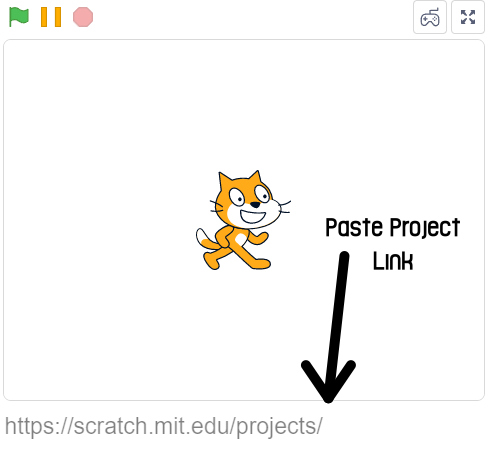
First, navigate to turbowarp.org. Paste your project's link where it says “Copy and paste your project's link here!” Check the image below for more info.
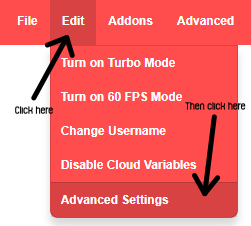
Click the “Edit” button at the top-left once your project has loaded, then click “Advanced Settings” from the drop-down (see the image below).
Finally, check the “Infinite Clones” box to remove the clone limit.
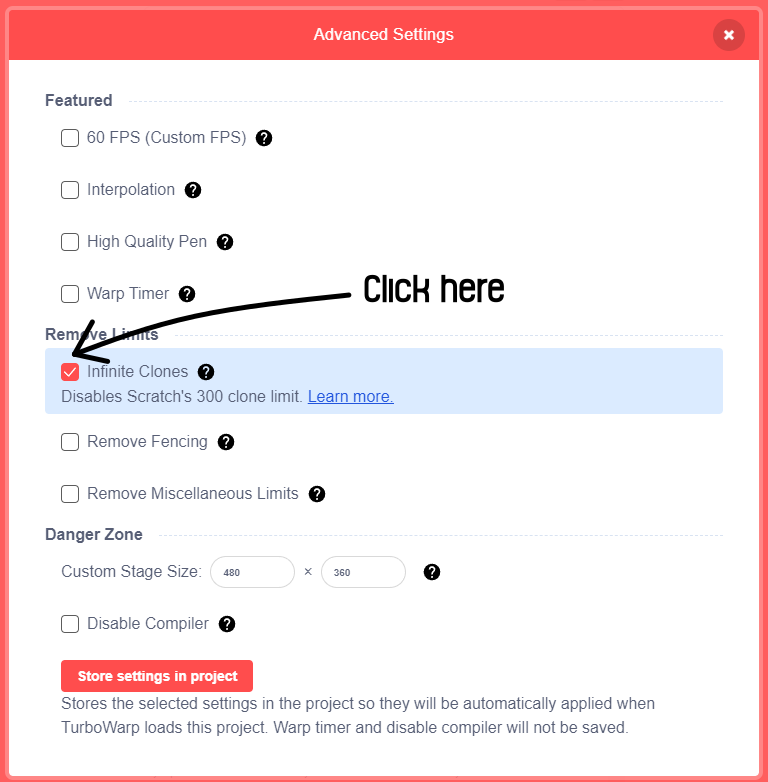
After doing this, you can close the popup and run your project without the clone limit.
Hope this helped!

- Shadow__666
-
Scratcher
8 posts
Pls help me exceed clone limit, in or out of scratch
oh ok thanks!
say [Thank you!] for (infinite) secs
- WaxingCrescentWolf
-
 Scratcher

13 posts
Pls help me exceed clone limit, in or out of scratch
i did it look inside my project https://scratch.mit.edu/projects/937745794/editor/
- Discussion Forums
- » Help with Scripts
-
» Pls help me exceed clone limit, in or out of scratch