Discuss Scratch

- Discussion Forums
- » Advanced Topics
- » Images and CSS Shadow
![[RSS Feed]](//cdn.scratch.mit.edu/scratchr2/static/__ff7229f036c458728e45c39b0751aa44__//djangobb_forum/img/feed-icon-small.png "[RSS Feed]")
![[RSS Feed]](http://cdn.scratch.mit.edu/scratchr2/static/__ff7229f036c458728e45c39b0751aa44__//djangobb_forum/img/feed-icon-small.png "[RSS Feed]")
- happex
-
 Scratcher

1000+ posts
Images and CSS Shadow
Please could you tell me how to put a shadow to an <img> element?
Current behavior
The two codes that don't work:
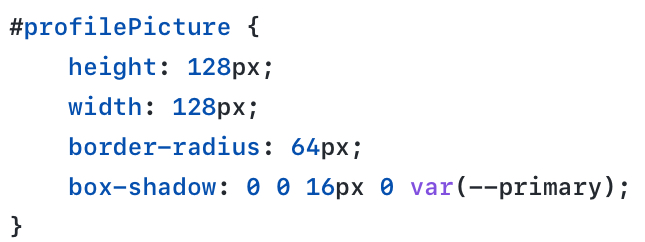
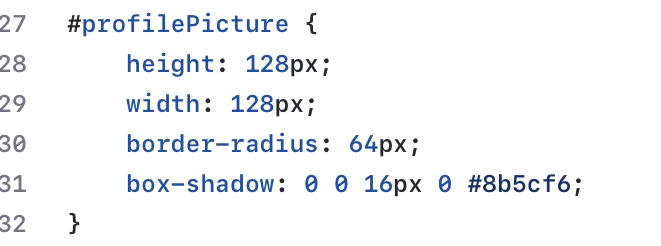
var(–primary) changed to #8b5cf6
The output:

Current behavior
The two codes that don't work:
var(–primary) changed to #8b5cf6
The output:
- LegoManiac04
-
 Scratcher
1000+ posts
Images and CSS Shadow
I believe you need to use drop-shadow for this.
- happex
-
Scratcher
1000+ posts
Images and CSS Shadow
I believe you need to use drop-shadow for this.But it worked in the past, less than 2 months ago I used box-shadow for an image
But thanks for your answer, it works now!
Last edited by happex (April 27, 2022 15:55:10)
- happex
-
Scratcher
1000+ posts
Images and CSS Shadow
Hum but now it doesn't seem to accept hex colors, that's boring!

- Maximouse
-
 Scratcher

1000+ posts
Images and CSS Shadow
Hum but now it doesn't seem to accept hex colors, that's boring!It does, but you need to remove the last “0” – drop-shadows can't have a spread radius.
But it worked in the past, less than 2 months ago I used box-shadow for an imagebox-shadow is always rectangular (around the entire image). drop-shadow will match the shape of the image if it has transparent areas.
- happex
-
Scratcher
1000+ posts
Images and CSS Shadow
box-shadow is always rectangular (around the entire image). drop-shadow will match the shape of the image if it has transparent areas.Yeah i know, but no shadow appeared, even in rectangular.
It does, but you need to remove the last “0” – drop-shadows can't have a spread radius.Okay, I will try, thanks alot!
- Discussion Forums
- » Advanced Topics
-
» Images and CSS Shadow