Discuss Scratch

- Discussion Forums
- » Bugs and Glitches
- » "Oops! Something went wrong. We are so sorry, but it looks like Scratch has crashed" around 90% of the time the project is loaded.
![[RSS Feed]](//cdn.scratch.mit.edu/scratchr2/static/__5b3e40ec58a840b41702360e9891321b__//djangobb_forum/img/feed-icon-small.png "[RSS Feed]")
![[RSS Feed]](http://cdn.scratch.mit.edu/scratchr2/static/__5b3e40ec58a840b41702360e9891321b__//djangobb_forum/img/feed-icon-small.png "[RSS Feed]")
- scratchfan321
-
 Scratcher

100+ posts
"Oops! Something went wrong. We are so sorry, but it looks like Scratch has crashed" around 90% of the time the project is loaded.
“Oops! Something went wrong. We are so sorry, but it looks like Scratch has crashed” almost every time the project is opened.
When trying to load the project for the first time, it's effectively certain that the project will fail to load and give the error message “Oops! Something went wrong. We are so sorry, but it looks like Scratch has crashed. This bug has been automatically reported to the Scratch Team. Please refresh your page to try again.”. Afterwards, refreshing the page repeatedly rarely works until after around 5 minutes, which is deterring people from even trying to view the project. Clearing cache doesn't help.
If you look in the F12 console logs, there are many error messages
Started after I uploaded the project to the website after making it in the offline editor.
On the project page whenever the project is loaded
Link is https://scratch.mit.edu/projects/622435399/
Expected: Load the project, doesn't crash
Actual: Load the project, and it is extremely likely to fail to download.
(Always crashes for users on a Chromebook, info gathered from users in project comments)
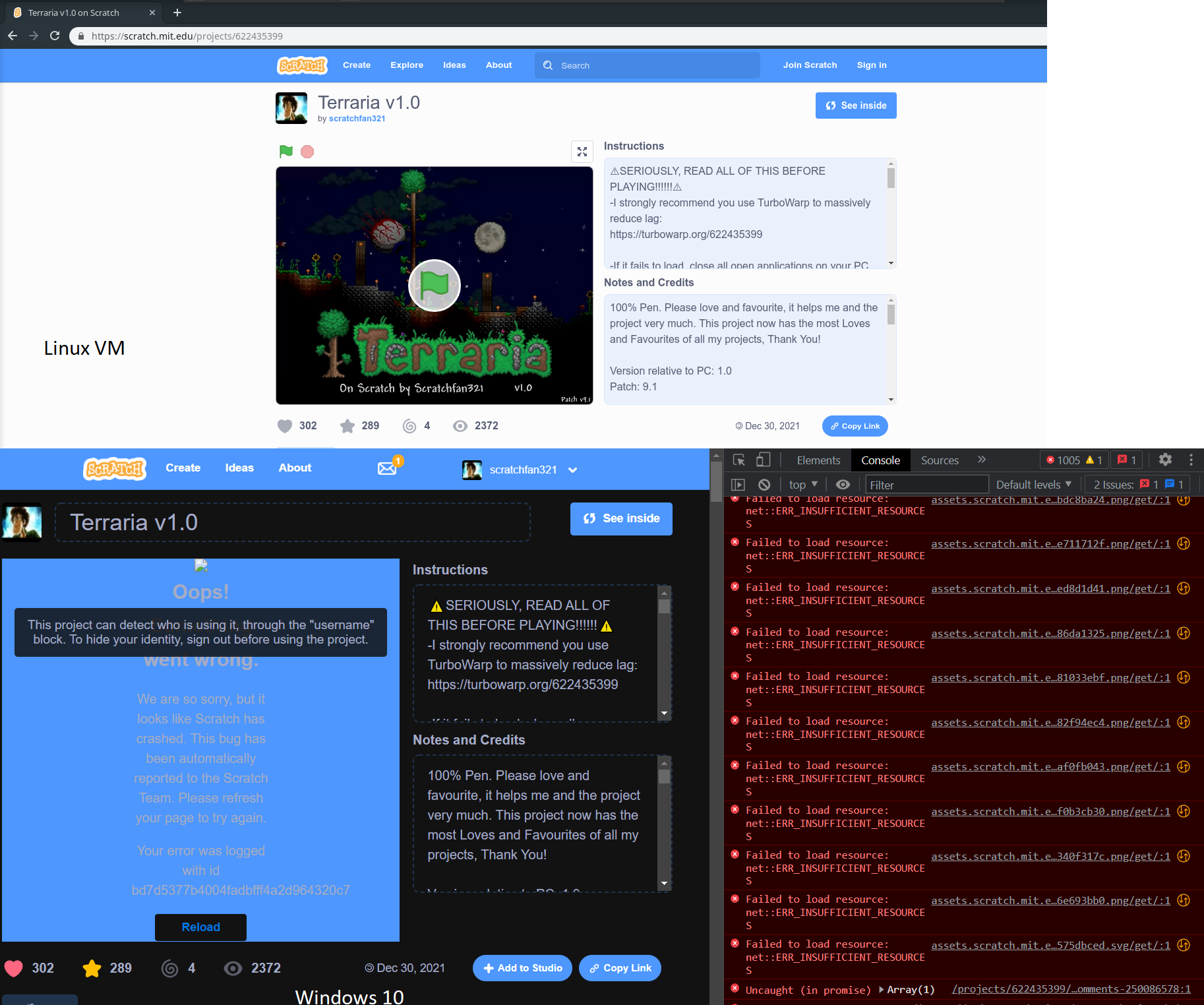
Edition: Windows 10 Home
Version: 21H1
Installed: 01/01/2021
OS Build: 19043.1466
Experience: Windows Feature Experience Pack 120.2212.3920.0
Flash not installed
Gooogle Chrome
Version 98.0.4758.82 (Official Build) (64-bit)
When trying to load the project for the first time, it's effectively certain that the project will fail to load and give the error message “Oops! Something went wrong. We are so sorry, but it looks like Scratch has crashed. This bug has been automatically reported to the Scratch Team. Please refresh your page to try again.”. Afterwards, refreshing the page repeatedly rarely works until after around 5 minutes, which is deterring people from even trying to view the project. Clearing cache doesn't help.
If you look in the F12 console logs, there are many error messages
Started after I uploaded the project to the website after making it in the offline editor.
On the project page whenever the project is loaded
Link is https://scratch.mit.edu/projects/622435399/
Expected: Load the project, doesn't crash
Actual: Load the project, and it is extremely likely to fail to download.
(Always crashes for users on a Chromebook, info gathered from users in project comments)
Edition: Windows 10 Home
Version: 21H1
Installed: 01/01/2021
OS Build: 19043.1466
Experience: Windows Feature Experience Pack 120.2212.3920.0
Flash not installed
Gooogle Chrome
Version 98.0.4758.82 (Official Build) (64-bit)
- misteray
-
 Scratcher

1000+ posts
"Oops! Something went wrong. We are so sorry, but it looks like Scratch has crashed" around 90% of the time the project is loaded.
Could be because an immense amount of code in the project. My Scratch Bros Mod project S freezes my computer for a few seconds, and it's a gaming pc with 8 gigs of ram.
- T0RRENT_
-
 Scratcher

100+ posts
"Oops! Something went wrong. We are so sorry, but it looks like Scratch has crashed" around 90% of the time the project is loaded.
Always crashes on ChromeOS. Try using TurboWarp and refreshing a few times on there.
- -ElectronicArts-
-
 Scratcher

1000+ posts
"Oops! Something went wrong. We are so sorry, but it looks like Scratch has crashed" around 90% of the time the project is loaded.
on your console shows error insufficient resources it may caused youre out of ram
- ideapad-320
-
 Scratcher

1000+ posts
"Oops! Something went wrong. We are so sorry, but it looks like Scratch has crashed" around 90% of the time the project is loaded.
Could be because an immense amount of code in the project. My Scratch Bros Mod project S freezes my computer for a few seconds, and it's a gaming pc with 8 gigs of ram.Can Reproduce.
My browser / operating system: Windows NT 10.0.19044.1469, Chrome 97.0.4692.99
My specs: HP OMEN 15, Ryzen 7 5800H, 16gb ram(15.3 usable), RTX 3060 and Radeon iGPU
- scratchfan321
-
Scratcher
100+ posts
"Oops! Something went wrong. We are so sorry, but it looks like Scratch has crashed" around 90% of the time the project is loaded.
on your console shows error insufficient resources it may caused youre out of ramI have 8Gb RAM, didn't fill RAM, checked in task manager, project used just under 1 Gb of RAM.
- Chiroyce
-
 Scratcher

1000+ posts
"Oops! Something went wrong. We are so sorry, but it looks like Scratch has crashed" around 90% of the time the project is loaded.
This is not a bug with Scratch, as it seems to have loaded perfectly fine for me.

This is most likely because of the number of costumes and songs. The more the number, the less likelier it is to load. In your screenshot you can see “INSUFFICIENT RESOURCES” - which means there wasn't enough RAM or CPU power in order to load the project. I did some research and found the problem. Not enough multi-threading power. The assets are loaded synchronously, which means multiple threads are required to load the resources. On my M1 MacBook Air, CPU usage went up to 48%, which is a LOT. The blue spike you can see occurs when the project is loading.

When the project is loading, the webpage can only render at ~11 FPS since most of the threads are working on loading the assets.

Can you open up task manager and check for any spikes in CPU usage while the project is loading?
This is most likely because of the number of costumes and songs. The more the number, the less likelier it is to load. In your screenshot you can see “INSUFFICIENT RESOURCES” - which means there wasn't enough RAM or CPU power in order to load the project. I did some research and found the problem. Not enough multi-threading power. The assets are loaded synchronously, which means multiple threads are required to load the resources. On my M1 MacBook Air, CPU usage went up to 48%, which is a LOT. The blue spike you can see occurs when the project is loading.
When the project is loading, the webpage can only render at ~11 FPS since most of the threads are working on loading the assets.
Can you open up task manager and check for any spikes in CPU usage while the project is loading?
Last edited by Chiroyce (Feb. 10, 2022 08:59:38)
- Discussion Forums
- » Bugs and Glitches
-
» "Oops! Something went wrong. We are so sorry, but it looks like Scratch has crashed" around 90% of the time the project is loaded.