Discuss Scratch
- Discussion Forums
- » Questions about Scratch
- » Top Tips? What is one thing you wish you knew when you started coding on Scratch?
![[RSS Feed]](//cdn.scratch.mit.edu/scratchr2/static/__5f750b17a17db0b5d7ffaf5afb2e7e2b__//djangobb_forum/img/feed-icon-small.png "[RSS Feed]")
![[RSS Feed]](http://cdn.scratch.mit.edu/scratchr2/static/__5f750b17a17db0b5d7ffaf5afb2e7e2b__//djangobb_forum/img/feed-icon-small.png "[RSS Feed]")
- MrHill26
-
 Scratcher

17 posts
Top Tips? What is one thing you wish you knew when you started coding on Scratch?
Hi all, I'm running a project this fortnight across the globe called #12GamesofChristmas
I am looking for some tips that you could share that perhaps beginners and intermediates would love to learn about. For example, I remember learning how to move my sprite smoothly for the first time and I was so mad I hadn't learnt that from my teacher straight away instead of moving 10 steps on every key press.
Anyone who posts a great tip will be featured in my YT video over the next two weeks and I'll add links to your studios and prompt people to follow your studio. I've already had a couple of good ideas in another post but I wanted a fresh post to collate as many ideas as possible.
So simply add a bit of code -tell me why it is really useful - and I will share it to over 10,000 students watching the videos on the dedicated site.
You can also add your best games to the studio as well and they could be featured.
TIA everyone.
- Nezon
-
 Scratcher

1000+ posts
Top Tips? What is one thing you wish you knew when you started coding on Scratch?
that math is the most useful thing in coding
- Yeetoburro1
-
 Scratcher

1000+ posts
Top Tips? What is one thing you wish you knew when you started coding on Scratch?
One of my favorite basic tips is Clone ID's, which you can use to tell individual clones what to do. Here's some example code:
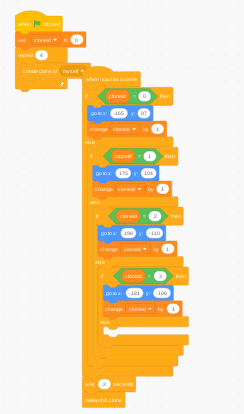
The output is that 4 scratch cats are put in the corners of the stage.
The output is that 4 scratch cats are put in the corners of the stage.
Last edited by Yeetoburro1 (Dec. 1, 2021 05:03:12)
- MrHill26
-
Scratcher
17 posts
Top Tips? What is one thing you wish you knew when you started coding on Scratch?
One of my favorite basic tips is Clone ID's, which you can use to tell individual clones what to do. Here's some example code:
The output is that 4 scratch cats are put in the corners of the stage.
This is perfect - I will add it in to my day 4 tip (next Monday) and give you credit - thanks for the share
- god286
-
 Scratcher

1000+ posts
Top Tips? What is one thing you wish you knew when you started coding on Scratch?
Some tips:
Make sure you understand what code you are copying/backpacking, otherwise when you want to improve your projects then you will be lost.
Knowing basic math is key like @Nezon said - it really helps because then you can create better projects and also since maths is cool
Remember that there is a big community of Scratchers to help you with your problems.
You can use broadcasts to send things to other sprites or start other scripts - one example of this is the sprite movement in this project.
One very nice thing to have is the “Run without screen refresh” option in My Blocks that waits until some code is finished before redrawing the screen. For example:
If you didn't make draw square “run without screen refresh” you would see some of the square being drawn while the script is run.
Run without screen refresh basically tells Scratch “hey, until this script is done, don't show anything” and Scratch will obey. One thing is that if you have a wait block or a forever loop in there, it will freeze your whole project as Scratch will obey 100%.
Make sure you understand what code you are copying/backpacking, otherwise when you want to improve your projects then you will be lost.
Knowing basic math is key like @Nezon said - it really helps because then you can create better projects and also since maths is cool

Remember that there is a big community of Scratchers to help you with your problems.
You can use broadcasts to send things to other sprites or start other scripts - one example of this is the sprite movement in this project.
One very nice thing to have is the “Run without screen refresh” option in My Blocks that waits until some code is finished before redrawing the screen. For example:
define draw squareIf you want to see the scratch 3.0 versions of these blocks then you can go to this URL or this download link.
// run without screen refresh
clear
pen up
go to x: (0) y: (0)
point in direction (90 v)
pen down
repeat (4)
move (50) steps
turn cw (90) degrees
end
when gf clicked
draw square
If you didn't make draw square “run without screen refresh” you would see some of the square being drawn while the script is run.
Run without screen refresh basically tells Scratch “hey, until this script is done, don't show anything” and Scratch will obey. One thing is that if you have a wait block or a forever loop in there, it will freeze your whole project as Scratch will obey 100%.
Last edited by god286 (Dec. 1, 2021 08:42:37)
- Chiroyce
-
 Scratcher

1000+ posts
Top Tips? What is one thing you wish you knew when you started coding on Scratch?
- Use custom blocks.
- Get inspiration from others' projects.
- DO NOT get forced into making a project someone asked to make - make whatever you feel like, as long as it keeps you happy.
- Get inspiration from others' projects.
- DO NOT get forced into making a project someone asked to make - make whatever you feel like, as long as it keeps you happy.
- MrHill26
-
Scratcher
17 posts
Top Tips? What is one thing you wish you knew when you started coding on Scratch?
Some tips:
Make sure you understand what code you are copying/backpacking, otherwise when you want to improve your projects then you will be lost.
Knowing basic math is key like @Nezon said - it really helps because then you can create better projects and also since maths is cool
Remember that there is a big community of Scratchers to help you with your problems.
You can use broadcasts to send things to other sprites or start other scripts - one example of this is the sprite movement in this project.
One very nice thing to have is the “Run without screen refresh” option in My Blocks that waits until some code is finished before redrawing the screen. For example:define draw squareIf you want to see the scratch 3.0 versions of these blocks then you can go to this URL or this download link.
// run without screen refresh
clear
pen up
go to x: (0) y: (0)
point in direction (90 v)
pen down
repeat (4)
move (50) steps
turn cw (90) degrees
end
when gf clicked
draw square
If you didn't make draw square “run without screen refresh” you would see some of the square being drawn while the script is run.
Run without screen refresh basically tells Scratch “hey, until this script is done, don't show anything” and Scratch will obey. One thing is that if you have a wait block or a forever loop in there, it will freeze your whole project as Scratch will obey 100%.
This is well explained and will be shared to everyone thank you so much - I wonder, other than for drawing, why else would a intermediate scratcher want to run part of their code without screen refresh - do you have any other examples where this is a benefit?
- god286
-
Scratcher
1000+ posts
Top Tips? What is one thing you wish you knew when you started coding on Scratch?
This is well explained and will be shared to everyone thank you so much - I wonder, other than for drawing, why else would a intermediate scratcher want to run part of their code without screen refresh - do you have any other examples where this is a benefit?https://en.scratch-wiki.info/wiki/All_at_Once_(block)#Example_Uses
You might want to see this, it's basically the “Run without screen refresh” but it got changed to My Blocks later in Scratch 2.0 development, otherwise it's the same. It can be used for mathemtatical projects and removing the slight delay in blocks such as
repeat (3)which can make games more smooth and removes some jagged movement.
...
end
Last edited by god286 (Dec. 2, 2021 00:27:39)
- Leekalo
-
 Scratcher

100+ posts
Top Tips? What is one thing you wish you knew when you started coding on Scratch?
Keep your code consistent.
- real_ender_dragon
-
 Scratcher

61 posts
Top Tips? What is one thing you wish you knew when you started coding on Scratch?
variables are the most useful thing 

- MrHill26
-
Scratcher
17 posts
Top Tips? What is one thing you wish you knew when you started coding on Scratch?
Keep your code consistent.
I like the sound of this - what exactly would you describe as consistent - so beginners would understand?
- Vaibhs11
-
 Scratcher

1000+ posts
Top Tips? What is one thing you wish you knew when you started coding on Scratch?
Stop thinking people will see your projects even if you follow the trend.
Start making bigger projects more than embarrassing ones.
Start making bigger projects more than embarrassing ones.
- lolecksdeehaha
-
 Scratcher

1000+ posts
Top Tips? What is one thing you wish you knew when you started coding on Scratch?
Oh, this one will be useful.
Unless the game heavily relies on broadcasts otherwise, use a tick system. It really helps to synchronize everything, especially with turbo mode.
Unless the game heavily relies on broadcasts otherwise, use a tick system. It really helps to synchronize everything, especially with turbo mode.
when green flag clicked // in stage or another sprite
forever
broadcast [tick v]
end

when I receive [tick v] // fires at the same time, all sprites
... // game code
- CST1229
-
 Scratcher

1000+ posts
Top Tips? What is one thing you wish you knew when you started coding on Scratch?
That popular browser extension that we aren't allowed to mention.
I can't imagine living without it now.
I can't imagine living without it now.
- MrHill26
-
Scratcher
17 posts
Top Tips? What is one thing you wish you knew when you started coding on Scratch?
Oh, this one will be useful.
Unless the game heavily relies on broadcasts otherwise, use a tick system. It really helps to synchronize everything, especially with turbo mode.when green flag clicked // in stage or another sprite
forever
broadcast [tick v]
end
when I receive [tick v] // fires at the same time, all sprites
... // game code
This is a great tip - so this works a bit like a run without screen refresh without using your own blocks?
- MrHill26
-
Scratcher
17 posts
Top Tips? What is one thing you wish you knew when you started coding on Scratch?
That popular browser extension that we aren't allowed to mention.
I can't imagine living without it now.
Thanks, though I probably can't share this to younger students!
- ventoaurum
-
 Scratcher

100+ posts
Top Tips? What is one thing you wish you knew when you started coding on Scratch?
Don't overcomplicate stuff just for “readability” or “editability”
You don't need to check the “Run without screen refresh” on every custom blocks you made
Always center your costume, except on some occasion
“Set rotation style” exist, so you don't have to make different animation of walking right and left
Scratch's angle is normal degree subtracted by 90
Learn math ahead of your age
You have a life, so don't give all your time in Scratch
You don't need to check the “Run without screen refresh” on every custom blocks you made
Always center your costume, except on some occasion
“Set rotation style” exist, so you don't have to make different animation of walking right and left
Scratch's angle is normal degree subtracted by 90
Learn math ahead of your age
You have a life, so don't give all your time in Scratch
- -Mini-X-
-
 Scratcher

100+ posts
Top Tips? What is one thing you wish you knew when you started coding on Scratch?
Hi!
I don't have much that other people haven't said already, but here it goes:
- Put a broadcast underneath the green flag and use that broadcast to start your project rather than just a green flag. I find doing that is really useful in case you want to make a major change to the start of your project because there wouldn't be much to change. You would only have to change the broadcast underneath the green flag and move the previous one to where you want it to be.
- This next one is my favourite piece of code.
I hope this helped!
I don't have much that other people haven't said already, but here it goes:
- Put a broadcast underneath the green flag and use that broadcast to start your project rather than just a green flag. I find doing that is really useful in case you want to make a major change to the start of your project because there wouldn't be much to change. You would only have to change the broadcast underneath the green flag and move the previous one to where you want it to be.
- This next one is my favourite piece of code.
when green flag clicked // This doesn't have to be a green flag block.It is used for animating, which I don't know if you want or not. This is much quicker to set up and it's way easier than changing the costume by doing “(next costume) (wait) (next costume) (wait)” etc. This method is also easier to change in case you make a mistake.
repeat until <(costume #) = [*The number of the costume you want to end on*]>
wait () secs // I usually go with 0.05
next costume
end
I hope this helped!

Last edited by -Mini-X- (Dec. 3, 2021 15:12:31)
- RL1123
-
 Scratcher


1000+ posts
Top Tips? What is one thing you wish you knew when you started coding on Scratch?
This isn't really coding, but it can really help with coding.
When I started scratch, I wish I knew about the Help with Scripts forum. That place helped me enormously on several of my projects and continues to help hundreds every day.
When I started scratch, I wish I knew about the Help with Scripts forum. That place helped me enormously on several of my projects and continues to help hundreds every day.
- Chiroyce
-
Scratcher
1000+ posts
Top Tips? What is one thing you wish you knew when you started coding on Scratch?
I usually go with 0.005Scratch's minimum is 0.03.
- Discussion Forums
- » Questions about Scratch
-
» Top Tips? What is one thing you wish you knew when you started coding on Scratch?