Discuss Scratch

![[RSS Feed]](http://cdn.scratch.mit.edu/scratchr2/static/__5b3e40ec58a840b41702360e9891321b__//djangobb_forum/img/feed-icon-small.png "[RSS Feed]")
- Chiroyce
-
 Scratcher

1000+ posts
Email Updates
So when you sign-up for scratch, they ask you if you would like to receive updates on Scratch in your email inbox.
I signed-up for Scratch using my dad's email ID, and he's a person who wouldn't want his inbox filled with stuff about scratch, so can I change that setting now? I know I can change my email here, but how do I make it so that I can receive email updates now?
I signed-up for Scratch using my dad's email ID, and he's a person who wouldn't want his inbox filled with stuff about scratch, so can I change that setting now? I know I can change my email here, but how do I make it so that I can receive email updates now?
- jvvg
-
 Scratcher

1000+ posts
Email Updates
You can change your email subscription settings in Account settings -> Email.
- Chiroyce
-
Scratcher
1000+ posts
Email Updates
You can change your email subscription settings in Account settings -> Email.So after I change my email I can change this setting?
- jvvg
-
Scratcher
1000+ posts
Email Updates
I believe so.You can change your email subscription settings in Account settings -> Email.So after I change my email I can change this setting?

- jvvg
-
Scratcher
1000+ posts
Email Updates
You may need to have your email confirmed. In my case it's at the bottom of the page, below the “change email” button.
- Chiroyce
-
Scratcher
1000+ posts
Email Updates
I removed all of my extensions, cleared my cache, and I reset my email again, but I don't see any option for this.
What happens -
What happens -
- I provide the new email and password for authentication here.
- It asks me to check my email, OR type in the details again (password + new email) and resend the mail
- At first try, I get the mail in my inbox, I click on the link, then it says that the email has been confirmed and I'm all set to go (with some blue coloured scratch mascot)
- Then when I refresh the email changing page, it's just the default one saying that the new email has been confirmed.
- Mrcomputer1
-
 Scratcher

500+ posts
Email Updates
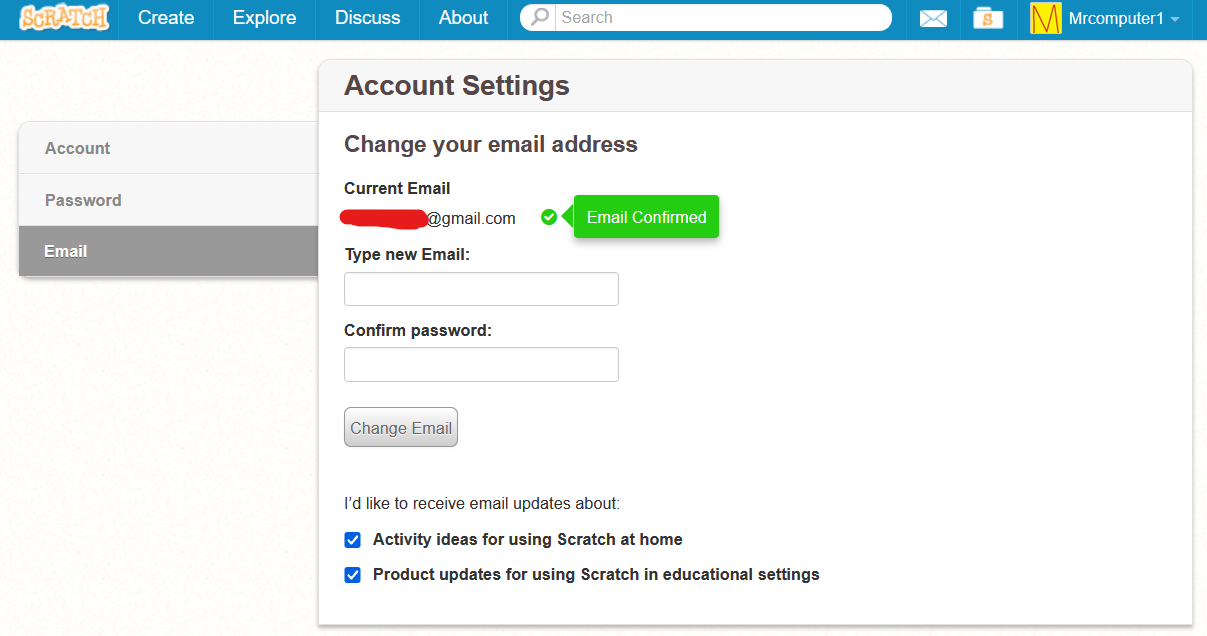
So a section like the one at the bottom of this screenshot just doesn't exist for you?
- Chiroyce
-
Scratcher
1000+ posts
Email Updates
So a section like the one at the bottom of this screenshot just doesn't exist for you?HUH, not at all!

I think it's because I denied it while making the account, so can I turn it on somehow?
Last edited by Chiroyce (July 5, 2021 04:17:31)
- Mrcomputer1
-
Scratcher
500+ posts
Email Updates
I found a “Sign up to receive updates and tips from the Scratch Team” thing in the For Educators page. It goes to a page that looks similar to the “update your preferences” page linked in the emails I have received in the past, so it might be the same thing as the option in account settings. I don't know why it doesn't show the option in your account settings page though.So a section like the one at the bottom of this screenshot just doesn't exist for you?HUH, not at all!
-image-
I think it's because I denied it while making the account, so can I turn it on somehow?
Last edited by Mrcomputer1 (July 5, 2021 04:45:51)
- Chiroyce
-
Scratcher
1000+ posts
Email Updates
I found a “Sign up to receive updates and tips from the Scratch Team” thing in the For Educators page. It goes to a page that looks similar to the “update your preferences” page linked in the emails I have received in the past, so it might be the same thing as the option in account settings. I don't know why it doesn't show the option in your account settings page though.It doesn't for anyone else as well, here - https://scratch.mit.edu/studios/3688309/comments/#comments-155512855
- -Mini-X-
-
 Scratcher

100+ posts
Email Updates
So when you sign-up for scratch, they ask you if you would like to receive updates on Scratch in your email inbox.
I signed-up for Scratch using my dad's email ID, and he's a person who wouldn't want his inbox filled with stuff about scratch, so can I change that setting now? I know I can change my email here, but how do I make it so that I can receive email updates now?
I went into an Scratch update email and clicked “change my preferences” and was sent to the same “Sign up to receive updates and tips from the Scratch Team” that can be found on the “For Educators” page that Mrcomputer1 said. You should try that, I presume it would have the same effect.
- Chiroyce
-
Scratcher
1000+ posts
Email Updates
receive updates and tips from the Scratch Team” that can be found on the “For Educators” page that Mrcomputer1 said. You should try that, I presume it would have the same effect.You sure it's the same thing that shows up when signing up for Scratch? Because I'm not an educator.
wait after i clicked on it it took me here instead -

Last edited by Chiroyce (July 5, 2021 05:49:45)
- -Mini-X-
-
Scratcher
100+ posts
Email Updates
receive updates and tips from the Scratch Team” that can be found on the “For Educators” page that Mrcomputer1 said. You should try that, I presume it would have the same effect.You sure it's the same thing that shows up when signing up for Scratch? Because I'm not an educator.
wait after i clicked on it it took me here instead -
It is, it asked the same questions (which you don't need to answer all of them. The only one filled out for me was the email, and what type of emails I wanted to recieve) on the link I received. The link wasn't the same, but they wanted people to have a separate link for privacy reasons. I'd say try it

- Za-Chary
-
 Scratcher
1000+ posts
Email Updates
I do have those checkmark boxes appear in my account settings. If what @Mrcomputer1 showed is not appearing for you, then… that's somewhat strange. I'm not sure if it's intentional.
- -Mini-X-
-
Scratcher
100+ posts
Email Updates
I do have those checkmark boxes appear in my account settings. If what @Mrcomputer1 showed is not appearing for you, then… that's somewhat strange. I'm not sure if it's intentional.I don't have what @Mrcomputer1 showed either. Is that a glitch or does it just come for some people?
- Jeffalo
-
 Scratcher

1000+ posts
Email Updates
for @Jeffalo

on one of my alts

at first i thought maybe only new accounts have it, but za-chary has existed since 2011!
on one of my alts
at first i thought maybe only new accounts have it, but za-chary has existed since 2011!
- Chiroyce
-
Scratcher
1000+ posts
Email Updates
at first i thought maybe only new accounts have it, but za-chary has existed since 2011!so why don't I have it?
- -Mini-X-
-
Scratcher
100+ posts
Email Updates
I tested it by making different accounts. I feel like (not certain) it has to do with the date of birth you put in. The first account I made I put the date of birth as a random month and year that would make me younger than 18. The second time I did it I put in a month and the year 2000. The first account didn't have the setting, however the second account did. I don't know what month and year you put in but this could be a reason.at first i thought maybe only new accounts have it, but za-chary has existed since 2011!so why don't I have it?
Correction: It's 16+ not 18+
Last edited by -Mini-X- (July 21, 2021 06:31:56)
- Jeffalo
-
Scratcher
1000+ posts
Email Updates
that explains it! thanks!I tested it by making different accounts. I feel like (not certain) it has to do with the date of birth you put in. The first account I made I put the date of birth as a random month and year that would make me younger than 18. The second time I did it I put in a month and the year 2000. The first account didn't have the setting, however the second account did. I don't know what month and year you put in but this could be a reason.at first i thought maybe only new accounts have it, but za-chary has existed since 2011!so why don't I have it?
(now im interested in what gender/birthdate i put when signing up for @jeffalo.. i think i made it in a rush and i wonder if i put my real birthdate in)