Discuss Scratch

- Discussion Forums
- » Bugs and Glitches
- » Scratch projects and editor not working on LibreWolf
![[RSS Feed]](//cdn.scratch.mit.edu/scratchr2/static/__d235e7f35585482ca999583499337ccd__//djangobb_forum/img/feed-icon-small.png "[RSS Feed]")
![[RSS Feed]](http://cdn.scratch.mit.edu/scratchr2/static/__d235e7f35585482ca999583499337ccd__//djangobb_forum/img/feed-icon-small.png "[RSS Feed]")
- Victoriix
-
 Scratcher

35 posts
Scratch projects and editor not working on LibreWolf
My browser / operating system: Windows NT 10.0, Firefox 78.0, No Flash version detected
All Scratch projects and the editor do not work on LibreWolf (a fork of firefox with more privacy tools).
I first noticed this issue when trying to enter the Scratch Lab (https://lab.scratch.mit.edu/face). I just got a random blue page with an error.
The projects are the same, but the viewer is the blue page, not the whole page. The viewer was also made extremely tall (3x taller).

All Scratch projects and the editor do not work on LibreWolf (a fork of firefox with more privacy tools).
I first noticed this issue when trying to enter the Scratch Lab (https://lab.scratch.mit.edu/face). I just got a random blue page with an error.
The projects are the same, but the viewer is the blue page, not the whole page. The viewer was also made extremely tall (3x taller).
Last edited by Victoriix (June 7, 2021 19:48:27)
- hiPeeps124816
-
 Scratcher

500+ posts
Scratch projects and editor not working on LibreWolf
Right-click anywhere, open inspect element, go to the console tab, and paste the error message.
- Victoriix
-
Scratcher
35 posts
Scratch projects and editor not working on LibreWolf
There are a lot of them
Blocked https://scratch.mit.edu/projects/editor/ from extracting canvas data because no user input was detected.
TypeError: this.audioContext.createGain is not a function
gui error Unhandled Error: e@https://scratch.mit.edu/js/projects.bundle.js:209:80755
Uncaught (in promise) TypeError: can't access property "setRecyclingEnabled", e.workspace.getFlyout() is null
Uncaught (in promise) TypeError: NetworkError when attempting to fetch resource.
Uncaught TypeError: undefined is not a constructor
- dhuls
-
 Scratcher

1000+ posts
Scratch projects and editor not working on LibreWolf
Blocked https://scratch.mit.edu/projects/editor/ from extracting canvas data because no user input was detected.This might be the problem. Is there any way to turn off the privacy features on a per site basis?
- Chiroyce
-
 Scratcher

1000+ posts
Scratch projects and editor not working on LibreWolf
Blocked https://scratch.mit.edu/projects/editor/ from extracting canvas data because no user input was detected.That means that LibreWolf blocked Scratch from loading the canvas for the project player, so you'd have to turn off a few controls for Scratch for it to work properly. Also for others reading this, please note that this isn't a Bug with Scratch, but an issue with the browser @Victoriix is using.
- Venatus_123
-
 Scratcher

1000+ posts
Scratch projects and editor not working on LibreWolf
its kinda rareBlocked https://scratch.mit.edu/projects/editor/ from extracting canvas data because no user input was detected.That means that LibreWolf blocked Scratch from loading the canvas for the project player, so you'd have to turn off a few controls for Scratch for it to work properly. Also for others reading this, please note that this isn't a Bug with Scratch, but an issue with the browser @Victoriix is using.
- Victoriix
-
Scratcher
35 posts
Scratch projects and editor not working on LibreWolf
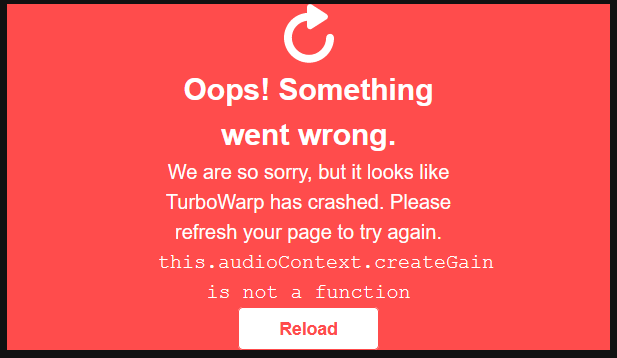
After trying to use TurboWarp on the same browser, it told me that the first error didn't matter. It instead complained about “this.audioContext.createGain is not a function”
- Venatus_123
-
Scratcher
1000+ posts
Scratch projects and editor not working on LibreWolf
After trying to use TurboWarp on the same browser, it told me that the first error didn't matter. It instead complained about “this.audioContext.createGain is not a function”Check scratch permission/cookies on browser settings
- Victoriix
-
Scratcher
35 posts
Scratch projects and editor not working on LibreWolf
Check scratch permission/cookies on browser settingsI allowed it to save cookies, extract data and disabled the privacy tools but it still doesn't work.
I doubt that allowing cookies would help me, because it's still complaining about something audio-related.
- kccuber
-
 Scratcher

1000+ posts
Scratch projects and editor not working on LibreWolf
Can you use firefox? your browser (which seems like a fork of Firefox 78 ESR) is definitely messing with Scratch.
- Venatus_123
-
Scratcher
1000+ posts
Scratch projects and editor not working on LibreWolf
Or unsupported browser
- dhuls
-
Scratcher
1000+ posts
Scratch projects and editor not working on LibreWolf
Don't use browsers that Scratch does not support
Supported browsers:
1. Chrome 63+
2. Firefox 57+
3. Edge 15+
4. Safari 11+
All others browsers may have compatibility issues. Issues like this are mainly reported on “privacy browsers.”
Supported browsers:
1. Chrome 63+
2. Firefox 57+
3. Edge 15+
4. Safari 11+
All others browsers may have compatibility issues. Issues like this are mainly reported on “privacy browsers.”
- Venatus_123
-
Scratcher
1000+ posts
Scratch projects and editor not working on LibreWolf
İt does messing scratch using firefox54+
- Victoriix
-
Scratcher
35 posts
Scratch projects and editor not working on LibreWolf
Can you use firefox? your browser (which seems like a fork of Firefox 78 ESR) is definitely messing with Scratch.Yes. It worked fine on firefox, but not on LibreWolf.
- dhuls
-
Scratcher
1000+ posts
Scratch projects and editor not working on LibreWolf
Like I said, LibreWolf isn't supported. Most privacy browsers aren't, and make Scratch work incorrectly. I'd say it's best to stick with Firefox when you're using Scratch.Can you use firefox? your browser (which seems like a fork of Firefox 78 ESR) is definitely messing with Scratch.Yes. It worked fine on firefox, but not on LibreWolf.
- Victoriix
-
Scratcher
35 posts
Scratch projects and editor not working on LibreWolf
Hi, for anyone still searching for the solution, I think I found one. The issue was because I enabled fingerprint resisting, which automatically blocks some HTML canvas features that Scratch relies on. To solve this problem, I just disabled the fingerprint resisting in about:config
- Walker082
-
 Scratcher

1 post
Scratch projects and editor not working on LibreWolf
Hi, for anyone still searching for the solution, I think I found one. The issue was because I enabled fingerprint resisting, which automatically blocks some HTML canvas features that Scratch relies on. To solve this problem, I just disabled the fingerprint resisting in about:config
Thank you. I was having the same issue with a Microsoft video player and your answer solved the problem.
- Discussion Forums
- » Bugs and Glitches
-
» Scratch projects and editor not working on LibreWolf