Discuss Scratch

![[RSS Feed]](http://cdn.scratch.mit.edu/scratchr2/static/__ff7229f036c458728e45c39b0751aa44__//djangobb_forum/img/feed-icon-small.png "[RSS Feed]")
- 7salad3salad
-
 Scratcher

1000+ posts
Sprite Sheets
Example: So, Scratch is an easy to understand programming language for beginners, right? But lets say… Person12 used scratch before he made a more advanced game that used different sprites. He wants to make the game and get into more advanced programming but he has to learn another programming language first that requires you to use a sprite sheet. He also wants to use sprites for characters, but to do so, he has to learn how to make a sprite sheet. Since Scratch doesn't have them, and he wasn't taught how to use them, he is unable to make his game.
The example above kinda is terrible, i wrote it in 2021. If it is bad, just ignore it xD
So, my suggestion is to make an option called “Advanced Sprites” which would give functionality to use sprite sheets. If you do it while making a project, then maybe it can convert? but with this will be added a block
Or maybe like the
block, it would be a dropdown so u can highlight the area the costume is located.
Well, this was my idea for a sprite sheet!
The example above kinda is terrible, i wrote it in 2021. If it is bad, just ignore it xD
So, my suggestion is to make an option called “Advanced Sprites” which would give functionality to use sprite sheets. If you do it while making a project, then maybe it can convert? but with this will be added a block
[costume 1 v] located x: [ ] y: [ ] through x: [ ] y: [ ]::looksThis would basically decide where each costume in the sprite sheet is located. (top left to bottom right)
Or maybe like the
point in direction ( v)
block, it would be a dropdown so u can highlight the area the costume is located.
Well, this was my idea for a sprite sheet!
Last edited by 7salad3salad (April 13, 2023 15:31:56)
- 7salad3salad
-
Scratcher
1000+ posts
Sprite Sheets
by the way if u have more block suggestions reply
(sr\orry i forgot editing existed
(sr\orry i forgot editing existed
Last edited by 7salad3salad (May 7, 2021 18:18:07)
- CST1229
-
 Scratcher

1000+ posts
Sprite Sheets
Maybe this could be a pen feature:
stamp from x: () y: () to x: () y: () from costume :: pen
- Steve0Greatness
-
 Scratcher

1000+ posts
Sprite Sheets
Use line [3 v] row [4 v] from [Sprite Sheet v] as :: looksWhen you show the variable, it would show something like:
(Sprite Sheet::looks)
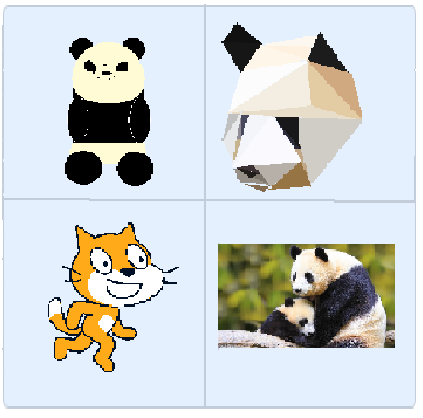
and how you would make one:
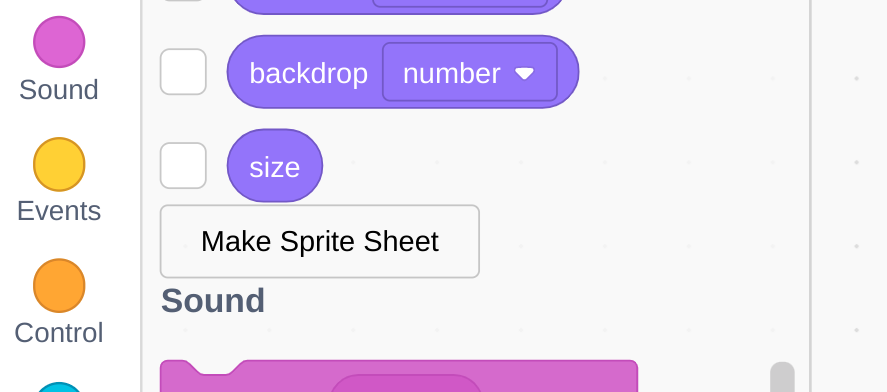
of course, this is only my opinion.
- 7salad3salad
-
Scratcher
1000+ posts
Sprite Sheets
Actually, i kinda like that “Make sprite sheet” button!Use line [3 v] row [4 v] from [Sprite Sheet v] as :: looksWhen you show the variable, it would show something like:
(Sprite Sheet::looks)
and how you would make one:
of course, this is only my opinion.

- Steve0Greatness
-
Scratcher
1000+ posts
Sprite Sheets
This may be too confusingIf you think about it, X and Y could be confusing.
- cruncherBones
-
 Scratcher
500+ posts
Sprite Sheets
TheThis may be too confusingIf you think about it, X and Y could be confusing.
go to x: () y: (0)
Block is quite simple

- 7salad3salad
-
Scratcher
1000+ posts
Sprite Sheets
TheThis may be too confusingIf you think about it, X and Y could be confusing.go to x: () y: (0)
Block is quite simple
lol not just the block
- 7salad3salad
-
Scratcher
1000+ posts
Sprite Sheets
their talking about coordinates themselves
but please elaborate on what exactly is confusing
but please elaborate on what exactly is confusing
- 7salad3salad
-
Scratcher
1000+ posts
Sprite Sheets
This may be too confusingbump, also I'm asking you again to please elaborate
- ittybitmap
-
 Scratcher

1000+ posts
Sprite Sheets
support, its a ton of work to extract each sprite from a spritesheet
- VeryFamus
-
 Scratcher

1000+ posts
Sprite Sheets
Support, if the spritesheet order and placement is determined by costume order and when exporting the sprite, it gives you an option to export as spritesheet.
- VeryFamus
-
Scratcher
1000+ posts
Sprite Sheets
This so confusing, make it yourselfWhat’s so confusing about it, if it auto-compiles to spritesheet based on costume order and let’s you have an option to upload as spritesheet? Not complicated and relatively easy to do (on our side). Also, if you do it yourself, that will not work. Mainly because when doing that, it compiles to one costume when they are all in the same costume, so the sheet would identify that as the only frame.
No support
Last edited by VeryFamus (Dec. 18, 2021 14:10:20)

- VeryFamus
-
Scratcher
1000+ posts
Sprite Sheets
Please dont make hubs.It’s not a hub. The user is suggesting something and allowing others to add on to it. It’s not the same