Discuss Scratch
- Discussion Forums
- » Help with Scripts
- » 3 Dimensial Game
![[RSS Feed]](//cdn.scratch.mit.edu/scratchr2/static/__ff7229f036c458728e45c39b0751aa44__//djangobb_forum/img/feed-icon-small.png "[RSS Feed]")
![[RSS Feed]](http://cdn.scratch.mit.edu/scratchr2/static/__ff7229f036c458728e45c39b0751aa44__//djangobb_forum/img/feed-icon-small.png "[RSS Feed]")
- Mad__Moss
-
 Scratcher

100+ posts
3 Dimensial Game
Hi I'm sorry for bothering everyone and this may be a bit big of a question, and it may make me look like a total noob, and I am most likely going to regret posting this for some reason.
But how would you make a 3D game environment like –> this <– or something like it because I've looked through the scripts and it makes absolutely no sense to me whatsoever and it's really confusing and I want to make something awesome and and and and and…… so on.
Yeah sorry, for some reason not knowing how to do something really stresses me out and makes me a bit hyperactive.
Please help. Bye.
But how would you make a 3D game environment like –> this <– or something like it because I've looked through the scripts and it makes absolutely no sense to me whatsoever and it's really confusing and I want to make something awesome and and and and and…… so on.
Yeah sorry, for some reason not knowing how to do something really stresses me out and makes me a bit hyperactive.
Please help. Bye.
- MegaApuTurkUltra
-
 Scratcher

1000+ posts
3 Dimensial Game
That is called “raycasting.” It's a method for 3D used in the original classic 90s 3D games like Wolfenstein. I would post diagrams but I'm on iPad and iPads have a habit of unloading your tabs from RAM for some reason (like there's no swap or anything; it sucks)
Anyway, raycasting involves having a map made of of tiles, much like a 2D map. The tile pattern would become apparent if you viewed the map top down. Each tile becomes a box like thing that makes up the map.
In raycasting, the camera is basically a point. An fov is chosen, and then rays are sent out from the point, perpendicular to the Y axis. Basically, it's projecting a 2D horizontal slice of the map onto a line. This line can be imagined as going horizontally across the center of the screen. Once a ray hits something, it's Z is calculated with respect to the point where the camera is. Then, the height of the tile the ray hit is calculated based on the Z, the fov of the camera, and the tile's height. Finally, a vertical line as tall as the height of the tile is drawn on the screen at the point where the ray's hit was projected onto the line. Color data, or even textures as in Wolfenstein can be calculated at this point. Scratch lists are too slow for good texture storage (just see my water simulation) so only plain colors or gradients are used.
I'm sorry if this doesn't make sense. It's hard to explain without diagrams. Once I get on the computer I can draw and post some stuff to clarify, if necessary.
Anyway, raycasting involves having a map made of of tiles, much like a 2D map. The tile pattern would become apparent if you viewed the map top down. Each tile becomes a box like thing that makes up the map.
In raycasting, the camera is basically a point. An fov is chosen, and then rays are sent out from the point, perpendicular to the Y axis. Basically, it's projecting a 2D horizontal slice of the map onto a line. This line can be imagined as going horizontally across the center of the screen. Once a ray hits something, it's Z is calculated with respect to the point where the camera is. Then, the height of the tile the ray hit is calculated based on the Z, the fov of the camera, and the tile's height. Finally, a vertical line as tall as the height of the tile is drawn on the screen at the point where the ray's hit was projected onto the line. Color data, or even textures as in Wolfenstein can be calculated at this point. Scratch lists are too slow for good texture storage (just see my water simulation) so only plain colors or gradients are used.
I'm sorry if this doesn't make sense. It's hard to explain without diagrams. Once I get on the computer I can draw and post some stuff to clarify, if necessary.
- SurgeForce
-
 Scratcher

100+ posts
3 Dimensial Game
Hi I'm sorry for bothering everyone and this may be a bit big of a question, and it may make me look like a total noob, and I am most likely going to regret posting this for some reason.Sorry to bother you, but the link you gave to a 3d project IS A REMIX WITH ABSELUTELY NO CHANGES WHAT SO EVER.
But how would you make a 3D game environment like –> this <– or something like it because I've looked through the scripts and it makes absolutely no sense to me whatsoever and it's really confusing and I want to make something awesome and and and and and…… so on.
Yeah sorry, for some reason not knowing how to do something really stresses me out and makes me a bit hyperactive.
Please help. Bye.
Basicly, the person who made it completely ripped-off the original creator in order to become more famous and make it look like they made the project.
Next time, please give the link to the original project
- Mad__Moss
-
Scratcher
100+ posts
3 Dimensial Game
Hi I'm sorry for bothering everyone and this may be a bit big of a question, and it may make me look like a total noob, and I am most likely going to regret posting this for some reason.Sorry to bother you, but the link you gave to a 3d project IS A REMIX WITH ABSELUTELY NO CHANGES WHAT SO EVER.
But how would you make a 3D game environment like –> this <– or something like it because I've looked through the scripts and it makes absolutely no sense to me whatsoever and it's really confusing and I want to make something awesome and and and and and…… so on.
Yeah sorry, for some reason not knowing how to do something really stresses me out and makes me a bit hyperactive.
Please help. Bye.
Basicly, the person who made it completely ripped-off the original creator in order to become more famous and make it look like they made the project.
Next time, please give the link to the original project
Sorry but I'm still new to scratch and have no idea how to check for things like that, sorry
- MegaApuTurkUltra
-
Scratcher
1000+ posts
3 Dimensial Game
Hah I didn't get to the computer today but rest assured I will post those diagrams and an in depth explanation!Hi I'm sorry for bothering everyone and this may be a bit big of a question, and it may make me look like a total noob, and I am most likely going to regret posting this for some reason.Sorry to bother you, but the link you gave to a 3d project IS A REMIX WITH ABSELUTELY NO CHANGES WHAT SO EVER.
But how would you make a 3D game environment like –> this <– or something like it because I've looked through the scripts and it makes absolutely no sense to me whatsoever and it's really confusing and I want to make something awesome and and and and and…… so on.
Yeah sorry, for some reason not knowing how to do something really stresses me out and makes me a bit hyperactive.
Please help. Bye.
Basicly, the person who made it completely ripped-off the original creator in order to become more famous and make it look like they made the project.
Next time, please give the link to the original project
Sorry but I'm still new to scratch and have no idea how to check for things like that, sorry
- MegaApuTurkUltra
-
Scratcher
1000+ posts
3 Dimensial Game
Ok now for an in-depth explanation of raycasting.
Basically, 3D can be thought of as projecting a 3D scene onto a 2D plane. This is a pinhole camera:
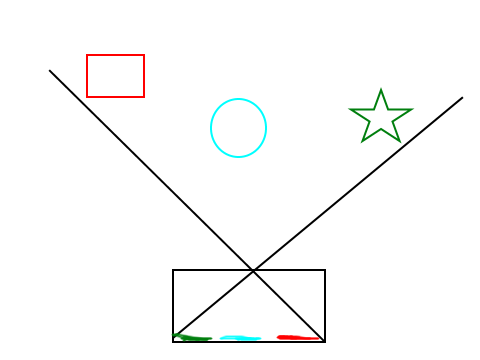
Light goes through a hole and then is projected onto a wall behind the hole. A pinhole camera provides realistic 3D projection right? So let's model it. There's just one problem. The image projected in a pinhole camera is flipped! So, we do this:
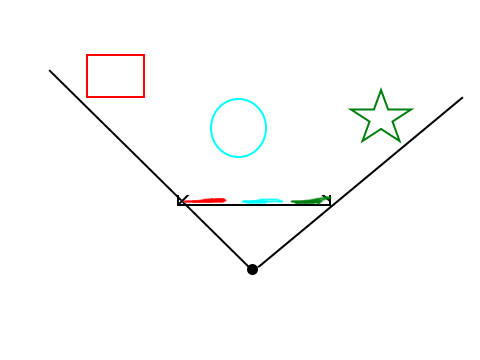
Doesn't make a lot of sense in real life, but it works for our model. The pinhole in our model is actually you and the projection plane is the screen!
Now, how do we detect what's in the scene and project it? Well, we can cast some rays and detect if they hit anything:
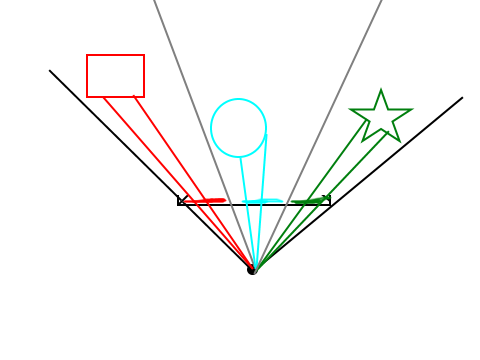
Where they hit, we detect the color and draw stuff on screen. To make an effective raycaster, you also need to support player movement and rotation. This requires some trigonometry and is beyond the scope of this tutorial. If you need help, try google.
Anyway, here is a simple tiled raycaster game map, in above view:
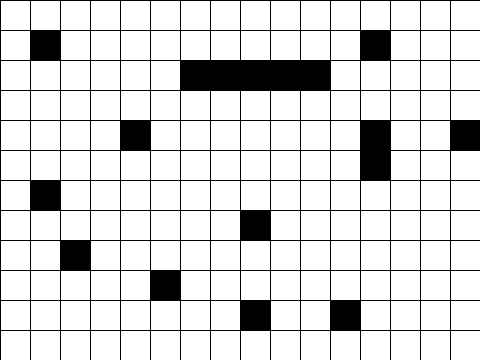
Now let's put in the player and cast some rays:
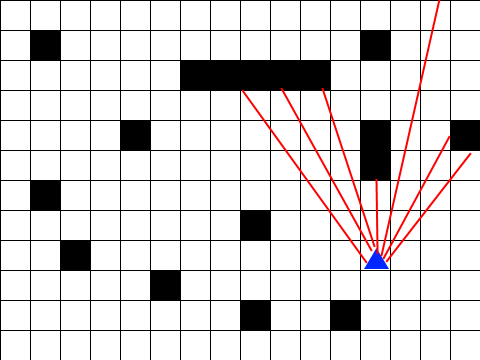
We detect which ones hit and which ones miss,
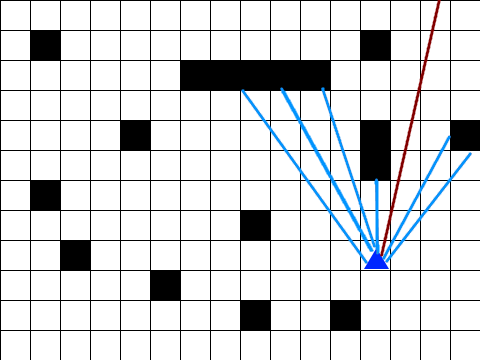
then we calculate how far away the hits are.
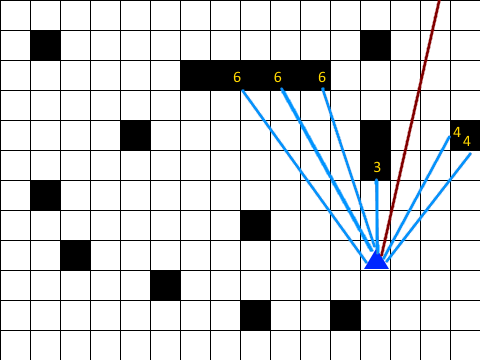
Finally, we render the hits on screen. Closer hits are bigger, farther ones are smaller
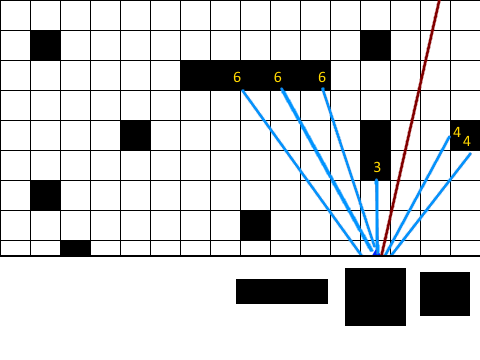
And that's basically how a raycaster works!
HTH
Basically, 3D can be thought of as projecting a 3D scene onto a 2D plane. This is a pinhole camera:

Light goes through a hole and then is projected onto a wall behind the hole. A pinhole camera provides realistic 3D projection right? So let's model it. There's just one problem. The image projected in a pinhole camera is flipped! So, we do this:

Doesn't make a lot of sense in real life, but it works for our model. The pinhole in our model is actually you and the projection plane is the screen!
Now, how do we detect what's in the scene and project it? Well, we can cast some rays and detect if they hit anything:

Where they hit, we detect the color and draw stuff on screen. To make an effective raycaster, you also need to support player movement and rotation. This requires some trigonometry and is beyond the scope of this tutorial. If you need help, try google.
Anyway, here is a simple tiled raycaster game map, in above view:

Now let's put in the player and cast some rays:

We detect which ones hit and which ones miss,

then we calculate how far away the hits are.

Finally, we render the hits on screen. Closer hits are bigger, farther ones are smaller

And that's basically how a raycaster works!
HTH
- Mad__Moss
-
Scratcher
100+ posts
3 Dimensial Game
Ok, Thank you.
I shall try Google because I am rather slow and only got about half of what you said.
But if (and only if) you have the time please keep posting information.
I shall try Google because I am rather slow and only got about half of what you said.
But if (and only if) you have the time please keep posting information.
- TheLogFather
-
 Scratcher

1000+ posts
3 Dimensial Game
There are several kinds of 3d project you can create in Scratch. How confident you feel about your current level of mathematical ability (and how willing you are to stretch further) may well determine which kind you go for.
It's worth noting that Scratch is not at all built for 3d - in some ways it's actually harder to do 3d in Scratch than in ‘grown up’ coding languages, because they provide specific capabilities that mean you don't have to do certain things (they do the maths, and 3d to 2d rendering/filling/texturing, and other complicated things, for you! - which is one reason why they're also about a zillion times faster than Scratch…)
And speaking of speed, one thing that it's well worth understanding before you delve into 3d in Scratch, is how to avoid some of the things that are computationally intensive in Scratch (like continually switching costumes, applying effects, setting rotation, etc.) - if you don't avoid doing such things unnecessarily, more complicated projects will very quickly become bogged down, because Scratch really has to do a lot of work whenever you tell it to do such operations - and when you add in the extra calculations & operations needed for 3d rendering with pen, then it just can't keep up.
Anyway, with that all said, here's a post I made a while back as a kind of intro to 3d in Scratch:
http://scratch.mit.edu/discuss/post/265641/
Hope you find something useful in there!
It's worth noting that Scratch is not at all built for 3d - in some ways it's actually harder to do 3d in Scratch than in ‘grown up’ coding languages, because they provide specific capabilities that mean you don't have to do certain things (they do the maths, and 3d to 2d rendering/filling/texturing, and other complicated things, for you! - which is one reason why they're also about a zillion times faster than Scratch…)
And speaking of speed, one thing that it's well worth understanding before you delve into 3d in Scratch, is how to avoid some of the things that are computationally intensive in Scratch (like continually switching costumes, applying effects, setting rotation, etc.) - if you don't avoid doing such things unnecessarily, more complicated projects will very quickly become bogged down, because Scratch really has to do a lot of work whenever you tell it to do such operations - and when you add in the extra calculations & operations needed for 3d rendering with pen, then it just can't keep up.
Anyway, with that all said, here's a post I made a while back as a kind of intro to 3d in Scratch:
http://scratch.mit.edu/discuss/post/265641/
Hope you find something useful in there!
Last edited by TheLogFather (Sept. 3, 2014 00:06:31)
- Mad__Moss
-
Scratcher
100+ posts
3 Dimensial Game
I understand the concept (I'm assuming that ‘concept’ means how something is supposed to work), I don't understand how you can make a sprite send out ‘rays’ to sense how far away an object is.
I also found a project not too long ago which was a semi-true 3D maze, meaning that you had an X, Y, and Z axis to make stair and so on, is there a way to see what projects you have viewed recently?
I also found a project not too long ago which was a semi-true 3D maze, meaning that you had an X, Y, and Z axis to make stair and so on, is there a way to see what projects you have viewed recently?
- MegaApuTurkUltra
-
Scratcher
1000+ posts
3 Dimensial Game
I understand the concept (I'm assuming that ‘concept’ means how something is supposed to work), I don't understand how you can make a sprite send out ‘rays’ to sense how far away an object is.Idk about recent viewing, but to detect ray hits you need a collision algorithm. You have some shape and a line which is your ray, and you test if they intersect. Each shape has their own optimized version of a line collision algorithm, so I suggest you Google “<insert your shape here> line collision” if you need help with a certain shape. In the maze game, I'm assuming only sqaures were used. Even stairs can be represented as squares on the top view map. All you need to know is if rays intersect the stairs, and if they do then draw the stair shape in that position.
I also found a project not too long ago which was a semi-true 3D maze, meaning that you had an X, Y, and Z axis to make stair and so on, is there a way to see what projects you have viewed recently?
I don't know if this makes sense at all to you so I suggest you Google stuff. Especially follow the “stackoverflow.com” or “gamedev.stackexchange.com” links, they're a great resource.
- Mad__Moss
-
Scratcher
100+ posts
3 Dimensial Game
It was made using your previous diagrams on checking too see if there was a wall or not


- lbruns
-
 Scratcher

500+ posts
3 Dimensial Game
Hmm I understand the concept but how would I program this?
- jjbrady18
-
 Scratcher

81 posts
3 Dimensial Game
To: MegaApuTurkUltraUse 1 sprite in turbo mode.
HAHA BREAKTHROUGH!
(this was before I saw your last post)
Check this out.
How could I make rendering the 3D image take a lot less time without creating 90 ‘Recon’ sprites?
Or use variables instead of actual sprites.
Last edited by jjbrady18 (Oct. 5, 2014 09:33:21)
- MegaApuTurkUltra
-
Scratcher
1000+ posts
3 Dimensial Game
Hmm I understand the concept but how would I program this?Well, first you'll need a good collision algorithm. If you have a lot of different kinds of shapes in your map a discrete point based collision algorithm might be the best option. However, if you only have simple shapes like only axis aligned squares, it becomes easier and more accurate. For example line/axis aligned square collision is trivial.
suppose we have a player at px, py
For each ray cast, find its equation y = f(x) on the top down map grid
    Then for each box you need to test for:
        plug in the minimum x value of the box to f(x) and see if what you get out is between the min and max y of the box
        do the same for maximum x value
        if there's a hit
           calculate the distance with the Pythagorean theorem, skip the square root for now (saves time since square root is processor intensive)
    use the shortest hit distance to render. Since square root is a function with slope >0 all the time, if a > b then root(a) > root (b), therefore the comparison still works even though we haven't calculated square roots
    Once you have the shortest hit distance, calculate the square root and render a line with height inversely based on the distance
For other shapes, you can go look up respective line collision algorithms.
I hope this makes some sense
- lbruns
-
Scratcher
500+ posts
3 Dimensial Game
I found this on the wiki for scratch at the end of the advanced list based one it didn't show any help could you help me? Here's the link http://wiki.scratch.mit.edu/wiki/Raycaster

- gtoal
-
 Scratcher

1000+ posts
3 Dimensial Game
to detect ray hits you need a collision algorithm. You have some shape and a line which is your ray, and you test if they intersect. Each shape has their own optimized version of a line collision algorithm, so I suggest you Google “<insert your shape here> line collision” if you need help with a certain shape. In the maze game, I'm assuming only sqaures were used.
Here's a suggestion for a beginner programmer, might get some results with less complex code:
Don't do raycasting at first, just draw the entire maze, starting at the back and working to the front. Parts of the maze that you can't see because they're blocked by parts you can see … will be overdrawn by the parts you can see! This is an old technique called “painter's algorithm” and with the speed of modern machines, might be usable for a simple maze.
Once you get that working, add a simple test to not draw anything if it would be off the sides of the screen.
By the time you get that far, you'll have written enough code to get a feel for how this stuff all works and you should be ready to add more code that will not draw a wall if it is hidden behind another wall.
If your game is an actual maze with corridors rather than a more complex area, you can also make some assumptions about how far down a side corridor you can see. If you don't allow the viewer to turn to arbitrary angles but just look straight ahead (and allow them to turn 90 degrees at a time), and move a whole square forwards or backwards at a time, then you can simplify it even more and use precomputed sprites for all walls because they'll always be the same size and shape for any fixed distance.
Graham
Last edited by gtoal (Oct. 27, 2014 20:01:50)
- Discussion Forums
- » Help with Scripts
-
» 3 Dimensial Game