Discuss Scratch
- Discussion Forums
- » Advanced Topics
- » JSON Tutorial
![[RSS Feed]](//cdn.scratch.mit.edu/scratchr2/static/__5b3e40ec58a840b41702360e9891321b__//djangobb_forum/img/feed-icon-small.png "[RSS Feed]")
![[RSS Feed]](http://cdn.scratch.mit.edu/scratchr2/static/__5b3e40ec58a840b41702360e9891321b__//djangobb_forum/img/feed-icon-small.png "[RSS Feed]")
- PhoenixCoderBessie
-
 Scratcher

37 posts
JSON Tutorial
Many people have been wanting to create hacked blocks, I know how, follow these steps to get your very own hacked block.
Step 1
First, you can drag a block into your editor. For starters, I recommend this one so you can follow along with me:
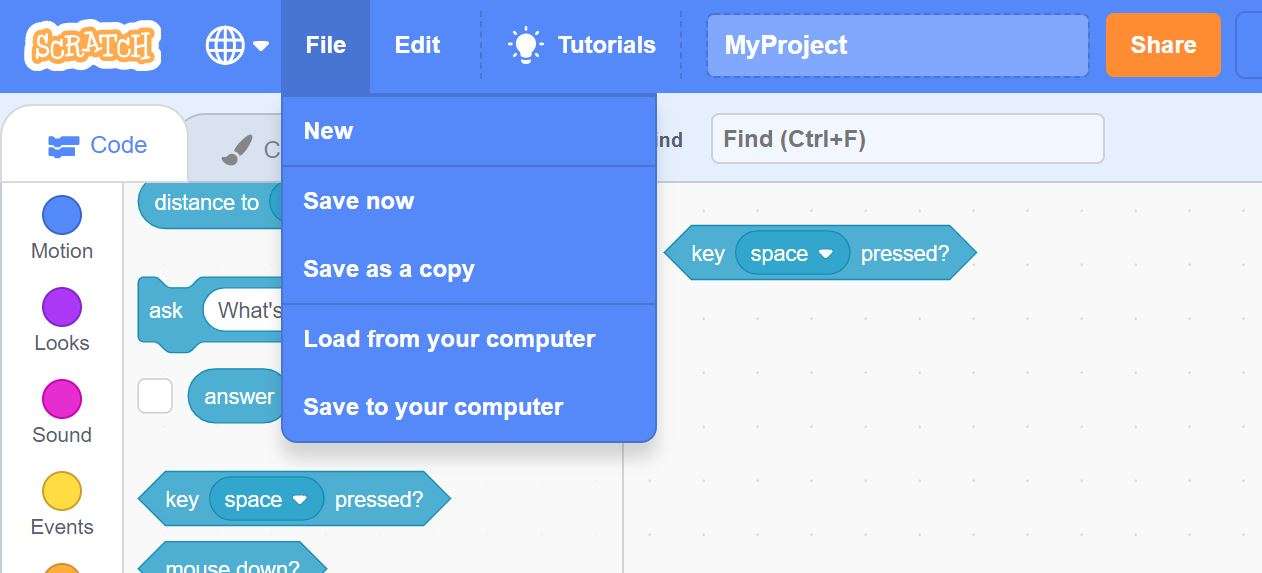
Next, you want to open your files. You should be able to see MyProject.sb3
Sb3 means it's a scratch file. Rename it to MyProject.zip
Then open project.json with a tool like text(chromebook) or notepad(windows)
You see this:
I know, it's a lot, right? Don't worry, I'll walk you through it.
Step 2
See this?
That's the block you dragged into the editor IF you had the same block as me.
At the last part, where it says
you can change the “space” to whatever. You could change it to your username or something. BUT KEEP THE QUOTES! THAT MAKES IT A STRING!
Step 3
Close the notepad window, hit save as, then you're almost done. Notice how the project.json in the MyProject.zip is in the zip file, while the project.json you just downloaded is outside. Now what?
Many people prefer using WinZip or WinRar, but an easier way I prefer is this:
Select the file you just downloaded. Hit ctrl+x.
Go into the zip file, and delete project.json. Hit ctrl+v.
Step 4
Now, exit the zip file and rename MyProject.zip to MyProject.sb3
Hit file, then hit upload from your computer, select your file, then BAM! You have your hacked block!
Step 1
First, you can drag a block into your editor. For starters, I recommend this one so you can follow along with me:
<key [space v] pressed?>First you download your project, which is the save to your computer option.
Next, you want to open your files. You should be able to see MyProject.sb3
Sb3 means it's a scratch file. Rename it to MyProject.zip
Then open project.json with a tool like text(chromebook) or notepad(windows)
You see this:
{"targets":[{"isStage":true,"name":"Stage","variables":{"`jEk@4|i[#*?(8x)AV.-my variable":["my variable",0]},"lists":{},"broadcasts":{},"blocks":{},"comments":{},"currentCostume":0,"costumes":[{"assetId":"cd21514d0531fdffb22204e0ec5ed84a","name":"backdrop1","md5ext":"cd21514d0531fdffb22204e0ec5ed84a.svg","dataFormat":"svg","rotationCenterX":240,"rotationCenterY":180}],"sounds":[{"assetId":"83a9787d4cb6f3b7632b4ddfebf74367","name":"pop","dataFormat":"wav","format":"","rate":48000,"sampleCount":1123,"md5ext":"83a9787d4cb6f3b7632b4ddfebf74367.wav"}],"volume":100,"layerOrder":0,"tempo":60,"videoTransparency":50,"videoState":"on","textToSpeechLanguage":null},{"isStage":false,"name":"Sprite1","variables":{},"lists":{},"broadcasts":{},"blocks":{"rmWpB3~(;FW)#U!]F4j6":{"opcode":"sensing_keypressed","next":null,"parent":null,"inputs":{"KEY_OPTION":[1,"4mRI^Qb86df,k2;}fU3F"]},"fields":{},"shadow":false,"topLevel":true,"x":31,"y":31},"4mRI^Qb86df,k2;}fU3F":{"opcode":"sensing_keyoptions","next":null,"parent":"rmWpB3~(;FW)#U!]F4j6","inputs":{},"fields":{"KEY_OPTION":["space",null]},"shadow":true,"topLevel":false}},"comments":{},"currentCostume":0,"costumes":[{"assetId":"bcf454acf82e4504149f7ffe07081dbc","name":"costume1","bitmapResolution":1,"md5ext":"bcf454acf82e4504149f7ffe07081dbc.svg","dataFormat":"svg","rotationCenterX":48,"rotationCenterY":50},{"assetId":"0fb9be3e8397c983338cb71dc84d0b25","name":"costume2","bitmapResolution":1,"md5ext":"0fb9be3e8397c983338cb71dc84d0b25.svg","dataFormat":"svg","rotationCenterX":46,"rotationCenterY":53}],"sounds":[{"assetId":"83c36d806dc92327b9e7049a565c6bff","name":"Meow","dataFormat":"wav","format":"","rate":48000,"sampleCount":40681,"md5ext":"83c36d806dc92327b9e7049a565c6bff.wav"}],"volume":100,"layerOrder":1,"visible":true,"x":0,"y":0,"size":100,"direction":90,"draggable":false,"rotationStyle":"all around"}],"monitors":[],"extensions":[],"meta":{"semver":"3.0.0","vm":"0.2.0-prerelease.20201112030151","agent":"Mozilla/5.0 (Windows NT 10.0; Win64; x64) AppleWebKit/537.36 (KHTML, like Gecko) Chrome/87.0.4280.88 Safari/537.36"}}Step 2
See this?
{"opcode":"sensing_keyoptions","next":null,"parent":"rmWpB3~(;FW)#U!]F4j6","inputs":{},"fields":{"KEY_OPTION":["space",null]}At the last part, where it says
["space",null]}
Step 3
Close the notepad window, hit save as, then you're almost done. Notice how the project.json in the MyProject.zip is in the zip file, while the project.json you just downloaded is outside. Now what?
Many people prefer using WinZip or WinRar, but an easier way I prefer is this:
Select the file you just downloaded. Hit ctrl+x.
Go into the zip file, and delete project.json. Hit ctrl+v.
Step 4
Now, exit the zip file and rename MyProject.zip to MyProject.sb3
Hit file, then hit upload from your computer, select your file, then BAM! You have your hacked block!
<key [Hacks! v] pressed?>
- Discussion Forums
- » Advanced Topics
-
» JSON Tutorial