Discuss Scratch

- Discussion Forums
- » Bugs and Glitches
- » SVG import error
![[RSS Feed]](//cdn.scratch.mit.edu/scratchr2/static/__ff7229f036c458728e45c39b0751aa44__//djangobb_forum/img/feed-icon-small.png "[RSS Feed]")
![[RSS Feed]](http://cdn.scratch.mit.edu/scratchr2/static/__ff7229f036c458728e45c39b0751aa44__//djangobb_forum/img/feed-icon-small.png "[RSS Feed]")
- mysterious-neutron
-
 Scratcher

1000+ posts
SVG import error
I know that this topic is already made but I have a different problem. When I upload a image like this 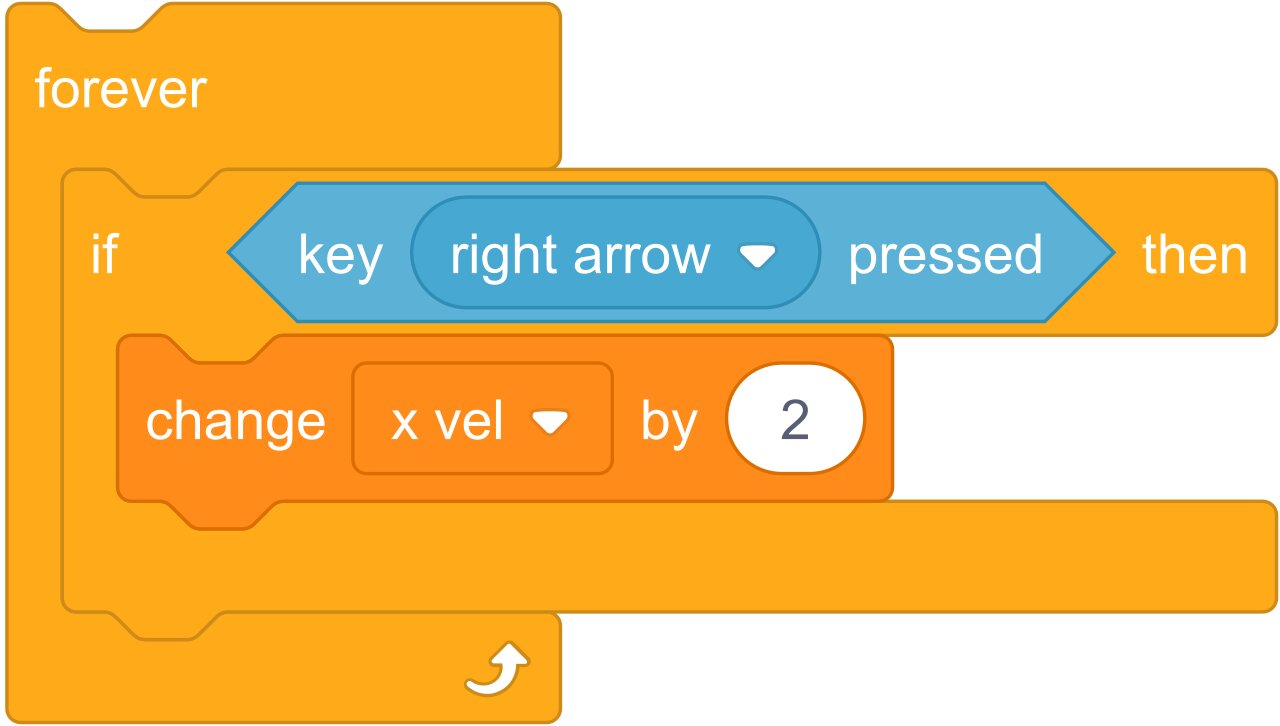 it get imported like this
I am making a game which has scratch blocks. But the svg imported from here gets like the image above
I know I can use png but it gets too pixelated
it get imported like this I am making a game which has scratch blocks. But the svg imported from here gets like the image above
I know I can use png but it gets too pixelated
Last edited by mysterious-neutron (Oct. 8, 2020 08:50:35)
- awtyagrawals
-
 Scratcher

100+ posts
SVG import error
(-removed; why did i even post this???
Last edited by awtyagrawals (April 21, 2023 01:43:54)
- Just_ng
-
 Scratcher

500+ posts
SVG import error
Oof just about to make that topic.. yeah, scratch is ruining every svg that i import, from scratchblocks.io to designer.gravit.io … everything got ruined. Another thing is that it always compresses png and jpg, so when I imported a 500 * 500 png I will get aroung 300 something
- dndnrmn1
-
 Scratcher

24 posts
SVG import error
On the Scratch Forums, code must be written between
Every block goes on a new line and is written as the text on the block is shown on Scratch.
...tags. (On the wiki, <scratchblocks>…</scratchblocks> tags are used.) For a simplified explanation, see here.
Every block goes on a new line and is written as the text on the block is shown on Scratch.

- 54387a
-
 Scratcher

1000+ posts
SVG import error
On the Scratch Forums, code must be written betweenHow does that relate to the issue? /offtopic...tags. (On the wiki, <scratchblocks>…</scratchblocks> tags are used.) For a simplified explanation, see here.
Every block goes on a new line and is written as the text on the block is shown on Scratch.
- medians
-
 Scratcher

1000+ posts
SVG import error
On the Scratch Forums, code must be written betweenThis was from 2020, don't necropost....tags. (On the wiki, <scratchblocks>…</scratchblocks> tags are used.) For a simplified explanation, see here.
Every block goes on a new line and is written as the text on the block is shown on Scratch.
Also, you can still post images of your code, it doesn't have to be between those tags:

- dndnrmn1
-
Scratcher
24 posts
SVG import error
The BolcksOn the Scratch Forums, code must be written betweenThis was from 2020, don't necropost....tags. (On the wiki, <scratchblocks>…</scratchblocks> tags are used.) For a simplified explanation, see here.
Every block goes on a new line and is written as the text on the block is shown on Scratch.
Also, you can still post images of your code, it doesn't have to be between those tags:

move () steps
turn cw () degrees
turn ccw () degrees
point towards [ v]
go to x: () y: (0)
glide () secs to x: (0) y: (0)
glide () secs to x: (0) y: (0)
change x by ()
set x to ()
- dndnrmn1
-
Scratcher
24 posts
SVG import error
The CodeaOn the Scratch Forums, code must be written betweenHow does that relate to the issue? /offtopic...tags. (On the wiki, <scratchblocks>…</scratchblocks> tags are used.) For a simplified explanation, see here.
Every block goes on a new line and is written as the text on the block is shown on Scratch.
move () steps
move () steps
move () steps
move () steps
move () steps
move () steps
move () steps
move () steps
move () steps
move () steps
move () steps
move () steps
move () steps
move () steps
move () steps
move () steps
move () steps
move () steps
move () steps
move () steps
move () steps
move () steps
move () steps
move () steps
move () steps
move () steps
move () steps
move () steps
move () steps
move () steps
move () steps
move () steps
move () steps
move () steps
move () steps
move () steps
move () steps
move () steps
move () steps
move () steps
move () steps
move () steps
move () steps
move () steps
move () steps
move () steps
move () steps
move () steps
move () steps
move () steps
move () steps
move () steps

- kitten_two
-
 Scratcher

6 posts
SVG import error
when green flag clicked
move (10) steps
[/scratchblock[scratchblocks]
s]
forever

end
[/scratchblocks]
- Discussion Forums
- » Bugs and Glitches
-
» SVG import error