Discuss Scratch

- Discussion Forums
- » Advanced Topics
- » Leopard: Convert Scratch projects to JavaScript AUTOMATICALLY!
![[RSS Feed]](//cdn.scratch.mit.edu/scratchr2/static/__74e70580e9dbe93ce1c3f8422dde592d__//djangobb_forum/img/feed-icon-small.png "[RSS Feed]")
![[RSS Feed]](http://cdn.scratch.mit.edu/scratchr2/static/__74e70580e9dbe93ce1c3f8422dde592d__//djangobb_forum/img/feed-icon-small.png "[RSS Feed]")
- -Isaact-Alt-
-
 Scratcher

41 posts
Leopard: Convert Scratch projects to JavaScript AUTOMATICALLY!
Big bugs that STILL haven't been fixed yet:
Layering is completely broken
Hidden blocks don't work (ie for, while, when touches, and other things)
…
Layering is completely broken
Hidden blocks don't work (ie for, while, when touches, and other things)
…
-Isaact-Alt-
Main Account: -Isaact-
My friends are: _–Daniel_2–_, Scratcher1049, RC777Again, TheScratcher2021_ME, harduy91, and StickManGMalt.
I usually only go on the forums if I don't know what else to do.
- Mario5Sonic
-
 Scratcher

48 posts
Leopard: Convert Scratch projects to JavaScript AUTOMATICALLY!
I have this project that uses clones to make snow, but the clones don't fall. Help?
Try using a more simple way.
kia ora!
when green flag clicked
repeat (10)
turn cw () degrees
end
say [hey, you lookin at me??] for (2) secs
- Minecraft_aa
-
 Scratcher

1 post
Leopard: Convert Scratch projects to JavaScript AUTOMATICALLY!
Cannot read property ‘name’ of undefined
what is this error?
what is this error?
define scratch.mit.edu/projects/434614411
- _SNIPR-
-
 Scratcher

37 posts
Leopard: Convert Scratch projects to JavaScript AUTOMATICALLY!
Cannot read property ‘name’ of undefinedIt means there is a character that leopard cannot understand. Most likely a ! ? : ; ,
what is this error?define scratch.mit.edu/projects/434614411
Try removing those characters from your scratch project and try again
Cutting myself just to feel something
What's the point in having love with no pain?
What's the point in having blood with no veins?
Wake up and take your own advice!
Why you act like I'm not a part of this?
You can't get rid of all of me!
I thought I told you to keep your mouth shut!
What you don't like being afraid?
My therapist told me not to bury my issues but I ain't gonna lie I'm feeling great!
I thought you had me imprisoned this whole time, but I'm the one holding the keys!
- Horrorfan86
-
 Scratcher

37 posts
Leopard: Convert Scratch projects to JavaScript AUTOMATICALLY!
Excuse me… https://scratch.mit.edu/projects/666709931/ is not working,any way to fix it?
—–
Hello.
Im a cat that likes to make normal and unusual projects.
–
ctrl+shift+down to view my whole army. (good luck stupid kumquats.)
Chatroom.
|^|_|^|siggy defender commander
|e_-|siggy lentiunt
Def:e_d:er
Def:e_d:er
Def:e_d:er
Def:e_d:erRest of em
- Abradee
-
 Scratcher

7 posts
Leopard: Convert Scratch projects to JavaScript AUTOMATICALLY!
sussy…
ABRADEE
i am the most bored person ever
- pelofan_251
-
 Scratcher

3 posts
Leopard: Convert Scratch projects to JavaScript AUTOMATICALLY!
Please use this thread to discuss Leopard, share your projects, and ask for help.
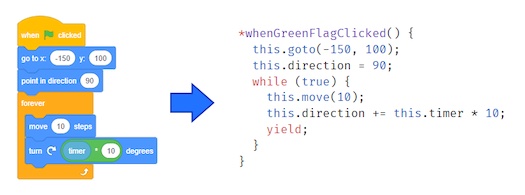
That's right! Translating Scratch to JavaScript is now possible! The tool is called Leopard, and it's available here:Leopard Website – Go here to convert your projects!
Who needs this?
Scratch is amazing. This is the place where I learned to code almost 9 years ago. I love the Scratch community, and the fact that it's so easy to get started with Scratch. However, many of the features that make it easy to start using Scratch also make it underpowered for more experienced programmers.
With a different programming language like JavaScript, you get:If you want to try a different programming language but find it difficult to get started, Leopard can help.
- More features: You can do cool tricks that simply aren't possible with Scratch.
- Speed: Your projects run faster and lag isn't as problematic.
- Publishing options: Run your projects on any website, not just Scratch.
How is this different than Phosphorus?
Phosphorus is awesome, but it's a little different than Leopard. With Leopard you can view and edit the translated JavaScript code yourself.
What if it doesn't work?
Not every project will translate perfectly.
- Only projects created using Scratch 3.0 can be translated. If you created your project using Scratch 2.0 or older, you'll need to open it up in the Scratch 3.0 editor, make a small change, and then try again.
- Some Scratch blocks are not yet supported. Check the translations page to see which blocks have JavaScript equivalents using Leopard. More blocks will be supported over time.
- Extension blocks won't work (except pen, which works great!)
- Sometimes there are little inconsistencies. We've done our best to make sure Leopard behaves exactly the same as Scratch, but there will always be little cases we haven't considered. It's possible that your scripts will run slightly out of order, be a little too fast, or some other issue. Fortunately, you can edit the JavaScript code to fix those issues, and I'm happy to help.
Upcoming Improvements
Based on the feedback I'm seeing on the forums and in comments, these are the top-priority issues to solve (most important first):
- Sprite layering doesn't work! go to front/back & go forward/backward blocks need to be implemented. Sprite layering now works in Leopard!
- Projects run too fast! Leopard projects currently run at 60fps, but it should also be possible to slow them down to 30fps. Frame rate is now a configuration option, and the default is 30fps–the same as Scratch.
- Variable watchers don't work Variable watchers now work in Leopard!
- If touching edge and if on edge, bounce blocks don't work.
- Lots of little bugs that all add up to cause issues
Thank you so much to the contributors who made Leopard possible!


i tried it with my friday night funkin mod and apparently leopard.com can't support it because it's outdated
- TheSmartGuy1234
-
 Scratcher

1000+ posts
Leopard: Convert Scratch projects to JavaScript AUTOMATICALLY!
loool avast

It's AF day in my timzone.
ST: celebrate AF day in your timezones
Me: I live in new zealand
ST: oh no nononono
you use
sudo sh -c 'echo "text" > file'
echo 'text' | sudo tee file 1> /dev/null
Scroll* for more!

what are @SIMIA1358 and @TPRATTAY doing!??!?!
(2023/11/04 YEAR-MM-DD)
https://scratch.mit.edu/discuss/topic/652044/?page=222#post-7453472
griffpatch appel is broken
Games snippet:
10. yFzZ3MgsySzJLMv8yBzIfMqcynzJ04zLbMi8yNzJvNjM2KzYPNgsybzJLMi8yOzYzMk8yHzY3MmMyhzKrNlcytzYnMpcy6Ncy3zJLNoMyCzI7NisyQzL7Mhc2QzYrMkcyUzI7MisyBzKjNicyfzLHMrMymzJnMocygzYk
- kccuber
-
 Scratcher

1000+ posts
Leopard: Convert Scratch projects to JavaScript AUTOMATICALLY!
loool avasttry leopardjs.com


- MagicCrayon9342
-
 Scratcher

1000+ posts
Leopard: Convert Scratch projects to JavaScript AUTOMATICALLY!
(#508)I recommend ANYTHING other than Avast for that EXACT reason. Heck, use Windows defender instead please!
loool avast

- _SNIPR-
-
Scratcher
37 posts
Leopard: Convert Scratch projects to JavaScript AUTOMATICALLY!
Yes I'm with you.(#508)I recommend ANYTHING other than Avast for that EXACT reason. Heck, use Windows defender instead please!
loool avast
Cutting myself just to feel something
What's the point in having love with no pain?
What's the point in having blood with no veins?
Wake up and take your own advice!
Why you act like I'm not a part of this?
You can't get rid of all of me!
I thought I told you to keep your mouth shut!
What you don't like being afraid?
My therapist told me not to bury my issues but I ain't gonna lie I'm feeling great!
I thought you had me imprisoned this whole time, but I'm the one holding the keys!
- Poyten
-
 Scratcher

1 post
Leopard: Convert Scratch projects to JavaScript AUTOMATICALLY!
my rotations i set to left and right don't stay clamped and instead go all around
scratch 3.0
scratch 3.0
- EKJXRF
-
 Scratcher

10 posts
Leopard: Convert Scratch projects to JavaScript AUTOMATICALLY!
Мой конвертированый платформер работает не правильно.
- 20sellerse
-
 Scratcher

1 post
Leopard: Convert Scratch projects to JavaScript AUTOMATICALLY!
When I try to convert https://scratch.mit.edu/projects/602930541 it said:
There was an error converting your project.
Cannot read property ‘find’ of undefined
Leopard only supports new projects (created in Scratch 3.0). And the only supported extension is “pen”; all others will fail.
If you aren't sure why your project is failing, ask on the forums!
There was an error converting your project.
Cannot read property ‘find’ of undefined
Leopard only supports new projects (created in Scratch 3.0). And the only supported extension is “pen”; all others will fail.
If you aren't sure why your project is failing, ask on the forums!
- auracoder
-
 Scratcher

12 posts
Leopard: Convert Scratch projects to JavaScript AUTOMATICALLY!
is there a way for it to transfer a scratch download? my project is to big for scratch
- TechNerd64
-
 Scratcher

100+ posts
Leopard: Convert Scratch projects to JavaScript AUTOMATICALLY!
My BEAM engine won't load it says
There was an error converting your project.
Cannot read property ‘find’ of undefined/quote] And the only extension it uses is the pen HELP!!!
Founder of Gigabyte Games, and apart of the EvolvusOS Team for OSWars 10. I mainly work on games and other interesting projects, but you can find me in the forums from time to time.
- UnoriginalName7
-
 New to Scratch

1 post
Leopard: Convert Scratch projects to JavaScript AUTOMATICALLY!
I just uploaded my project onto leopard and it isn't working. I think it has to do something with a block: ‘wait“pick random 1 to 7” seconds’. On leopard it's come up as: yield* this.wait(this.random(1, 7)); This is what the manual section says as well. Any help please?
- PullJosh
-
 Scratcher

1000+ posts
Leopard: Convert Scratch projects to JavaScript AUTOMATICALLY!
I just uploaded my project onto leopard and it isn't working. I think it has to do something with a block: ‘wait“pick random 1 to 7” seconds’. On leopard it's come up as: yield* this.wait(this.random(1, 7)); This is what the manual section says as well. Any help please?That seems like the correct code. Is it not working?
- Moooshroom
-
 Scratcher

1 post
Leopard: Convert Scratch projects to JavaScript AUTOMATICALLY!
for an odd reason the site Leopard can't convert a few of my projects i was a bit curious why that is if possible i could use a few reasons if there are any known ones
- moonwatcher348
-
 Scratcher

100+ posts
Leopard: Convert Scratch projects to JavaScript AUTOMATICALLY!
Getting an error for https://scratch.mit.edu/projects/660455669:
{“error”: "This endpoint requires the params `files` or `parameters` in order to work. See https://codesandbox.io/docs/importing#create-wizard for more details."}
{“error”: "This endpoint requires the params `files` or `parameters` in order to work. See https://codesandbox.io/docs/importing#create-wizard for more details."}
