Discuss Scratch

- Discussion Forums
- » Help with Scripts
- » Loop Around
![[RSS Feed]](//cdn.scratch.mit.edu/scratchr2/static/__5f750b17a17db0b5d7ffaf5afb2e7e2b__//djangobb_forum/img/feed-icon-small.png "[RSS Feed]")
![[RSS Feed]](http://cdn.scratch.mit.edu/scratchr2/static/__5f750b17a17db0b5d7ffaf5afb2e7e2b__//djangobb_forum/img/feed-icon-small.png "[RSS Feed]")
- funnypie1234
-
 Scratcher

15 posts
Loop Around
hi, I'm trying to make “asteroids” the old aracade game, and i cant get the Loop around thigny to work!


- unlocked_absolute
-
 Scratcher

100+ posts
Loop Around
You want to make a game where asteroids can fall is it?
If that is what you want,
here’s the script:
Then put the script for the clone.
Maybe add falling motions by changing y by 10 maybe…
If I’m helping, Thank You
If I’m not helping, Tell me.
If that is what you want,
here’s the script:
when green flag clicked
forever
wait (pick random (4) to (10)) secs
create clone of [myself v]
end
Then put the script for the clone.
Maybe add falling motions by changing y by 10 maybe…
If I’m helping, Thank You
If I’m not helping, Tell me.
- deck26
-
 Scratcher

1000+ posts
Loop Around
Do you mean going off one side and coming in at the opposite side?
- papipupepappa
-
 Scratcher

100+ posts
Loop Around
You might want to take a look at @RokCoder's Asteroids Tutorial:
https://scratch.mit.edu/projects/388166384/
https://scratch.mit.edu/projects/388166384/
- Vibrato
-
 Scratcher

1000+ posts
Loop Around
Something like this may help:
foreverBut you may need to tweak some numbers
if <(x position) < [-235]> then
set x to (234)
end
if <(x position) > [235]> then
set x to (-234)
end
if <(y position) < [-175]> then
set y to (174)
end
if <(y position) > [175]> then
set y to (-174)
end
end
- funnypie1234
-
Scratcher
15 posts
Loop Around
Do you mean going off one side and coming in at the opposite side?Yes, that is what i mean, like the clasic aracade game
- funnypie1234
-
Scratcher
15 posts
Loop Around
Something like this may help:I have tried that already… the problem is that it glitches sometimes and for some reason some of the edges dont work well. my game requires up arrow to move forward, and left and right arrows to turn. hope that information helps!foreverBut you may need to tweak some numbers
if <(x position) < [-235]> then
set x to (234)
end
if <(x position) > [235]> then
set x to (-234)
end
if <(y position) < [-175]> then
set y to (174)
end
if <(y position) > [175]> then
set y to (-174)
end
end
- funnypie1234
-
Scratcher
15 posts
Loop Around
You might want to take a look at @RokCoder's Asteroids Tutorial:problem! im not allowed to use Youtube
https://scratch.mit.edu/projects/388166384/
- deck26
-
Scratcher
1000+ posts
Loop Around
Shouold just be a case of fine tuing the values. Please try it and share if it isn'#t working so we can identify the problem.Something like this may help:I have tried that already… the problem is that it glitches sometimes and for some reason some of the edges dont work well. my game requires up arrow to move forward, and left and right arrows to turn. hope that information helps!foreverBut you may need to tweak some numbers
if <(x position) < [-235]> then
set x to (234)
end
if <(x position) > [235]> then
set x to (-234)
end
if <(y position) < [-175]> then
set y to (174)
end
if <(y position) > [175]> then
set y to (-174)
end
end
- Oumuamua
-
 Scratcher

1000+ posts
Loop Around
Hi, i have not idea about you expect it must look… you just try this:
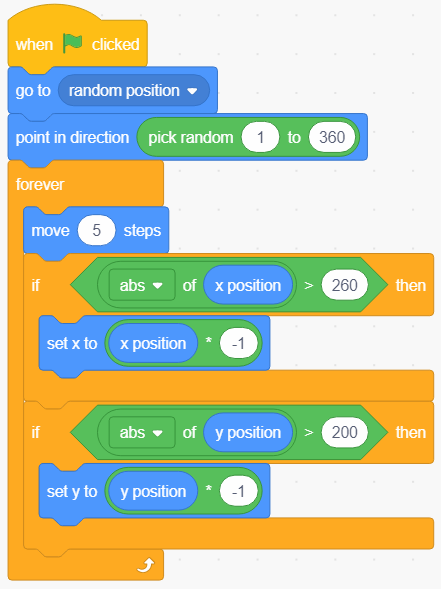
Sorry,i forgot to say that those x and y coordinates can vary depending sprites dimensions.
Sorry,i forgot to say that those x and y coordinates can vary depending sprites dimensions.
Last edited by Oumuamua (July 3, 2020 21:10:18)
- Discussion Forums
- » Help with Scripts
-
» Loop Around