Discuss Scratch

- Discussion Forums
- » Suggestions
- » Divide sprite's scripts into sections.
![[RSS Feed]](//cdn.scratch.mit.edu/scratchr2/static/__5b3e40ec58a840b41702360e9891321b__//djangobb_forum/img/feed-icon-small.png "[RSS Feed]")
![[RSS Feed]](http://cdn.scratch.mit.edu/scratchr2/static/__5b3e40ec58a840b41702360e9891321b__//djangobb_forum/img/feed-icon-small.png "[RSS Feed]")
- ggenije
-
 Scratcher

500+ posts
Divide sprite's scripts into sections.
Idea:
The main idea is to one sprite have addable sections.
What is section?
In sections you will use same code (same custom blocks) as before, but this time it will be organised in sections.
You can drag scripts across different sections as well as custom blocks.This way it will only change place but will not change any script execution.
Why sections?
There is plenty of reasons but MAIN reason is to reduce lag when you have 2000+ blocks(you can see in the image down there), it will start to lag also you'll need to wait 2-10 seconds to load the sprite , also I can't work on my laptop because it's to slow and it's lagging because of that high number of blocks in that sprite.
So this way it will have to load only for example 500-1000 per sections that will decrease lag drastically, and it will do same code!
Another reason is:
Imagine there is not lag, everything is working fast, but still there's 5000 blocks you'll need to scroll down there far away from start, also you can forget where you put the code , especially when you press “Clean up blocks” it will shuffle them in kilometers/miles long column of code so you have to spent your time on arranging them instead of coding.
So this way you'll have sections example: Calculate positions, Draw player, Animate player, etc…… this way you can easily find what you want.
Why not using different sprites instead?
Just because you'll need specific layout:(have in mind when I say draw I mean draw with pen)
example your project is all about drawing something in 2D in super graphics: your code for drawing head contains 3000 blocks your drawing chest script contains 4000 blocks and other contains 16000 blocks divided…
You can use different sprites for this but problem is you can't control which sprite will execute first so it will for example draw arms first then chest so it will feel arms is behind of body instead seeing them on the top of the body.
But if is in same sprite just call “draw chest” , “draw arms” “draw head” …
Also I'll need same custom blocks to use for example for chest and arms , and that custom blocks are consuming most of the place/blocks (e.g.1000 blocks in one custom block)
Maybe use broadcasts?
This will not working because it will have to use broadcast and wait in order to draw it in layout . And these broadcast must be called every frame, but when there are many broadcast it will decrease speed of project which even worse of slow editor.
Is it all ages friendly?
I don't see anything complicated just press new section and select between sections same as selecting sprites, also even younger scratchers can use this even if their scripts are simple short just to divide them into sections like (now talking for pong/breakout game) “move pad” “ball collision” etc.
Also this may be useful for note block projects, cloud save/multiplayer making it easily to explain/understand, also this will help a lot scratcher which create big projects, including 100% pen projects, big games (like mine) , note block projects…
Is that too much important?
This is important because almost all other scripts suggestions can be made with workaround, but they don't want because that work around take 50 times more spaces then simple blocks which is consuming space and it lags .Also they may be complicated for young ones(workarounds).
With sections you can create these workarounds,but number of scripts is surely to became insane high, but with sections it doesn't matter, this is literally only thing one scratcher which is making big projects can wish.
There is image how it will look like:
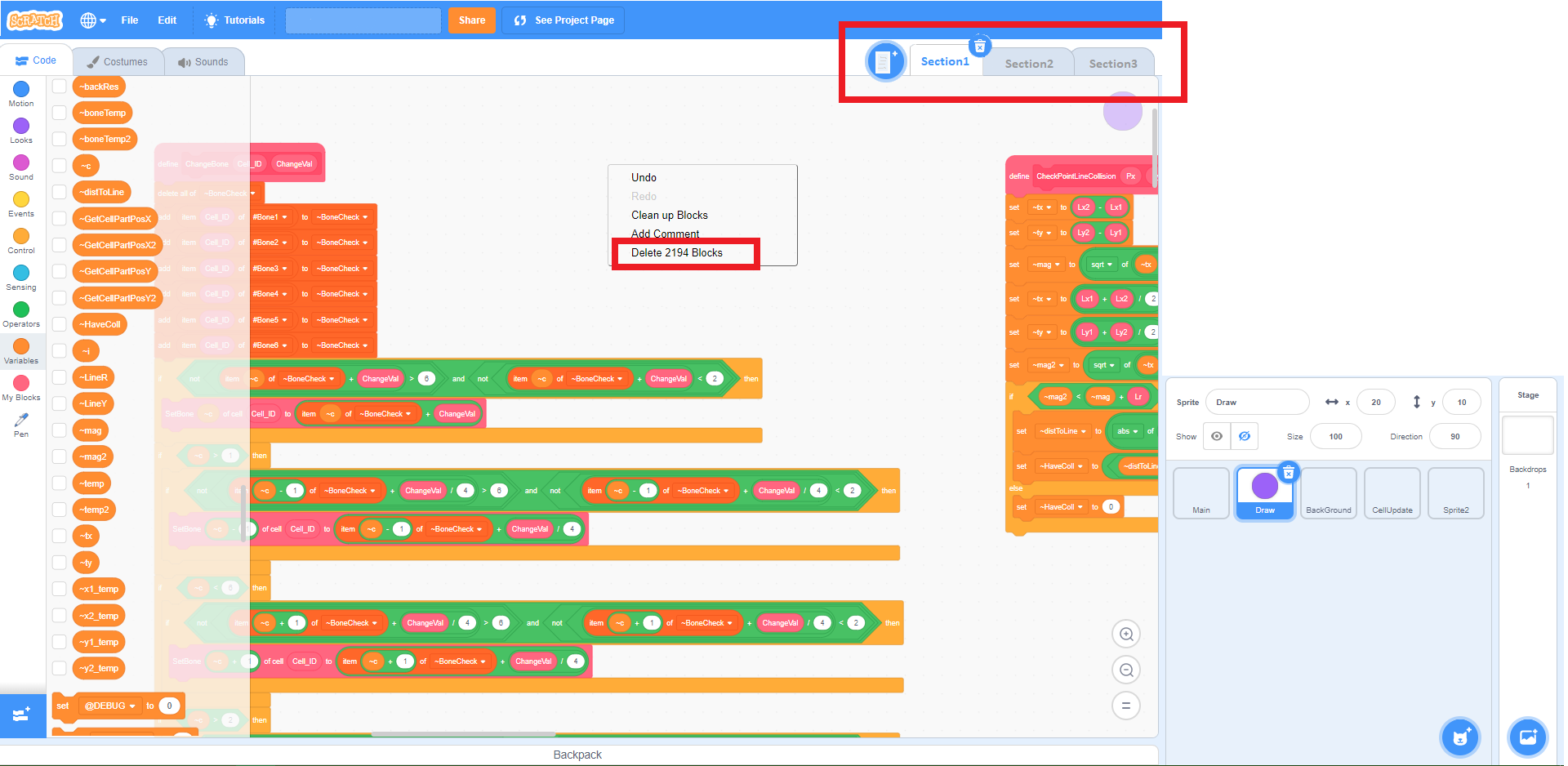
The main idea is to one sprite have addable sections.
What is section?
In sections you will use same code (same custom blocks) as before, but this time it will be organised in sections.
You can drag scripts across different sections as well as custom blocks.This way it will only change place but will not change any script execution.
Why sections?
There is plenty of reasons but MAIN reason is to reduce lag when you have 2000+ blocks(you can see in the image down there), it will start to lag also you'll need to wait 2-10 seconds to load the sprite , also I can't work on my laptop because it's to slow and it's lagging because of that high number of blocks in that sprite.
So this way it will have to load only for example 500-1000 per sections that will decrease lag drastically, and it will do same code!
Another reason is:
Imagine there is not lag, everything is working fast, but still there's 5000 blocks you'll need to scroll down there far away from start, also you can forget where you put the code , especially when you press “Clean up blocks” it will shuffle them in kilometers/miles long column of code so you have to spent your time on arranging them instead of coding.
So this way you'll have sections example: Calculate positions, Draw player, Animate player, etc…… this way you can easily find what you want.
Why not using different sprites instead?
Just because you'll need specific layout:(have in mind when I say draw I mean draw with pen)
example your project is all about drawing something in 2D in super graphics: your code for drawing head contains 3000 blocks your drawing chest script contains 4000 blocks and other contains 16000 blocks divided…
You can use different sprites for this but problem is you can't control which sprite will execute first so it will for example draw arms first then chest so it will feel arms is behind of body instead seeing them on the top of the body.
But if is in same sprite just call “draw chest” , “draw arms” “draw head” …
Also I'll need same custom blocks to use for example for chest and arms , and that custom blocks are consuming most of the place/blocks (e.g.1000 blocks in one custom block)
Maybe use broadcasts?
This will not working because it will have to use broadcast and wait in order to draw it in layout . And these broadcast must be called every frame, but when there are many broadcast it will decrease speed of project which even worse of slow editor.
Is it all ages friendly?
I don't see anything complicated just press new section and select between sections same as selecting sprites, also even younger scratchers can use this even if their scripts are simple short just to divide them into sections like (now talking for pong/breakout game) “move pad” “ball collision” etc.
Also this may be useful for note block projects, cloud save/multiplayer making it easily to explain/understand, also this will help a lot scratcher which create big projects, including 100% pen projects, big games (like mine) , note block projects…
Is that too much important?
This is important because almost all other scripts suggestions can be made with workaround, but they don't want because that work around take 50 times more spaces then simple blocks which is consuming space and it lags .Also they may be complicated for young ones(workarounds).
With sections you can create these workarounds,but number of scripts is surely to became insane high, but with sections it doesn't matter, this is literally only thing one scratcher which is making big projects can wish.
There is image how it will look like:
Last edited by ggenije (Aug. 21, 2019 07:35:00)
- openPoll
-
 Scratcher

1000+ posts
Divide sprite's scripts into sections.
Support, as long as the max file size of each section is where “n” is equal to the amount of sections there currently are.
This would help to organise scripts into their own categories so that if you were looking for a particular script in a project, or if you wanted to organise your scripts, you could place them in different sections.
(1/n)50MB
This would help to organise scripts into their own categories so that if you were looking for a particular script in a project, or if you wanted to organise your scripts, you could place them in different sections.
- ResExsention
-
 New Scratcher

1000+ posts
Divide sprite's scripts into sections.
This sounds like code editor layers, to be honest…
There is already a suggestion on that.
Btw, support. It would help keep code organized. It'd he nice if you could rename the sections, too.
There is already a suggestion on that.
Btw, support. It would help keep code organized. It'd he nice if you could rename the sections, too.
- ggenije
-
Scratcher
500+ posts
Divide sprite's scripts into sections.
This sounds like code editor layers, to be honest…
There is already a suggestion on that.
Btw, support. It would help keep code organized. It'd he nice if you could rename the sections, too.
I did my best to find the duplicate … also renaming section was implied by me.


- WindOctahedron
-
 Scratcher

1000+ posts
Divide sprite's scripts into sections.
mi nik name is nchnchPlease don't post something off-topic. I see that you are new, so check out the New Scratchers forum.
(I really, really wanted to post a sarcastic comment on this, but I have to be constructive.)
To the original post: support, because it would reduce page lag.
- Nambaseking01
-
 Scratcher

1000+ posts
Divide sprite's scripts into sections.
Support.
Not only would this clear up space, but it would make things more organized like ResExsention mentioned.
The only small issue is that these sections could be used for bypassing the 50MB limit using a glitch. But since there are already several issues about that limit…who cares?
And I did not come here without an important announcement.
Not only would this clear up space, but it would make things more organized like ResExsention mentioned.
The only small issue is that these sections could be used for bypassing the 50MB limit using a glitch. But since there are already several issues about that limit…who cares?
And I did not come here without an important announcement.
Hello!
I am a worker from the Scratch Ultimate Coding Shop and we would like to sponsor your suggestions! This means that we will advertise your suggestion in our shop and ask others to view it and see how it is! If you would want to remove your suggestion from the sponsoring event, you can always notify us in the shop!
Thank you for reading this letter,
Nambaseking01

- ggenije
-
Scratcher
500+ posts
Divide sprite's scripts into sections.
Support.
The only small issue is that these sections could be used for bypassing the 50MB limit using a glitch. But since there are already several issues about that limit…who cares?
The point of implementing feature, expect for main reason, is also to fix existing glitches.
Also I don't see reason of not working with 50MB limit , it's not that hard to fix that even with sections.
Probably it's not fixed because it is not worth it, what is advantage of my suggestion ― they can fix that while working on sections.
- Nambaseking01
-
Scratcher
1000+ posts
Divide sprite's scripts into sections.
~snip~
…it's not fixed because it is not worth it…
No, it is worth it. The ST is currently paying a lot of money for the server of Scratch, and if people manage to get projects that have 100MB or so they will have to pay money that they cannot afford.
- bigpuppy
-
 Scratcher

1000+ posts
Divide sprite's scripts into sections.
Ooh - I love this idea! It'd definitely help with projects with tons of code - I can definitely see what you're saying. I can't think of much to say that hasn't been said yet. There's a “code sections” idea here, but it's in an entirely different way; if both suggestions were implemented, your idea could be considered “sections” and the other idea could be considered “sub-sections.” 

- ggenije
-
Scratcher
500+ posts
Divide sprite's scripts into sections.
Ooh - I love this idea! It'd definitely help with projects with tons of code - I can definitely see what you're saying. I can't think of much to say that hasn't been said yet. There's a “code sections” idea here, but it's in an entirely different way; if both suggestions were implemented, your idea could be considered “sections” and the other idea could be considered “sub-sections.”
I have seen these “sub-sections.” but it's not practical because in case of high number of script I have to scroll down 5 mins in order to reach target script, because when minimized they will stay at same place even that way.
- Paddle2See
-
 Scratch Team

1000+ posts
Divide sprite's scripts into sections.
This is a really nice description of a problem that many of us have faced, as we attempt more complicated projects. Thanks for taking the time to write this up.
I'm not sure if the solution proposed here is the right one though - we have to be make every attempt to keep Scratch as simple as possible for the beginning user. Re-nameable scripting “pages” would introduce some additional complexity. I wonder if there is another way to achieve the same means that might be simpler?
I will leave this topic open for now so we can continue the discussion and perhaps come up with a more refined approach that would be very simple but still achieve the desired results.
I'm not sure if the solution proposed here is the right one though - we have to be make every attempt to keep Scratch as simple as possible for the beginning user. Re-nameable scripting “pages” would introduce some additional complexity. I wonder if there is another way to achieve the same means that might be simpler?
I will leave this topic open for now so we can continue the discussion and perhaps come up with a more refined approach that would be very simple but still achieve the desired results.
- ggenije
-
Scratcher
500+ posts
Divide sprite's scripts into sections.
Hmmmm…
Maybe to minimize one set of blocks like one custom block (to remove lagging and to get more clear-sightedness)
I'll create another topic if is it worth it…
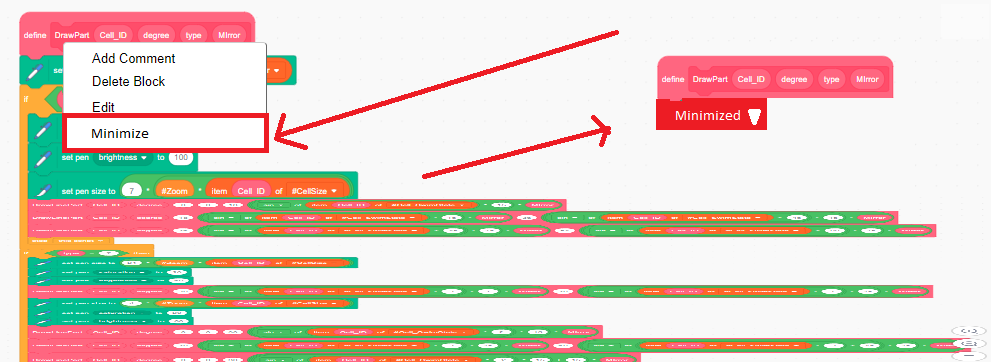
Also there should be Go to Definition option on left list of blocks at least.
Maybe to minimize one set of blocks like one custom block (to remove lagging and to get more clear-sightedness)
I'll create another topic if is it worth it…
Also there should be Go to Definition option on left list of blocks at least.
- Discussion Forums
- » Suggestions
-
» Divide sprite's scripts into sections.