Discuss Scratch
- Discussion Forums
- » Questions about Scratch
- » how to save a song
![[RSS Feed]](//cdn.scratch.mit.edu/scratchr2/static/__5f750b17a17db0b5d7ffaf5afb2e7e2b__//djangobb_forum/img/feed-icon-small.png "[RSS Feed]")
![[RSS Feed]](http://cdn.scratch.mit.edu/scratchr2/static/__5f750b17a17db0b5d7ffaf5afb2e7e2b__//djangobb_forum/img/feed-icon-small.png "[RSS Feed]")

- PhoenixLondon2008
-
 Scratcher

100+ posts
how to save a song
how do u save a song ?What do you mean? If it's how to import a song, go to the “sounds” tab in your sprite. Then, click on the “import sound” button and then you are done!

- PopStarYoda
-
 Scratcher

1000+ posts
how to save a song
how do u save a song ?
I'm sorry, I don't understand. Are you asking how to save a song from Scratch to your computer? If so, I don't believe there's a download button in the 3.0 editor. (At least I haven't found one.) However, you can upload sound to projects.
- awesome-llama
-
 Scratcher

1000+ posts
how to save a song
See the similar thread, Downloading Music (scratch.mit.edu/discuss/topic/336736/)
Looks like I cannot find it in Scratch 3.0.
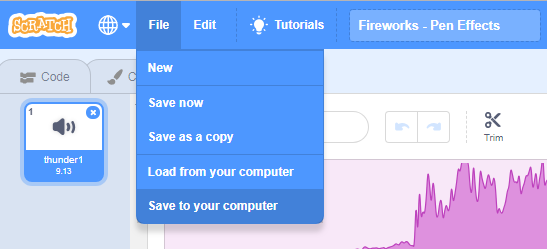
The only way I can think of for downloading music from Scratch projects is to download the whole project, which does work!
1. Find the project, and go into it. Click File, and Save to your computer:
2. Go to the downloaded file on your computer, and rename the extension (.sb3) to .zip
3. Open/extract the .zip folder and look inside. You will see that it contains all the files - the code (in the project.json), sounds and graphics.
4. Copy it out and put it in a place you want. Rename it as well.


There's also a similar method that requires a little less space.
It turns out that you can download sprites to a local file. Move the sound file to a sprite, then download the sprite. Then, in a different project, upload the sprite and extract the sound file.

- awesome-llama
-
Scratcher
1000+ posts
how to save a song
Play your project while running a sound recorder.Actually, that is a good way as well.
If anyone is to do this, I recommend Audacity, a audio editing tool that can also record sounds. It is free.
- olpiver
-
 Scratcher

2 posts
how to save a song
How do you get a song from youtube, download it, and put it on scratch?
- ILoveElevatorsBois
-
 Scratcher

1 post
how to save a song
I know the easiest method I think, that works great on Windows 10. Select the sound and then right-click it. A small menu should pop up. On that menu, there should be a button that says “export”. Click the button, and it will export (or download) the song. Then just open the file and you will have it saved to your computer, available for use on your Scratch project. I don't know if this works on other operating systems.
Last edited by ILoveElevatorsBois (May 10, 2020 05:39:42)
- Discussion Forums
- » Questions about Scratch
-
» how to save a song