Discuss Scratch

- Discussion Forums
- » Help with Scripts
- » Character Not Walking Smoothly when holding the left or right arrow buttons.
![[RSS Feed]](//cdn.scratch.mit.edu/scratchr2/static/__5b3e40ec58a840b41702360e9891321b__//djangobb_forum/img/feed-icon-small.png "[RSS Feed]")
![[RSS Feed]](http://cdn.scratch.mit.edu/scratchr2/static/__5b3e40ec58a840b41702360e9891321b__//djangobb_forum/img/feed-icon-small.png "[RSS Feed]")
- SamuraiNinjaBento
-
 Scratcher

82 posts
Character Not Walking Smoothly when holding the left or right arrow buttons.
There seems to be a little lag or skip that is a minor problem but I would like to fix it. If you know how to help then please look here. https://scratch.mit.edu/projects/256883377/#player
- Catalystix
-
 Scratcher

100+ posts
Character Not Walking Smoothly when holding the left or right arrow buttons.
It's because there's a wait/delay between each time the character moves 10 steps and switching costume when the broadcast is received. To fix this i would have two separate “When (left or right) arrow key press”, one to deal with changing costume and the other to deal with moving the character.
And the same thing for the right arrow key. Let me know if this help and if not i can remix your project.
when [Left Arrow v] key pressed
change x by (-5)

when [Left Arrow v] key pressed
next costume
wait (0) secs
set [leftright v] to [1]
And the same thing for the right arrow key. Let me know if this help and if not i can remix your project.
Last edited by Catalystix (Oct. 26, 2018 18:24:03)
- kieranblackley
-
 Scratcher

500+ posts
Character Not Walking Smoothly when holding the left or right arrow buttons.
To make a much more smoother game follow this little tutorial I have made for you.
Before I explain how to make your character walk smooth, I would like to explain a math function. This function will help you when making your project.
This special function is called modula. Modula works by finding the remainder of a division math sequence. For example 3 mod 2 is 1, 4 mod 3 is 1, 5 mod 3 is 2 etc.
Now that I have got that out of the way, let's go onto the next part. I recommend you make your costumes much more simple. You can actually get rid all of the costumes where the character is facing left. This is because you can use the point direction block and set rotation style block.
Next, the costumes you use for when the character is walking can be made more simple. Since you use the idle costumes, I recommend you copy them and put those copies where they need to be in the walk cycle. Next in your walk cycle, name the costumes something like this:
walk_1
walk_2
walk_3
walk_4
etc.
That way you will know that they are walk costumes. Do the same for your jump sprites. Like this:
jump_1
jump_2
jump_3
etc.
Now on your idle costumes. (These are not the ones that were copies these are the original ones) Delete the idle costumes where the character is facing left. And then name the idle costume you have left to:
idle_1
or
idle
That way you know it is the idle sprite.
Do not worry about the actions your player has. You can keep them in.
With the jump costumes, center each of them so it looks as if she is just putting her hands up instead of actually jumping when you play them through. This is because we are able to animate the jumping via a program.
Now we have got the costumes simplified, we can program.
First of all get rid of all the movement scripts. We are going to re-program these scripts.
Once these scripts are deleted let's replace them:
Right Arrow Script:

To make the left arrow script just copy it and make it so it is when left arrow key pressed. also change the direction to -90 instead of 90.
Now is the jump script.
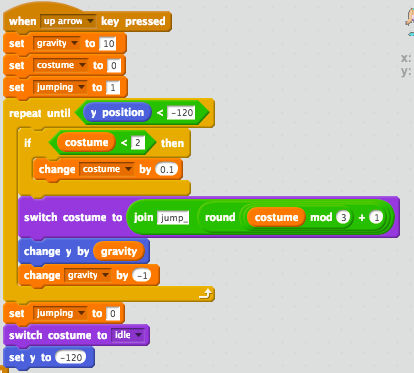
Do not worry if it looks hard. At least it will help your project.
You know the script that has the green flag and sets the x and y of the character. That script needs to have a few minor changes to it.
Add a set costume to 0 block to it and a switch costume to idle block as well.
After that, you are finished. Run your project and see how it looks. I hope it looks good!
NOTICE: This script also improved jumping and makes it extremely smooth and good looking.
Before I explain how to make your character walk smooth, I would like to explain a math function. This function will help you when making your project.
This special function is called modula. Modula works by finding the remainder of a division math sequence. For example 3 mod 2 is 1, 4 mod 3 is 1, 5 mod 3 is 2 etc.
Now that I have got that out of the way, let's go onto the next part. I recommend you make your costumes much more simple. You can actually get rid all of the costumes where the character is facing left. This is because you can use the point direction block and set rotation style block.
Next, the costumes you use for when the character is walking can be made more simple. Since you use the idle costumes, I recommend you copy them and put those copies where they need to be in the walk cycle. Next in your walk cycle, name the costumes something like this:
walk_1
walk_2
walk_3
walk_4
etc.
That way you will know that they are walk costumes. Do the same for your jump sprites. Like this:
jump_1
jump_2
jump_3
etc.
Now on your idle costumes. (These are not the ones that were copies these are the original ones) Delete the idle costumes where the character is facing left. And then name the idle costume you have left to:
idle_1
or
idle
That way you know it is the idle sprite.
Do not worry about the actions your player has. You can keep them in.
With the jump costumes, center each of them so it looks as if she is just putting her hands up instead of actually jumping when you play them through. This is because we are able to animate the jumping via a program.
Now we have got the costumes simplified, we can program.
First of all get rid of all the movement scripts. We are going to re-program these scripts.
Once these scripts are deleted let's replace them:
Right Arrow Script:
To make the left arrow script just copy it and make it so it is when left arrow key pressed. also change the direction to -90 instead of 90.
Now is the jump script.
Do not worry if it looks hard. At least it will help your project.
You know the script that has the green flag and sets the x and y of the character. That script needs to have a few minor changes to it.
Add a set costume to 0 block to it and a switch costume to idle block as well.
After that, you are finished. Run your project and see how it looks. I hope it looks good!
NOTICE: This script also improved jumping and makes it extremely smooth and good looking.
Last edited by kieranblackley (Oct. 26, 2018 18:35:10)
- SamuraiNinjaBento
-
Scratcher
82 posts
Character Not Walking Smoothly when holding the left or right arrow buttons.
It's because there's a wait/delay between each time the character moves 10 steps and switching costume when the broadcast is received. To fix this i would have two separate “When (left or right) arrow key press”, one to deal with changing costume and the other to deal with moving the character.when [Left Arrow v] key pressed
change x by (-5)
when [Left Arrow v] key pressed
next costume
wait (0) secs
set [leftright v] to [1]
And the same thing for the right arrow key. Let me know if this help and if not i can remix your project.
Thank you so much, that seems to do the job!
- SamuraiNinjaBento
-
Scratcher
82 posts
Character Not Walking Smoothly when holding the left or right arrow buttons.
To make a much more smoother game follow this little tutorial I have made for you.
Before I explain how to make your character walk smo… …tume to idle block as well.
After that, you are finished. Run your project and see how it looks. I hope it looks good!
NOTICE: This script also improved jumping and makes it extremely smooth and good looking.
I'll try to do this as well, thank you for the detailed explanation!
- kieranblackley
-
Scratcher
500+ posts
Character Not Walking Smoothly when holding the left or right arrow buttons.
I hope it worksTo make a much more smoother game follow this little tutorial I have made for you.
Before I explain how to make your character walk smo… …tume to idle block as well.
After that, you are finished. Run your project and see how it looks. I hope it looks good!
NOTICE: This script also improved jumping and makes it extremely smooth and good looking.
I'll try to do this as well, thank you for the detailed explanation!

- Discussion Forums
- » Help with Scripts
-
» Character Not Walking Smoothly when holding the left or right arrow buttons.