Discuss Scratch
- Discussion Forums
- » Announcements
- » Introducing the Network Connectivity block
![[RSS Feed]](//cdn.scratch.mit.edu/scratchr2/static/__da70381f846683102550a800dc50ce22__//djangobb_forum/img/feed-icon-small.png "[RSS Feed]")
![[RSS Feed]](http://cdn.scratch.mit.edu/scratchr2/static/__da70381f846683102550a800dc50ce22__//djangobb_forum/img/feed-icon-small.png "[RSS Feed]")
- ScratchCat
-
 Scratch Team

81 posts
Introducing the Network Connectivity block
Hey, Scratchers!
We’re writing to share that you’ll see a new type of block in the code editor today. Meet the Network Connectivity block, which you can find in the Sensing menu.
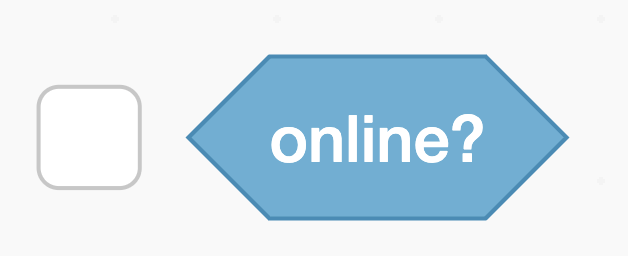
Over the years, some Scratchers have created projects that check the user’s online status by adapting existing blocks/extensions. The Network Connectivity block will allow your project to check whether or not a user is online easily – no workarounds required.
We hope you enjoy creating with this block! If you’re curious about how it works, read our Q&A below to learn more.
Scratch On!
The Scratch Team
Q&A
How does the Network Connectivity block work?
This block only runs on your own device, and is not storing any data about you. When a user plays a project with the Network Connectivity block, it runs a check back to your browser to see whether the browser believes your device is currently connected to the internet. The information it returns is a simple “yes” or “no.”
Why did you release this block?
Some Scratchers adapt existing blocks/extensions to check whether or not users are online. This block provides a built-in solution to Scratchers who want to include this function in their projects.
Can I use the Network Connectivity block to see if (my friend/my favorite Scratcher/the Scratch Team) is online?
No – this block can’t return information about any other Scratchers. Network Connectivity blocks are connecting back to your browser only as you run a project that uses them. The information about whether or not you’re online is only visible to you.
We’re writing to share that you’ll see a new type of block in the code editor today. Meet the Network Connectivity block, which you can find in the Sensing menu.
Over the years, some Scratchers have created projects that check the user’s online status by adapting existing blocks/extensions. The Network Connectivity block will allow your project to check whether or not a user is online easily – no workarounds required.
We hope you enjoy creating with this block! If you’re curious about how it works, read our Q&A below to learn more.
Scratch On!
The Scratch Team
Q&A
How does the Network Connectivity block work?
This block only runs on your own device, and is not storing any data about you. When a user plays a project with the Network Connectivity block, it runs a check back to your browser to see whether the browser believes your device is currently connected to the internet. The information it returns is a simple “yes” or “no.”
Why did you release this block?
Some Scratchers adapt existing blocks/extensions to check whether or not users are online. This block provides a built-in solution to Scratchers who want to include this function in their projects.
Can I use the Network Connectivity block to see if (my friend/my favorite Scratcher/the Scratch Team) is online?
No – this block can’t return information about any other Scratchers. Network Connectivity blocks are connecting back to your browser only as you run a project that uses them. The information about whether or not you’re online is only visible to you.
- Discussion Forums
- » Announcements
-
» Introducing the Network Connectivity block