Discuss Scratch

- Discussion Forums
- » Advanced Topics
- » Scratch on OS Project — Run Scratch on any platform
![[RSS Feed]](//cdn.scratch.mit.edu/scratchr2/static/__ff7229f036c458728e45c39b0751aa44__//djangobb_forum/img/feed-icon-small.png "[RSS Feed]")
![[RSS Feed]](http://cdn.scratch.mit.edu/scratchr2/static/__ff7229f036c458728e45c39b0751aa44__//djangobb_forum/img/feed-icon-small.png "[RSS Feed]")
- StudioPangoFan_2000
-
 Scratcher

500+ posts
Scratch on OS Project — Run Scratch on any platform
There is also scratch everywhere, at https://scratcheverywhere.github.io which can work on 3DS, Wii u, Wii, and PS Vita.
- HighlaneGamingStudio
-
 Scratcher

500+ posts
Scratch on OS Project — Run Scratch on any platform
There is also scratch everywhere, at https://scratcheverywhere.github.io which can work on 3DS, Wii u, Wii, and PS Vita.Thanks! That'll be very useful.
- StudioPangoFan_2000
-
Scratcher
500+ posts
Scratch on OS Project — Run Scratch on any platform
You're welcomeThere is also scratch everywhere, at https://scratcheverywhere.github.io which can work on 3DS, Wii u, Wii, and PS Vita.Thanks! That'll be very useful.

- HighlaneGamingStudio
-
Scratcher
500+ posts
Scratch on OS Project — Run Scratch on any platform
Bumper car
- HighlaneGamingStudio
-
Scratcher
500+ posts
Scratch on OS Project — Run Scratch on any platform
My browser / operating system: MacOS Macintosh X 10.15.7, Chrome 142.0.0.0, Flash 32.0 (release 0)
Edited: My browser / operating system: macOS 13, Chrome 142.0.0.0, Flash 32.0 (release 0)
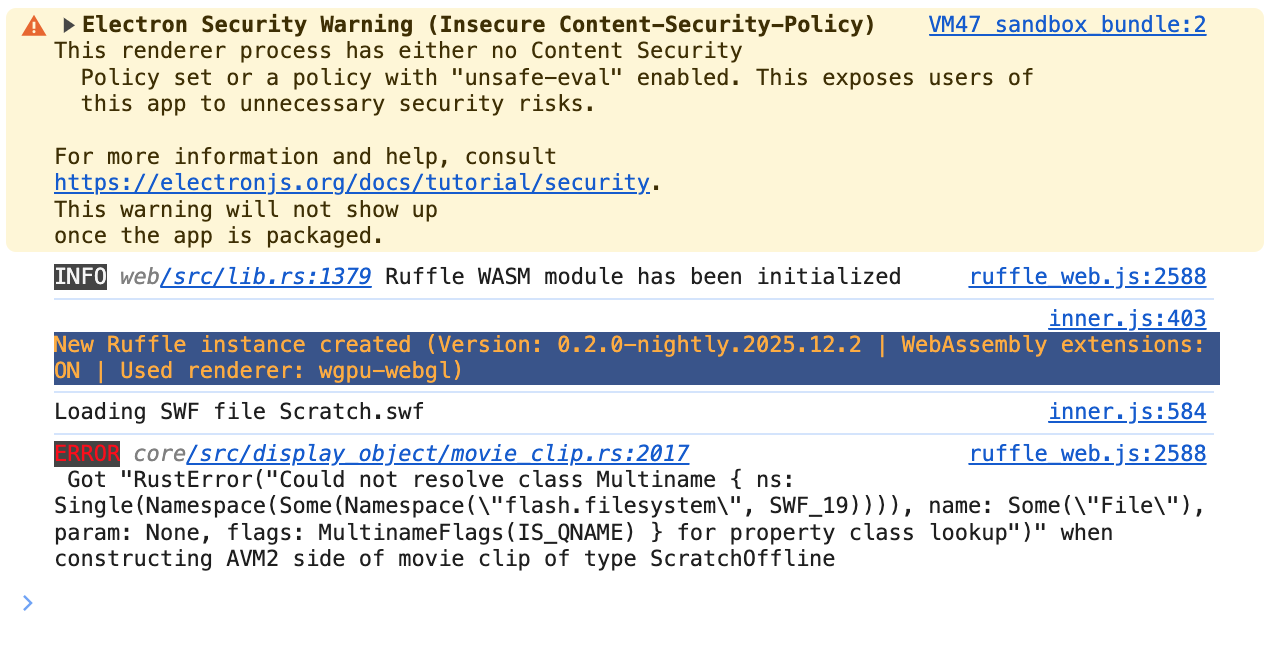
For those who are familiar with Ruffle and/or Electron: I've got a problem with developing an Electron-based version of Scratch 2.0. I've been able to debug my all errors so far, but this most recent one has me really stumped. I'm running Ruffle self-hosted in an Electron app the same way I would run it on a web server, and all I'm getting is a white screen. I opened the developer tools in the app and this is what I got (note: the first part isn't fundemental and I'm planning to fix it later. The part at the bottom that begins with ERROR is the part that's the issue):
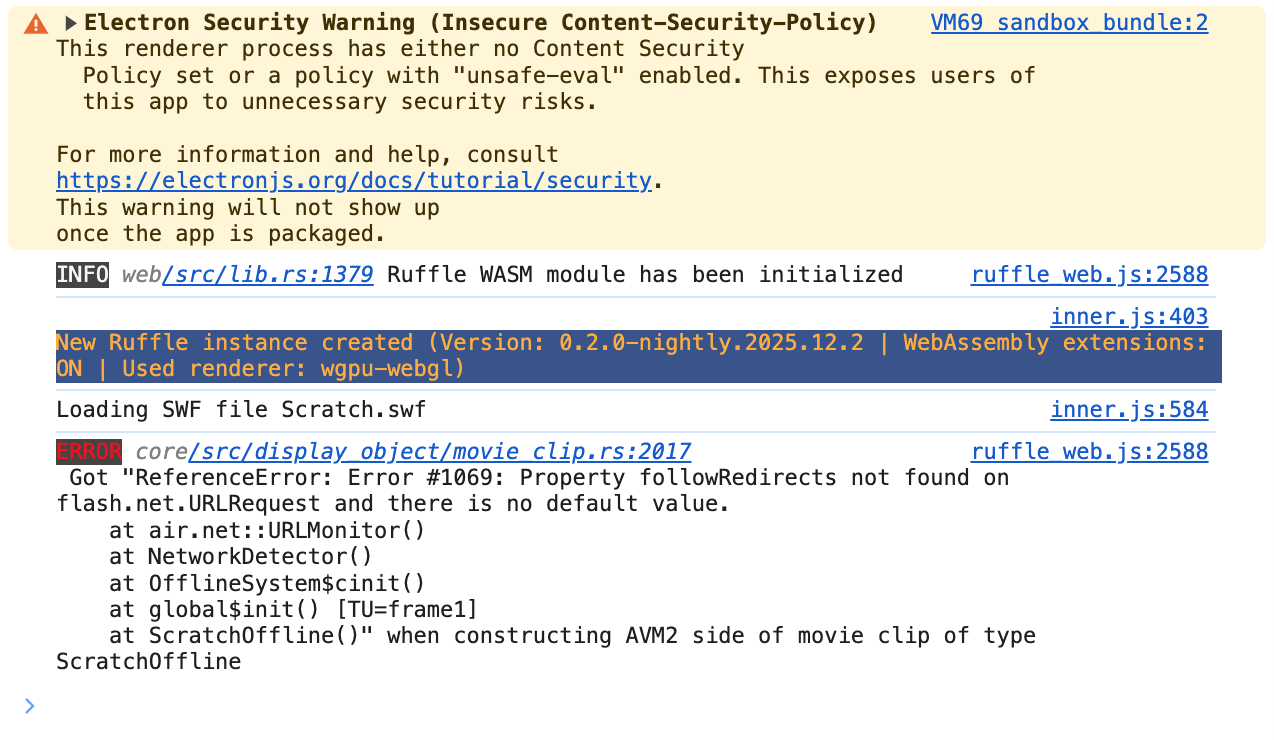
When I edit my index.html to switch the player runtime to Adobe AIR, this is what I get instead:
I also got this debug information in Terminal:

My index.html code is this:
I took the entire contents of the Resources folder within the package contents of the macOS version of the official Scratch 2 Offline Editor and placed it in the root directory of my Electron project folder. Everything else follows part two of the tutorial pretty much exactly.
Does someone know what's going on here? If so, please tell me.
Edited: My browser / operating system: macOS 13, Chrome 142.0.0.0, Flash 32.0 (release 0)
For those who are familiar with Ruffle and/or Electron: I've got a problem with developing an Electron-based version of Scratch 2.0. I've been able to debug my all errors so far, but this most recent one has me really stumped. I'm running Ruffle self-hosted in an Electron app the same way I would run it on a web server, and all I'm getting is a white screen. I opened the developer tools in the app and this is what I got (note: the first part isn't fundemental and I'm planning to fix it later. The part at the bottom that begins with ERROR is the part that's the issue):
When I edit my index.html to switch the player runtime to Adobe AIR, this is what I get instead:
I also got this debug information in Terminal:
My index.html code is this:
<!DOCTYPE html>
<html>
<head>
<meta charset="UTF-8">
<title>Scratch 2 Offline Editor</title>
</head>
<body>
<div id="container"></div>
<script>
    window.RufflePlayer = window.RufflePlayer || {};
window.RufflePlayer = window.RufflePlayer || {};
window.RufflePlayer.config = {
    "allowScriptAccess": true,
    "autoplay": "on",
    "unmuteOverlay": "hidden",
    "letterbox": "off",
    "splashScreen": false,
    "allowFullscreen": true,
};
    window.addEventListener("load", (event) => {
        const ruffle = window.RufflePlayer.newest();
        const player = ruffle.createPlayer();
        const container = document.getElementById("container");
        container.appendChild(player);
        player.style.width = "100%"; player.style.height = "100%";
        player.ruffle().load("Scratch.swf");
    });
</script>
<script src="ruffle-nightly-2025_12_02-web-selfhosted/ruffle.js"></script>
</body>
</html>
Does someone know what's going on here? If so, please tell me.
Last edited by HighlaneGamingStudio (Dec. 7, 2025 17:48:33)
- Scratch_Cat_Coder8
-
 Scratcher

1000+ posts
Scratch on OS Project — Run Scratch on any platform
Theres an online ruffle player that can load swf files but the only problem is that it just fails to load any scratch 2.0 swf
- HighlaneGamingStudio
-
Scratcher
500+ posts
Scratch on OS Project — Run Scratch on any platform
Theres an online ruffle player that can load swf files but the only problem is that it just fails to load any scratch 2.0 swfIf it's configured correctly, it'll play the SWF correctly and show the editor instead of a white screen or just the player with no editor.
- HighlaneGamingStudio
-
Scratcher
500+ posts
Scratch on OS Project — Run Scratch on any platform
My problem's fixed now.
All I needed to add was a little CSS, and now the viewport's big enough for me to get actual Ruffle errors. I'm still running into some problems, but these aren't quite as stumping.
All I needed to add was a little CSS, and now the viewport's big enough for me to get actual Ruffle errors. I'm still running into some problems, but these aren't quite as stumping.
- Supreme-Dev
-
 Scratcher

92 posts
Scratch on OS Project — Run Scratch on any platform
Bump
Totally did just bump a topic on the second page to get this one off the first page just so I could bump this.
Totally did just bump a topic on the second page to get this one off the first page just so I could bump this.
- Discussion Forums
- » Advanced Topics
-
» Scratch on OS Project — Run Scratch on any platform