Discuss Scratch

![[RSS Feed]](http://cdn.scratch.mit.edu/scratchr2/static/__5b3e40ec58a840b41702360e9891321b__//djangobb_forum/img/feed-icon-small.png "[RSS Feed]")
- mrscratcher123434305
-
 Scratcher

37 posts
Boss hiding mechanism
How do i make a script where the boss dissapears when an attack sprite hits the boss say, 4 times? please be very specific on how to do this stuff instead of one sentence. I am new
- 09878901234321
-
 Scratcher

500+ posts
Boss hiding mechanism
Hi there!
I'm not sure exactly what your game's internals look like, but I expect you can do something like this. If you have any other questions not covered already, feel free to ask about that as well.
First Method
Whenever your boss spawns in, you can have a variable that counts the number of times that the boss has been hit.
Add this code to your boss spawning code. You'll need to make this variable in the Variables tab.
Then, whenever your boss is hit, you can increase that counter.
Add this code to your code for hitting the boss.
Second Method
Alternatively, you can have a health system for your game's boss. That would look something like this.
Whenever your boss spawns in, you can have a variable that serves as your boss's health.
Add this code to your boss spawning code. You'll need to make this variable in the Variables tab.
Then, whenever your boss is hit, you can decrease their health.
Add this code to your code for hitting the boss.
Questions a beginner like you might have:
How do I know when the boss is hit?
You might want to check if the boss is touching the attack sprite (a sword, projectile, or perhaps even the player). This works no matter which method you use (hit counter or health system).
Just replace that red block with either:
What if I want the boss to disappear AND stop all its code?
Whether you're using hits or health, once the boss should disappear, you can use this:
What if I want the boss to take 10 hits instead of 4 before being defeated?
Here’s how to adjust either method:
Hit counter method:
Health system method:
You can either increase the boss’s health or reduce how much damage each hit does. For example:
I'm not sure exactly what your game's internals look like, but I expect you can do something like this. If you have any other questions not covered already, feel free to ask about that as well.
First Method
Whenever your boss spawns in, you can have a variable that counts the number of times that the boss has been hit.
Add this code to your boss spawning code. You'll need to make this variable in the Variables tab.
set [bossCountHits v] to [0]
Then, whenever your boss is hit, you can increase that counter.
Add this code to your code for hitting the boss.
change [bossCountHits v] by (1)
if <(bossCountHits) = [4]> then
hide // The code inside this IF block does not have to be a "hide" block, it can be whatever you need it to be.
end
Second Method
Alternatively, you can have a health system for your game's boss. That would look something like this.
Whenever your boss spawns in, you can have a variable that serves as your boss's health.
Add this code to your boss spawning code. You'll need to make this variable in the Variables tab.
set [bossHealth v] to [100] // The default boss health is 100, but you can change it to anything
Then, whenever your boss is hit, you can decrease their health.
Add this code to your code for hitting the boss.
change [bossHealth v] by (-25) // The default damage amount is 25, but you can change it to anything. Leaving it as 25 will mean the boss is defeated in 4 hits.
if <not <(bossHealth) > [0]>> then
hide // The code inside of this IF block does not have to be a "hide" block, it can be whatever you need it to be.
end
Questions a beginner like you might have:
How do I know when the boss is hit?
You might want to check if the boss is touching the attack sprite (a sword, projectile, or perhaps even the player). This works no matter which method you use (hit counter or health system).
if <touching (AttackSprite v)> then // Instead of `AttackSprite,` select whichever sprite you want to harm the boss
  Either increase hit counter or decrease health here
end
Just replace that red block with either:
change [bossCountHits v] by (1)or
if <(bossCountHits) = [4]> then
hide
end
change [bossHealth v] by (-25)
if <not <(bossHealth) > [0]>> then
hide
end
What if I want the boss to disappear AND stop all its code?
Whether you're using hits or health, once the boss should disappear, you can use this:
hide`hide` only makes the sprite invisible—use `stop this script` to stop it from still running code in the background.
stop [this script v] // Or "stop all" if you want to stop the whole game
What if I want the boss to take 10 hits instead of 4 before being defeated?
Here’s how to adjust either method:
Hit counter method:
if <(bossCountHits) = [10]> then
hide
end
Health system method:
You can either increase the boss’s health or reduce how much damage each hit does. For example:
set [bossHealth v] to [100]That would take 10 hits to bring health from 100 down to 0.
change [bossHealth v] by (-10)
Last edited by 09878901234321 (April 20, 2025 00:12:39)
- mrscratcher123434305
-
Scratcher
37 posts
Boss hiding mechanism
Thanks! I will give you the link to my game so that you can take a look at it, because its not working  https://scratch.mit.edu/projects/1162696800/
 https://scratch.mit.edu/projects/1162696800/
- 09878901234321
-
Scratcher
500+ posts
Boss hiding mechanism
Hi there! Thanks for responding with your link. I see the issue with your code.
In the sprite titled Inkman, you have the following code

It should be replaced with this code:
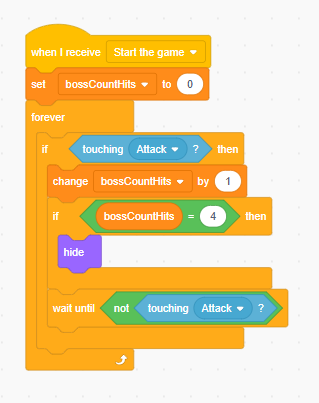
This ensures that the boss is always checking to see if it is under attack.
I would also recommend adding a period at the beginning of the game where the boss is invincible, so that the player doesn't defeat him before he even moves.
In the sprite titled Inkman, you have the following code
It should be replaced with this code:
This ensures that the boss is always checking to see if it is under attack.
I would also recommend adding a period at the beginning of the game where the boss is invincible, so that the player doesn't defeat him before he even moves.
Last edited by 09878901234321 (April 20, 2025 01:51:33)
- mrscratcher123434305
-
Scratcher
37 posts
Boss hiding mechanism
YES THIS WORKED!! Thanks! How do i do the invincible thing? i would want to do it when he glides to the left and then you can attack him from there, also sometimes when i hit him it does like multiple hits, how do i make it do only one hit per attack animation if that makes sense
Last edited by mrscratcher123434305 (April 20, 2025 16:05:58)
- 09878901234321
-
Scratcher
500+ posts
Boss hiding mechanism
To make the boss invincible for a while in the beginning, you can wait to start checking if he is being attacked. Currently, the code looks like this:
Instead of starting the loop when you receive “Start the game,” you could have something like this:
This should work for you. However, I suggest putting the attacking logic in the attack sprite instead, so you can wait for an attack to finish to check for another attack.
Instead of starting the loop when you receive “Start the game,” you could have something like this:
when I receive [Start the game v]
set [bossCountHits v] to [0]
when I receive [End invincibility v] // This doesn't have to be "End invincibility," it would probably be okay as your "SHOOT THU FIYAHH"
forever
if <touching [Attack v]?> then
change [bossCountHits v] by (1)
if <(bossCountHits) = [4]> then
hide
end
wait until <not <touching [Attack v]?>>
end
end
This should work for you. However, I suggest putting the attacking logic in the attack sprite instead, so you can wait for an attack to finish to check for another attack.
Last edited by 09878901234321 (April 20, 2025 16:24:54)
- mrscratcher123434305
-
Scratcher
37 posts
Boss hiding mechanism
Thanks, also when the boss is doing his attack sequence he is like glitching out of reality and then reappearing, heres the link AGAIN  lol https://scratch.mit.edu/projects/1162696800/
 lol https://scratch.mit.edu/projects/1162696800/
- 09878901234321
-
Scratcher
500+ posts
Boss hiding mechanism
I see the issue with your project and why the boss is disappearing.
In your project you have this code:
The problem is that “costume 11” is mostly empty, only composed of a few white dots. I think this may have been a mistake, and to fix it, you probably just have to replace that costume with the correct art.
In your project you have this code:
when I receive [Start the game v]
forever
    if <touching [Sprite2 v]?> then
        switch costume to [costume11 v]
        wait (1) seconds
        switch costume to [costume10 v]
    end
end

when I receive [Start the game v]
forever
    if <touching [Sprite3 v]?> then
        switch costume to [costume11 v]
        wait (1) seconds
        switch costume to [costume10 v]
    end
end
The problem is that “costume 11” is mostly empty, only composed of a few white dots. I think this may have been a mistake, and to fix it, you probably just have to replace that costume with the correct art.
Last edited by 09878901234321 (April 20, 2025 22:48:28)
- mrscratcher123434305
-
Scratcher
37 posts
Boss hiding mechanism
that was used to make him hide, because when he hides the broadcast stops and the fire animation wont play. what do i do about that?
- Scyth3d
-
 Scratcher

500+ posts
Boss hiding mechanism
To make the boss invincible for a while in the beginning, you can wait to start checking if he is being attacked. Currently, the code looks like this:
Instead of starting the loop when you receive “Start the game,” you could have something like this:when I receive [Start the game v]
set [bossCountHits v] to [0]
when I receive [End invincibility v] // This doesn't have to be "End invincibility," it would probably be okay as your "SHOOT THU FIYAHH"
forever
if <touching [Attack v]?> then
change [bossCountHits v] by (1)
if <(bossCountHits) = [4]> then
hide
end
wait until <not <touching [Attack v]?>>
end
end
This should work for you. However, I suggest putting the attacking logic in the attack sprite instead, so you can wait for an attack to finish to check for another attack.
Shouldn’t the if for the boss count hits be outside the if for if touching attack
- mrscratcher123434305
-
Scratcher
37 posts
Boss hiding mechanism
When my boss touches an invisible circle thats meant to play the attack animation, i want my other sprite to hide when the attack animation plays so that the other sprite does not get in the way of my attack animation. But when i try to hide it, it stops the broadcast from getting to the attack sprite and it
just wont play. But when i try to switch the boss to an invisible costume when it touches the circle, it flickers on and off. how do i fix this situation? and please be specific and not like “oh its so easy, first just do a big string of code. and then put it somewhere where im not specifying cause im pro”. i am pretty new, not like really really new but i still dont know stuff. also heres my game https://scratch.mit.edu/projects/1162696800/
just wont play. But when i try to switch the boss to an invisible costume when it touches the circle, it flickers on and off. how do i fix this situation? and please be specific and not like “oh its so easy, first just do a big string of code. and then put it somewhere where im not specifying cause im pro”. i am pretty new, not like really really new but i still dont know stuff. also heres my game https://scratch.mit.edu/projects/1162696800/
Last edited by mrscratcher123434305 (April 21, 2025 22:03:59)
- 09878901234321
-
Scratcher
500+ posts
Boss hiding mechanism
(#9)
That was used to make him hide, because when he hides the broadcast stops and the fire animation wont play. what do i do about that?
You should combine your sprites for the Inkman into a single set for both the attacking and non-attacking states. This way, you can easily switch to the appropriate costume when needed, which will help prevent any issues. This approach is definitely a better practice and will save you time and frustration in the future. I also recommend making a backup copy of your project before implementing any significant changes.
Remember, if you don't know how to do something, just ask.
(#10)
Shouldn’t the if for the boss count hits be outside the if for if touching attack
Nope! The number of hits being equal to 4 only needs to be checked when it is updated, not all the time.
Last edited by 09878901234321 (April 21, 2025 22:31:29)

- 09878901234321
-
Scratcher
500+ posts
Boss hiding mechanism
Hi there! If you feel like your topic isn't getting enough love, don't create a completely new topic; try to keep the discussion all in one place. Instead, you can bump your topic. Just make a short reply to the topic that says “bump.” This will bring your post right back to the top of the stream of the HwS forum. It's good practice to wait at least 24 hours since the most recent activity in your topic before bumping, so everyone gets a chance to have their issues fixed.
I'll provide a link to the other topic here for anyone looking for the current discussion.
If you feel like my code is hard to understand, just say so! I'm trying to help you, not confuse you. Feel free to ask any questions (just make sure to ask them in the other discussion and keep them relevant to your issue!).
I'll make a report so we can keep the conversation in the existing topic.
I'll provide a link to the other topic here for anyone looking for the current discussion.
If you feel like my code is hard to understand, just say so! I'm trying to help you, not confuse you. Feel free to ask any questions (just make sure to ask them in the other discussion and keep them relevant to your issue!).
I'll make a report so we can keep the conversation in the existing topic.
Last edited by 09878901234321 (April 22, 2025 22:05:55)
- mrscratcher123434305
-
Scratcher
37 posts
Boss hiding mechanism
Sorry. i made this because you weren't responding to me (UNTIL NOW BECAUSE I DIDNT CHECK)
Last edited by mrscratcher123434305 (April 21, 2025 22:51:55)
- mrscratcher123434305
-
Scratcher
37 posts
Boss hiding mechanism
When my boss goes into phase 2, should that also be in the main sprite? (also, it worked! thanks)
Last edited by mrscratcher123434305 (April 21, 2025 23:17:47)
- 09878901234321
-
Scratcher
500+ posts
Boss hiding mechanism
It might be okay for you to make a new sprite for phase 2 of your boss, but if you can, you should try to keep it in one sprite, since then you only have to do your interactions with the boss for one sprite, rather than interactions for every phase. If you have any problems implementing phase 2, let us know!
- mrscratcher123434305
-
Scratcher
37 posts
Boss hiding mechanism
Okay, so its in the same sprite but now its facing only one direction. I try using point in direction but that does nothing. what do i do? https://scratch.mit.edu/projects/1162696800/ (what does us mean)
Last edited by mrscratcher123434305 (April 22, 2025 01:07:03)
- 09878901234321
-
Scratcher
500+ posts
Boss hiding mechanism
If you use this block:
Then this will make the sprite look right:
And this will make the sprite look left:
Try this out and let me know if it works for you!
set rotation style [left-right v]
Then this will make the sprite look right:
point in direction [90]
And this will make the sprite look left:
point in direction [-90]
Try this out and let me know if it works for you!