Discuss Scratch

- Discussion Forums
- » Bugs and Glitches
- » what happened to the links
![[RSS Feed]](//cdn.scratch.mit.edu/scratchr2/static/__5b3e40ec58a840b41702360e9891321b__//djangobb_forum/img/feed-icon-small.png "[RSS Feed]")
![[RSS Feed]](http://cdn.scratch.mit.edu/scratchr2/static/__5b3e40ec58a840b41702360e9891321b__//djangobb_forum/img/feed-icon-small.png "[RSS Feed]")
- Barney_at_Bonels83
-
 Scratcher

500+ posts
what happened to the links
My browser / operating system: Windows NT 10.0, Chrome 120.0.0.0, No Flash version detected (SCHOOL LAPTOP)
I get this should go into the bugs and glitches, I wanted to try out the offline editor for 2.0 but it was shown:
Are they under maintence?
I get this should go into the bugs and glitches, I wanted to try out the offline editor for 2.0 but it was shown:
Hmm, editor downloads are not available right now - please refresh the page to try again.why and what
Are they under maintence?
- NotK3ndricAlt
-
 Scratcher

1000+ posts
what happened to the links
Maybe they’re trying to make it so you can have Scratch 3.0 blocks in 2.0? I don’t really know…
- -gr
-
 Scratcher

1000+ posts
what happened to the links
(#1)I had this same issue around a week ago when I was trying to run Scratch 2 in a Windows XP VM (don't ask why).Hmm, editor downloads are not available right now - please refresh the page to try again.
(#2)That doesn't make any sense.
Maybe they’re trying to make it so you can have Scratch 3.0 blocks in 2.0? I don’t really know…
- donotforgetmycode
-
 Scratcher

1000+ posts
what happened to the links
That's strange. This should probably be fixed eventually, but in the mean time, here's medians's post explaining how to use the flash version of 2.0:
So if you want to use the actual 2.0, you can basically install an older version of a browser that once supported Flash, or a browser that still supports Flash:
https://www.palemoon.org/download.shtml
https://classic.waterfox.net/
https://archive.mozilla.org/pub/firefox/releases/
https://archive.org/details/flashplayer_old
And go to a url like this (you won't be able to log in though):
https://scratchfoundation.github.io/scratchx
https://web.archive.org/web/20130315000000*/scratch.mit.edu/projects/editor (if you did everything correctly, https://web.archive.org/web/20130618065222/http://scratch.mit.edu/projects/editor/ should say v392 underneath the fullscreen button)
https://web.archive.org/web/20150601000000*/scratchx.org
https://s2online.github.io
Or you could use a version of the offline editor, as stated above.
- medians
-
 Scratcher

1000+ posts
what happened to the links
I think it's because the security certificate expired recently, try here:
https://web.archive.org/web/20240201020019/https://scratch.mit.edu/download/scratch2
https://web.archive.org/web/*/https://download.scratch.mit.edu/scratch2download/sa/*
https://web.archive.org/web/20240000000000*/scratch.mit.edu/scratch2download (for this one, make sure you have a computer that supports 32-bit)
https://web.archive.org/web/20240201020019/https://scratch.mit.edu/download/scratch2
https://web.archive.org/web/*/https://download.scratch.mit.edu/scratch2download/sa/*
https://web.archive.org/web/20240000000000*/scratch.mit.edu/scratch2download (for this one, make sure you have a computer that supports 32-bit)
Maybe they’re trying to make it so you can have Scratch 3.0 blocks in 2.0? I don’t really know…Why would they do that? 1.x is still there.
Last edited by medians (Feb. 3, 2024 00:13:43)
- 54387a
-
 Scratcher

1000+ posts
what happened to the links
Can replicate: 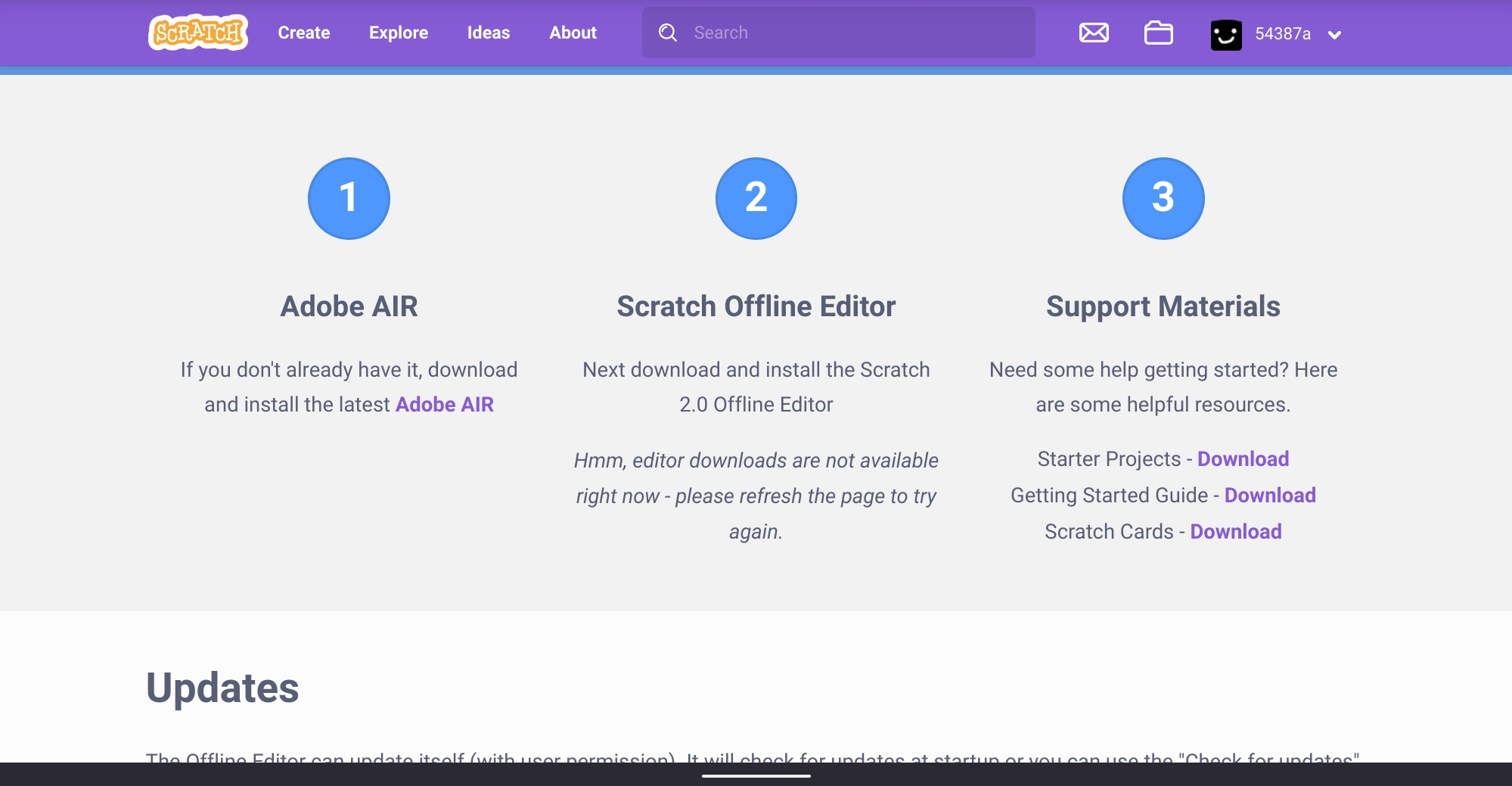 . I wonder why it's not provided at the moment the Scratch Team didn't renew the certificate.
. I wonder why it's not provided at the moment the Scratch Team didn't renew the certificate.Last edited by 54387a (Feb. 3, 2024 03:27:55)
- medians
-
Scratcher
1000+ posts
what happened to the links
Can replicate:. I wonder why it's not provided at the moment.I believe I figured it out, when I went to the downloads page it said that the security certificate expired, and when I clicked “proceed” it downloaded it but also started showing the links again.
- Discussion Forums
- » Bugs and Glitches
-
» what happened to the links