Discuss Scratch

- Discussion Forums
- » Help with Scripts
- » Dynamic collision based on position of player to wall
![[RSS Feed]](//cdn.scratch.mit.edu/scratchr2/static/__ff7229f036c458728e45c39b0751aa44__//djangobb_forum/img/feed-icon-small.png "[RSS Feed]")
![[RSS Feed]](http://cdn.scratch.mit.edu/scratchr2/static/__ff7229f036c458728e45c39b0751aa44__//djangobb_forum/img/feed-icon-small.png "[RSS Feed]")
- EVaDiSh
-
 Scratcher

18 posts
Dynamic collision based on position of player to wall
Heyo! I'm currently working on a game engine/port/remake of Dyna Blaster (1991, DOS, known as Bomberman in America) for my CS50x Project. My issue temps from creating player movement in a way that adheres to the game rules and movement in the original game.
Please note the attached gifs and explanations to understand my use case.
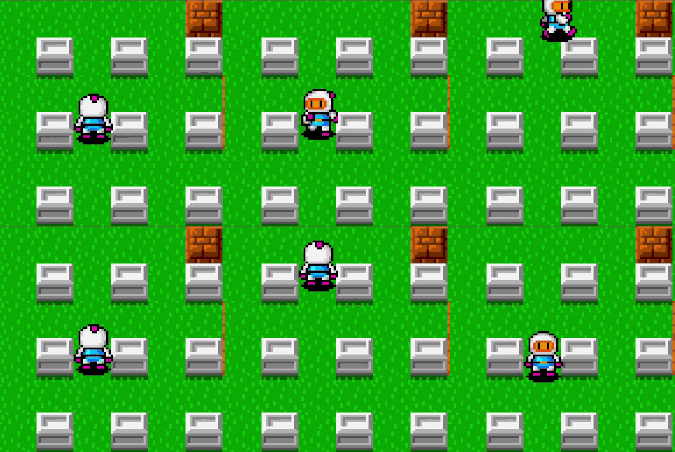
In the gif attached, movement is “smooth” and if its hard to see, if you're facing a wall, trying to walk into the wall simply “glides” you to the closest available space. For instance if I'm facing right at a wall, I wont simply be stopped, rather ill keep walking by “gliding” either to the topmost or bottommost available space depending on my proximity to either.
I have a rough logical idea on how to accomplish this, but I don't know the syntax or code necesarry to do so. Please note the given information wall.
I have created “six cases” that need to be met for proper player movement.

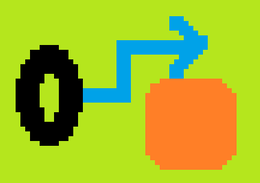
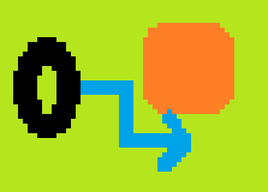
Assume black oval is a traditionally movable player, and the orange block is an “obstacle” that the player must collide against.
Block/Obstacle in question is 24x24 pixels, Gameplay plane is 11x13 blocks of these 24x24px cells/obstacles
The system of movement im trying to accomplish is threefold, based on the SEGMENT of the block the player is touching
Case 1: Player hits/walks into block from centre and is unable to walk further as a normal collision.
Visualization/Diagram:

Gif showcasing correct movement in Case 1:
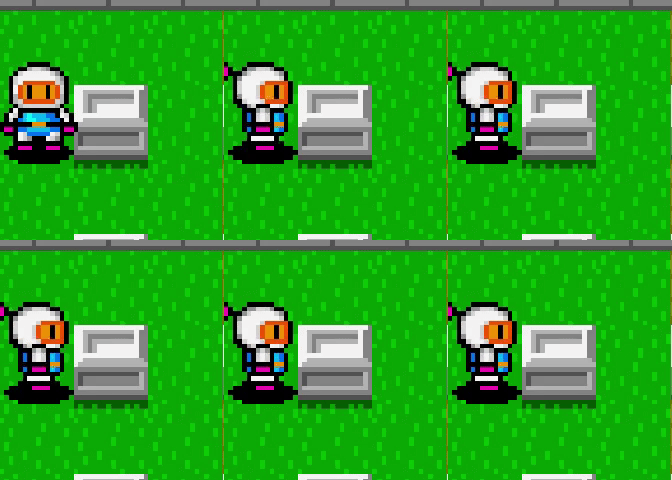
Case 2: Player approaches block from top 8 pixels of block, seamless “move” to open cell zone above.
Visualization/Diagram:
Gif:
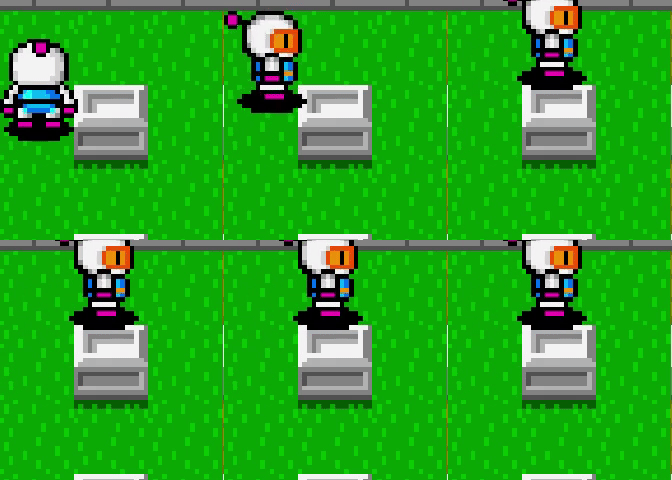
Note that in the above gif, using traditionally scripted movement, you would have to first move sprite up, then right due to hitbox collisions; meanwhile here only movement right is enacted, and sprite/player seamlessly is “moved” to the free cell above the obstacle.
Case 3: Player approaching block from bottom 8 pixels of block, seamless and continuous “move” to open cell below block
Visualization/Diagram:
Gif:
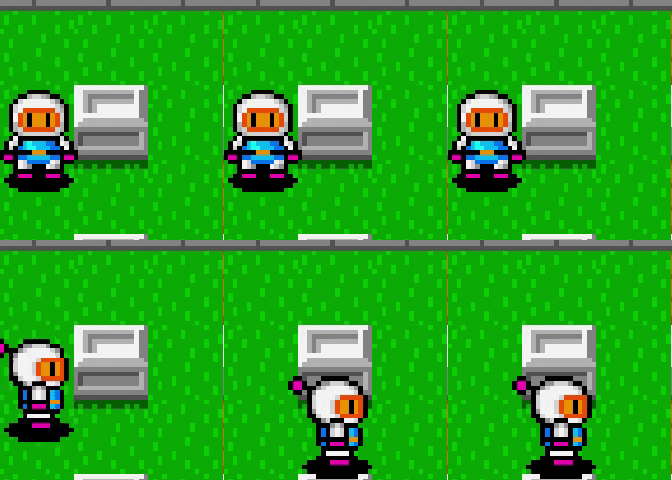
Please note that this should work regardless of orientation approached from. ie if I'm walking down (-y) and player is about to walk into a block; if I'm centered, i should hit it, if I'm shifted to the left, I should be ‘moved’ to the open cell to the left of that block and vice versa.
Case 4 (Identical to Case 1): Walks into block from center (however there are no available cells above or below the block):

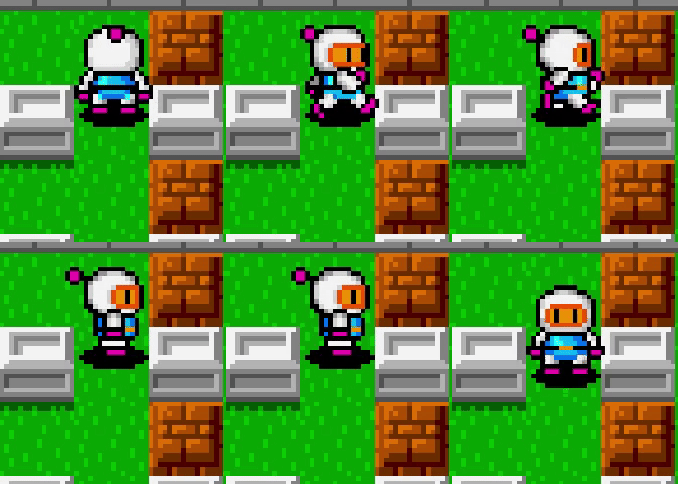
Case 5: Walks into upper part of block, however no “free space” above block, so simply walks into it:
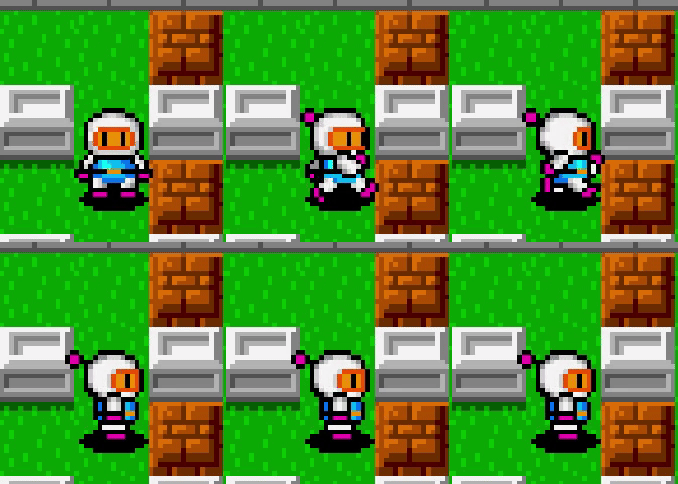
Case 6: Walks into lower part of block, however no “free space” below block, so simply walks into it:
My current idea revolves around using the Cartesian system, knowing each block is 24x24; we can use the x and y coordinate of the player to detect if the sprite is colliding with the top 8px, central 8px, or lower 8px. Knowing the map and the placement of the cells (which are clones), we can tell which “part” of the block we are approaching and instead of invoking a simple walk in single direction script, we create an entirely new conditional with an entirely new walk system where if we're not dead center, it actually simultaneously walks up and right, or up and left.
Current Collision Code that i'd like to replace because its very laggy and inefficient, and doesn't conform to the cases:
Project Link: https://scratch.mit.edu/projects/958226156/
Ideas on how to implement these types of advanced obstacle collisions to allow for seamless and easy gameplay so players dont have to mash the keyboard with broken laggy movement/collisions?
Thank you and sorry for the text wall!
avern01 (EVaDiSh)
Please note the attached gifs and explanations to understand my use case.
In the gif attached, movement is “smooth” and if its hard to see, if you're facing a wall, trying to walk into the wall simply “glides” you to the closest available space. For instance if I'm facing right at a wall, I wont simply be stopped, rather ill keep walking by “gliding” either to the topmost or bottommost available space depending on my proximity to either.
I have a rough logical idea on how to accomplish this, but I don't know the syntax or code necesarry to do so. Please note the given information wall.
I have created “six cases” that need to be met for proper player movement.
Assume black oval is a traditionally movable player, and the orange block is an “obstacle” that the player must collide against.
Block/Obstacle in question is 24x24 pixels, Gameplay plane is 11x13 blocks of these 24x24px cells/obstacles
The system of movement im trying to accomplish is threefold, based on the SEGMENT of the block the player is touching
Case 1: Player hits/walks into block from centre and is unable to walk further as a normal collision.
Visualization/Diagram:
Gif showcasing correct movement in Case 1:
Case 2: Player approaches block from top 8 pixels of block, seamless “move” to open cell zone above.
Visualization/Diagram:
Gif:
Note that in the above gif, using traditionally scripted movement, you would have to first move sprite up, then right due to hitbox collisions; meanwhile here only movement right is enacted, and sprite/player seamlessly is “moved” to the free cell above the obstacle.
Case 3: Player approaching block from bottom 8 pixels of block, seamless and continuous “move” to open cell below block
Visualization/Diagram:
Gif:
Please note that this should work regardless of orientation approached from. ie if I'm walking down (-y) and player is about to walk into a block; if I'm centered, i should hit it, if I'm shifted to the left, I should be ‘moved’ to the open cell to the left of that block and vice versa.
Case 4 (Identical to Case 1): Walks into block from center (however there are no available cells above or below the block):
Case 5: Walks into upper part of block, however no “free space” above block, so simply walks into it:
Case 6: Walks into lower part of block, however no “free space” below block, so simply walks into it:
My current idea revolves around using the Cartesian system, knowing each block is 24x24; we can use the x and y coordinate of the player to detect if the sprite is colliding with the top 8px, central 8px, or lower 8px. Knowing the map and the placement of the cells (which are clones), we can tell which “part” of the block we are approaching and instead of invoking a simple walk in single direction script, we create an entirely new conditional with an entirely new walk system where if we're not dead center, it actually simultaneously walks up and right, or up and left.
Current Collision Code that i'd like to replace because its very laggy and inefficient, and doesn't conform to the cases:
define WalkCollisions
if <<touching [Inner Cell v] ?> or <touching [Border Cell v] ?>> then
repeat until <not <<touching [Inner Cell v] ?> or <touching [Border Cell v] ?>>>
if <key [up arrow v] pressed?> then
change y by (-1)
end
if <key [down arrow v] pressed?> then
change y by (1)
end
if <key [right arrow v] pressed?> then
change x by (-1)
end
if <key [left arrow v] pressed?> then
change x by (1)
end
Project Link: https://scratch.mit.edu/projects/958226156/
Ideas on how to implement these types of advanced obstacle collisions to allow for seamless and easy gameplay so players dont have to mash the keyboard with broken laggy movement/collisions?
Thank you and sorry for the text wall!
avern01 (EVaDiSh)
- Malicondi
-
 Scratcher

1000+ posts
Dynamic collision based on position of player to wall
i would recommend using tile grid lists to detect collisions, as they usually are much more accurate - but more complicated - to use
- EVaDiSh
-
Scratcher
18 posts
Dynamic collision based on position of player to wall
i would recommend using tile grid lists to detect collisions, as they usually are much more accurate - but more complicated - to useMay you elaborate please?
- Malicondi
-
Scratcher
1000+ posts
Dynamic collision based on position of player to wall
i might not be the best at explaining this, and there are tutorials on how to make grid lists but basically you have a list with values (usually blank or #) which determine if a certain space on the screen is solid or not, the screen is divided into equal squares (using a grid, which griffpatch has a tutorial on how to make video: https://www.youtube.com/watch?v=6ZuImk8-TYk) and again griffpatch could probably explain this better but using the list of values # would stand for a wall, and if a player goes into a space where on the grid it is a #, then it would: move the player out of the space, block the player from going into that spacei would recommend using tile grid lists to detect collisions, as they usually are much more accurate - but more complicated - to useMay you elaborate please?
Last edited by Malicondi (Jan. 30, 2024 02:40:30)
- EVaDiSh
-
Scratcher
18 posts
Dynamic collision based on position of player to wall
i might not be the best at explaining this, and there are tutorials on how to make grid lists but basically you have a list with values (usually blank or #) which determine if a certain space on the screen is solid or not, the screen is divided into equal squares (using a grid, which griffpatch has a tutorial on how to make video: https://www.youtube.com/watch?v=6ZuImk8-TYk) and again griffpatch could probably explain this better but using the list of values # would stand for a wall, and if a player goes into a space where on the grid it is a #, then it would: move the player out of the space, block the player from going into that spacei would recommend using tile grid lists to detect collisions, as they usually are much more accurate - but more complicated - to useMay you elaborate please?
Believe it or not I already have this implemented! The actual game map is made up of clones. The map is an 11 by 13 array. You can enter the project, go into “Inner Cell”, view lists and code! You're saying I can modify the map creation script and use the same list for collisions?
- Malicondi
-
Scratcher
1000+ posts
Dynamic collision based on position of player to wall
Believe it or not I already have this implemented! The actual game map is made up of clones. The map is an 11 by 13 array. You can enter the project, go into “Inner Cell”, view lists and code! You're saying I can modify the map creation script and use the same list for collisions?
yes, you should be able to do so
- EVaDiSh
-
Scratcher
18 posts
Dynamic collision based on position of player to wall
yes, you should be able to do so
Thank you! I'll take a look at the tutorial
Last edited by EVaDiSh (Jan. 30, 2024 03:03:17)
- -TUB-
-
 Scratcher

100+ posts
Dynamic collision based on position of player to wall
When the player hits a wall, you could try to move the player out of the wall in all directions. For example, if the player hits a wall to the right, it will try to find a free space by going upwards 8 pixels. If it finds a free space, then the player will be moved to there. If not, the player will check downwards 8 pixels. If neither of these checks find a free space, then the player should be moved left out of the wall.
- avern01
-
 Scratcher

7 posts
Dynamic collision based on position of player to wall
When the player hits a wall, you could try to move the player out of the wall in all directions. For example, if the player hits a wall to the right, it will try to find a free space by going upwards 8 pixels. If it finds a free space, then the player will be moved to there. If not, the player will check downwards 8 pixels. If neither of these checks find a free space, then the player should be moved left out of the wall.
This is actually really smart thanks! Any ideas on how I would implement checks on which side of the wall/cell was hit? My current ideas are using either sprite direction faced or key pressed when wall hit, which works but bugs out in certain circumstances such as holding more than one key at once or moving too fast.
Thx!
(I'm the same guy these are just two separate accounts)
Last edited by avern01 (Jan. 30, 2024 08:35:44)
- HundenBasse
-
 Scratcher

100+ posts
Dynamic collision based on position of player to wall
The movement you've made is also pretty buggy. You could try to watch some griffpatch tutorials and make your project more efficient (check my desc.). Just a suggestion and just my opinion.
- avern01
-
Scratcher
7 posts
Dynamic collision based on position of player to wall
The movement you've made is also pretty buggy. You could try to watch some griffpatch tutorials and make your project more efficient (check my desc.). Just a suggestion and just my opinion.
That's the thing, the movement itself works beautifully however all the bugginess comes from the wall collisions (the random teleportations are a result of collision function moving you too far back). I'm working on it tho.
May you send a link to the aforementioned tutorials please?
Thanks!
- HundenBasse
-
Scratcher
100+ posts
Dynamic collision based on position of player to wall
The movement you've made is also pretty buggy. You could try to watch some griffpatch tutorials and make your project more efficient (check my desc.). Just a suggestion and just my opinion.
That's the thing, the movement itself works beautifully however all the bugginess comes from the wall collisions (the random teleportations are a result of collision function moving you too far back). I'm working on it tho.
May you send a link to the aforementioned tutorials please?
Thanks!
I would like to mention that the tp error is caused by the player spawning in the blocks. Should work if you just move him a little and make the collision a little more forgiving so that you can move more freely through the top gaps. I have looked at your code and the movement should be fine, it's just cluttered with all the unnecessary variables. Like velocity. It's not needed if you set the velocity straight up then just move the character. I will try to fix some of the errors and share the project maybe even make the op’s request.
- HundenBasse
-
Scratcher
100+ posts
Dynamic collision based on position of player to wall
https://scratch.mit.edu/projects/958445968/
Here is the project cleaned up.
I've commented every change i've made
I couldn't find a way to implement movement normalisation but people won’t notice (others don't add normalisation either but it would be nice).
Here is the project cleaned up.
I've commented every change i've made
I couldn't find a way to implement movement normalisation but people won’t notice (others don't add normalisation either but it would be nice).
Last edited by HundenBasse (Jan. 30, 2024 12:23:23)
- avern01
-
Scratcher
7 posts
Dynamic collision based on position of player to wall
https://scratch.mit.edu/projects/958445968/
Here is the project cleaned up.
I've commented every change i've made
I couldn't find a way to implement movement normalisation but people won’t notice (others don't add normalisation either but it would be nice).
Oh my gosh- thank you so much! Let me work through your code and I'll reply with any questions I have. So far I haven't a fiery clue how most of your changes work, I've only just briefly glanced and it appears to work flawlessly! I cant even fathom the custom block you made for corner cutting, I'll try to work through it and analyse other changes you made.
Also, when you say “movement normalisation”, what specifically do you mean?
Thank you again!
- HundenBasse
-
Scratcher
100+ posts
Dynamic collision based on position of player to wall
https://scratch.mit.edu/projects/958445968/
Here is the project cleaned up.
I've commented every change i've made
I couldn't find a way to implement movement normalisation but people won’t notice (others don't add normalisation either but it would be nice).
Oh my gosh- thank you so much! Let me work through your code and I'll reply with any questions I have. So far I haven't a fiery clue how most of your changes work, I've only just briefly glanced and it appears to work flawlessly! I cant even fathom the custom block you made for corner cutting, I'll try to work through it and analyse other changes you made.
Also, when you say “movement normalisation”, what specifically do you mean?
Thank you again!
NOTE: There should be comments that describe and explain everything i've changed
Ok so i will answer the question about normalization first. So imagine that you are moving to the right. You move at 40 movespeed. Then if you press both right and up you will move 40 right AND 40 up.
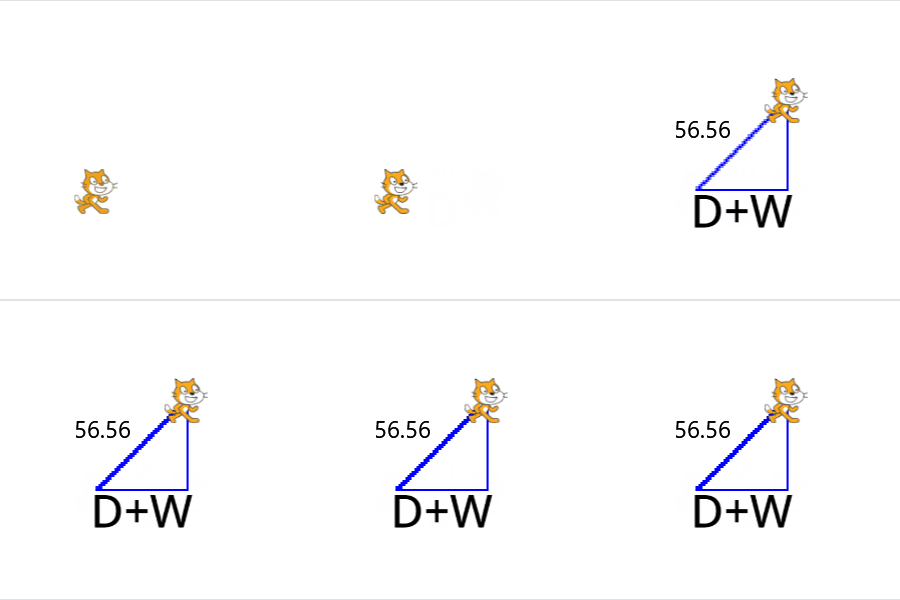
This is fixed by only moving it by 40 no matter what. People on scratch rarely take this into account so you don't need to do it. Plus in your case there isn't really space to move diagonally.
Now let me try and explain how our custom block cuts corners (using comments).
NOTE: I have also updated the project with comments
define Cut corner // Amount (CCA)
move (3) steps // This allows us to check if there is a wall where the player is trying to go
if <<touching [Inner Cell v] ?> or <touching [Border Cell v] ?>> then // If there is a wall
repeat (CCA) // How far you want it to check for a free space
turn ccw (45) degrees // This turns the player 45 degress up and moves it once turns it back and checks if it is not in a block
move (1) steps
turn cw (45) degrees
if <not <<touching [Inner Cell v] ?> or <touching [Border Cell v] ?>>> then
stop [this script v] // This checks if the player is touching the wall or not. If it isnt then it will simple stop the script at where it ended up. Effectively skipping the corner.
end
end
turn ccw (45) degrees // This only triggers if it didnt find a free space when going up. This resets it. To the original position.
move (() - (CCA)) steps
turn cw (45) degrees
repeat (CCA)
turn ccw (-45) degrees // This turns the player 45 degress DOWN and moves it once turns it back and checks if it is not in a block
move (1) steps
turn cw (-45) degrees
if <not <<touching [Inner Cell v] ?> or <touching [Border Cell v] ?>>> then
stop [this script v]
end
end
turn ccw (-45) degrees // This only triggers if it didnt find a free space when going DOWN. This resets it. To the original position.
move (() - (CCA)) steps
turn cw (-45) degrees
end
move (-3) steps // This moves it back 3 steps to counteract the first step.
Last edited by HundenBasse (Jan. 31, 2024 10:45:03)
- HundenBasse
-
Scratcher
100+ posts
Dynamic collision based on position of player to wall
By the way I would like to keep in touch with you Avern since this would be an interesting project to see realized! 

Last edited by HundenBasse (Feb. 1, 2024 08:07:53)
- Discussion Forums
- » Help with Scripts
-
» Dynamic collision based on position of player to wall