Discuss Scratch

- Discussion Forums
- » Advanced Topics
- » scratchattach - A Scratch API wrapper (Python)
![[RSS Feed]](//cdn.scratch.mit.edu/scratchr2/static/__5b3e40ec58a840b41702360e9891321b__//djangobb_forum/img/feed-icon-small.png "[RSS Feed]")
![[RSS Feed]](http://cdn.scratch.mit.edu/scratchr2/static/__5b3e40ec58a840b41702360e9891321b__//djangobb_forum/img/feed-icon-small.png "[RSS Feed]")
- ajskateboarder
-
 Scratcher

1000+ posts
scratchattach - A Scratch API wrapper (Python)
Just found this, seeing how to import to CodeSandbox.I'm not able to run the Python CodeSandbox due to some strange error with a “microVM”, but my guess is that it probably should work if you create a terminal and run “pip install scratchattach”
- perperperper
-
 Scratcher

16 posts
scratchattach - A Scratch API wrapper (Python)
yepTHE CLOUD LOGS ARE BACK!!!!!!!@!We know
- grandpasp
-
 Scratcher

100+ posts
scratchattach - A Scratch API wrapper (Python)
I'm trying to add 2 projects to the Scratchattach studio. They keep disppearing!
- ScratchcatandGobo
-
 Scratcher

1000+ posts
scratchattach - A Scratch API wrapper (Python)
Wait they are back up- *GROWS MENTALLY INSTABLE*
- Eason_9
-
 Scratcher
1000+ posts
scratchattach - A Scratch API wrapper (Python)
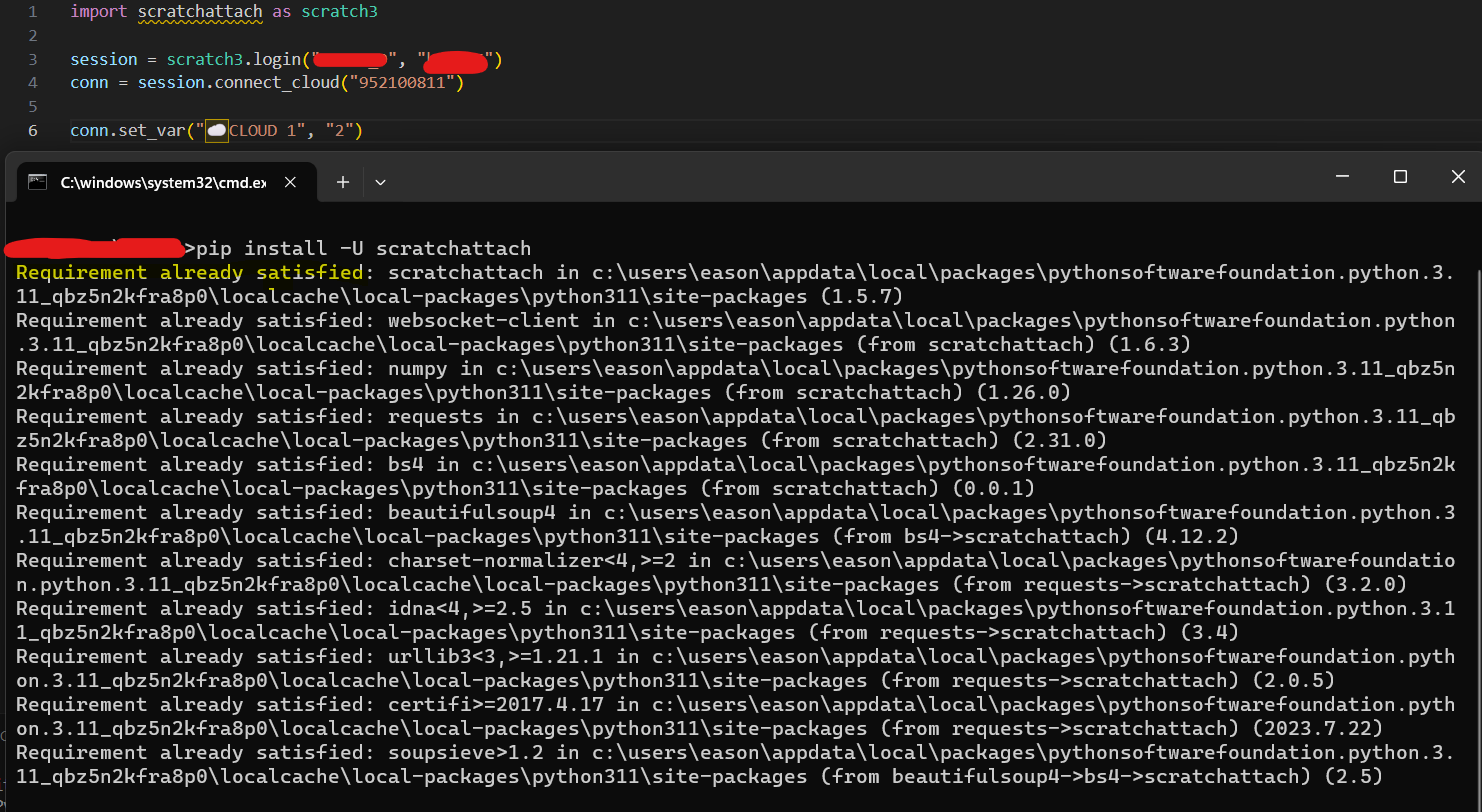
I already installed scratchattach but it says I haven't. Can anyone help?
Picture here btw: https://u.cubeupload.com/eason_9_lol/Screenshot2024012015.png
(also cloud logs are up!!!!
 )
)
Picture here btw: https://u.cubeupload.com/eason_9_lol/Screenshot2024012015.png
(also cloud logs are up!!!!

 )
)- EpicCoderGamer1000
-
 Scratcher

82 posts
scratchattach - A Scratch API wrapper (Python)
I already installed scratchattach but it says I haven't. Can anyone help?
Picture here btw: https://u.cubeupload.com/eason_9_lol/Screenshot2024012015.png
(also cloud logs are up!!!!
What are you using to code
Also you don't need to use the cloud emoji to set a var
- TheMobileGames
-
 Scratcher

100+ posts
scratchattach - A Scratch API wrapper (Python)
Hey, does anyone know of some problems that I could have made that results in a lot of data being lost? I am currently using cloud events such as this and I’m wondering if it’s lossless when the project is full of people and busy (constant cloud variable changes):
Lastly, does anyone have any tips for me to indeed make these things (events and setting cloud variables) lossless (or almost/close to lossless) while keeping the same speed? I would much rather resolve this without editing my Scratch code itself please.
import scratchattach as scratch3Also, from a single account, how fast can these variables be set with Scratchattach? Is it possible to set all 10 of them at max speed (10 per second, I think) while being completely lossless?
events = scratch3.CloudEvents(“project_id”)
@events.event
def on_set(event): #Called when a cloud var is set
print(f“{event.user} set the variable {event.var} to the value {event.value} at {event.timestamp}”)
@events.event #Called when the event listener is ready
def on_ready():
print(“Event listener ready!”)
events.start()
Lastly, does anyone have any tips for me to indeed make these things (events and setting cloud variables) lossless (or almost/close to lossless) while keeping the same speed? I would much rather resolve this without editing my Scratch code itself please.
Last edited by TheMobileGames (Jan. 20, 2024 21:50:54)
- TimMcCool
-
 Scratcher
100+ posts
scratchattach - A Scratch API wrapper (Python)
Hey, does anyone know of some problems that I could have made that results in a lot of data being lost? I am currently using cloud events such as this and I’m wondering if it’s lossless when the project is full of people and busy (constant cloud variable changes):Cloud events should be lossless because they use the clouddata log to detect cloud activity.import scratchattach as scratch3Also, from a single account, how fast can these variables be set with Scratchattach? Is it possible to set all 10 of them at max speed (10 per second, I think) while being completely lossless?
events = scratch3.CloudEvents(“project_id”)
@events.event
def on_set(event): #Called when a cloud var is set
print(f“{event.user} set the variable {event.var} to the value {event.value} at {event.timestamp}”)
@events.event #Called when the event listener is ready
def on_ready():
print(“Event listener ready!”)
events.start()
Lastly, does anyone have any tips for me to indeed make these things (events and setting cloud variables) lossless (or almost/close to lossless) while keeping the same speed? I would much rather resolve this without editing my Scratch code itself please.
Setting cloud variables is not garantueed to be lossless. You can reduce loss by reconnecting to the cloud regularly (close old connection and open new connection).
When setting cloud variables with scratchattach using a CloudConnection, there is a 0.1s cooldown between cloud variable sets. (You can only use the conn.set_var function 10 times per second.) However you can open multiple cloud connections to a project in order to set cloud variables more often (using only one session / one account):
import scratchattach as scratch3
session = scratch3.Session("sessionid", username="username")
conn1 = session.connect_cloud("projectid")
conn2 = session.connect_cloud("projectid")
conn1.set_var("var", "value") # Sets a cloud var using connection 1
conn2.set_var("var", "value") # Sets a cloud var using connection 2
- TimMcCool
-
Scratcher
100+ posts
scratchattach - A Scratch API wrapper (Python)
bro, remove the module. delete it now. people are hacking with it like crazy!Just like every useful tool, scratchattach can be abused. However, deleting the library would harm Scratch's Python dev community while it wouldn't stop hackers at all: There are plenty of other libraries that support setting cloud variables (many of these existed before scratchattach). Hackers could just use one of these libraries instead.
Last edited by TimMcCool (Jan. 21, 2024 01:34:16)
- Air_heads
-
 Scratcher

98 posts
scratchattach - A Scratch API wrapper (Python)
The blame goes on scratch attach because it is known of and well people don’t know much more than the basic programming in scratch and they have no idea how everything else works. (Notevveryone of course)True but it sure simplifies it and yes people use html and js but still the blame goes on scratch attach.Check robot destructor people are abusing and I hope this won’t happen but I would not be surprised if the st gets rid of scratchattach projectsbro, remove the module. delete it now. people are hacking with it like crazy!who ?
People can still do it without scratchattach -_-
I still don’t get your argument as to why the blame should be on Scratchattach …
If the API is public, then anyone can utilize it, and if you’re talking about JavaScript, scratchattach is completely irrelevant as it is a python library.
ScratchConnect and other libraries use a seemingly similar syntax as ScratchAttach, so anyone who knows how to use ScratchAttach can use ScratchConnect instead. I'm not even going to bring up the fact that ANYONE can access the API with a simple post request as your contention is based on the idea that libraries make it simpler to use the API.
- Air_heads
-
Scratcher
98 posts
scratchattach - A Scratch API wrapper (Python)
@wvzack @TimMcCool essentially encapsulated my contention here. Read this post for a better understanding of what I am trying to convey.bro, remove the module. delete it now. people are hacking with it like crazy!Just like every useful tool, scratchattach can be abused. However, deleting the library would harm Scratch's Python dev community while it wouldn't stop hackers at all: There are plenty of other libraries that support setting cloud variables (many of these existed before scratchattach). Hackers could just use one of these libraries instead.
Last edited by Air_heads (Jan. 21, 2024 01:40:35)
- scaryghost14
-
 Scratcher

58 posts
scratchattach - A Scratch API wrapper (Python)
coolbro, remove the module. delete it now. people are hacking with it like crazy!Just like every useful tool, scratchattach can be abused. However, deleting the library would harm Scratch's Python dev community while it wouldn't stop hackers at all: There are plenty of other libraries that support setting cloud variables (many of these existed before scratchattach). Hackers could just use one of these libraries instead.
- TheMobileGames
-
Scratcher
100+ posts
scratchattach - A Scratch API wrapper (Python)
Cloud events should be lossless because they use the clouddata log to detect cloud activity.Okay, I now understand that cloud events should be lossless. Yet, I still have some questions about setting cloud variables, below is some simplified example code for you to quickly analyze. Let’s say whenever any cloud variable in the project is changed, Scratchattach will set it back to 0 to emulate fast changes.
Setting cloud variables is not garantueed to be lossless. You can reduce loss by reconnecting to the cloud regularly (close old connection and open new connection).
When setting cloud variables with scratchattach using a CloudConnection, there is a 0.1s cooldown between cloud variable sets. (You can only use the conn.set_var function 10 times per second.) However you can open multiple cloud connections to a project in order to set cloud variables more often (using only one session / one account):import scratchattach as scratch3 session = scratch3.Session("sessionid", username="username") conn1 = session.connect_cloud("projectid") conn2 = session.connect_cloud("projectid") conn1.set_var("var", "value") # Sets a cloud var using connection 1 conn2.set_var("var", "value") # Sets a cloud var using connection 2
import scratchattach as scratch3
session = scratch3.login("TheMobileGames", os.environ["PASSWORD"])
conn1 = session.connect_cloud("project_id")
events = scratch3.CloudEvents("project_id")
@events.event
def on_set(event):
    conn1.set_var("event.var", "0")
@events.event
def on_ready():
   print("Event listener ready!")
events.start()
- Eason_9
-
Scratcher
1000+ posts
scratchattach - A Scratch API wrapper (Python)
(#2268)I used VS Code for coding and cmd for downloadingI already installed scratchattach but it says I haven't. Can anyone help?
Picture here btw: https://u.cubeupload.com/eason_9_lol/Screenshot2024012015.png
(also cloud logs are up!!!!
What are you using to code
Also you don't need to use the cloud emoji to set a var

- TimMcCool
-
Scratcher
100+ posts
scratchattach - A Scratch API wrapper (Python)
…Am I really supposed to make 10 connections and a function that takes in “event.var” and sets it to the last used connection? If there isn’t one already, there should be a function in Scratchattach that can “just” handle setting 5-10 cloud variables with each being changed 10 times a second. Maybe there could be one that opens as many connections as it needs and automatically closes them, all internally, so all someone has to do is use it and it works even when it’s setting a lot quickly.
I think in the use case you described, the gain in speed wouldn't justify the effort to code something like that. Using multiple connections can be beneficial if you want to set multiple cloud variables simultaneously, because one cloud connection only allows you to perform a total of 10 cloud var sets per second.
If there isn’t one already, there should be a function in Scratchattach that can “just” handle setting 5-10 cloud variables with each being changed 10 times a second.That's an interesting idea tho. This feature doesn't exist atm, but I might add something like this to scratchattach in the future
import scratchattach as scratch3
session = scratch3.login("TheMobileGames", os.environ["PASSWORD"])
conn1 = session.connect_cloud("project_id")
events = scratch3.CloudEvents("project_id")
@events.event
def on_set(event):
    conn1.set_var("event.var", "0")
@events.event
def on_ready():
   print("Event listener ready!")
events.start()
    if str(event.value) != "0":
        ...
Last edited by TimMcCool (Jan. 21, 2024 02:22:20)
- Eason_9
-
Scratcher
1000+ posts
scratchattach - A Scratch API wrapper (Python)
(#2276)bump for my post(#2268)I used VS Code for coding and cmd for downloadingI already installed scratchattach but it says I haven't. Can anyone help?
Picture here btw: https://u.cubeupload.com/eason_9_lol/Screenshot2024012015.png
(also cloud logs are up!!!!
What are you using to code
Also you don't need to use the cloud emoji to set a var
- TheMobileGames
-
Scratcher
100+ posts
scratchattach - A Scratch API wrapper (Python)
I think in the use case you described, the gain in speed wouldn't justify the effort to code something like that.Correct since this is just an example; I’m coding something different but I feel that there is no need to explain it as it will cause more confusion to answer the original question directly.
That would be really nice if you could add that feature, which does whatever is needed internally to set many cloud variables (up to 10) at max speed (10 times a second).If there isn’t one already, there should be a function in Scratchattach that can “just” handle setting 5-10 cloud variables with each being changed 10 times a second.That's an interesting idea tho. This feature doesn't exist atm, but I might add something like this to scratchattach in the future
When coding something like this, beware that the on_set event will also be called when the cloud variable is set to 0 by the Python script. To prevent an infinite loop of on_set events caused by the Python script itself, add something like this to the on_set event:Yep, I already have fixed that problem in my actual script that I am working on.if str(event.value) != "0": ...
I am going to try to make a similar function to the one I made in the code below. It takes in “event.var” as an input and uses the last used connection to set the variable to “0”.
import scratchattach as scratch3
session = scratch3.login("TheMobileGames", os.environ["PASSWORD"])
conn_list = [session.connect_cloud("project_id") for i in range(10)]
print(conn_list) # yep it works
next_conn_to_use = 0
def set_var_with_old_conn(var_name):
    global next_conn_to_use
    conn_list[next_conn_to_use].set_var(var_name, “0")
    if next_conn_to_use == 9:
        next_conn_to_use = 0
    else:
        next_conn_to_use += 1
events = scratch3.CloudEvents("project_id")
@events.event
def on_set(event):
    if str(event.value) != "0":
        set_var_with_old_conn(event.var)
@events.event
def on_ready():
   print("Event listener ready!")
events.start()
Last edited by TheMobileGames (Jan. 21, 2024 04:47:27)
- TheMobileGames
-
Scratcher
100+ posts
scratchattach - A Scratch API wrapper (Python)
Update: Much much less data is lost which is very exciting but there are still a few problems. After a while (about 30 seconds) setting cloud variables no longer works although I can see, in console, when an event is triggered. To fix this do I really have to open a bunch of connections and after 20-30 seconds, I would need create more connections and switch to them, afterwards, I need to close the old connections and repeat? Also how often should I create new connections?
Last edited by TheMobileGames (Jan. 21, 2024 21:14:26)
- ShadowMilo
-
 Scratcher

13 posts
scratchattach - A Scratch API wrapper (Python)
yoooo the cloud logs are back!!!!!!!![/b]:D:D:D:D:D:D:D:D:D:D:D:D:D:D:D:D:D:D:D