Discuss Scratch

- Discussion Forums
- » Help with Scripts
- » how do i block the player from pressing a button a certain amount of times
![[RSS Feed]](//cdn.scratch.mit.edu/scratchr2/static/__5b3e40ec58a840b41702360e9891321b__//djangobb_forum/img/feed-icon-small.png "[RSS Feed]")
![[RSS Feed]](http://cdn.scratch.mit.edu/scratchr2/static/__5b3e40ec58a840b41702360e9891321b__//djangobb_forum/img/feed-icon-small.png "[RSS Feed]")
- GERMAN-PIGY
-
 Scratcher

15 posts
how do i block the player from pressing a button a certain amount of times
i am making a game where if the w key if pressed 5 times, its function will stop working. ive tried a lot of ways to get it working, but it hasn't worked so far. how can i fix it?
Last edited by GERMAN-PIGY (Oct. 1, 2023 19:35:35)
- nyamandlovue
-
 Scratcher

43 posts
how do i block the player from pressing a button a certain amount of times
Hi there!
First you'll have to add this:
You can remove the wait until if you want it to change when you hold it too.
And then in whatever function the w key's used for.
First you'll have to add this:
when [w] key pressed
wait until <not <key [w] pressed?>>
change (times w has been pressed) by (1)
You can remove the wait until if you want it to change when you hold it too.
And then in whatever function the w key's used for.
when [w] key pressed
if <(times w has been pressed) < [5]> then
broadcast [Put what the input was going to do here!]
end
- GERMAN-PIGY
-
Scratcher
15 posts
how do i block the player from pressing a button a certain amount of times
what do i do for
is it a custom block?
(times w has been pressed)
is it a custom block?
Last edited by GERMAN-PIGY (Oct. 1, 2023 20:20:38)
- nyamandlovue
-
Scratcher
43 posts
how do i block the player from pressing a button a certain amount of times
You use the same variable as you did here
If you don't know how to make a variable however, just click on the variables section and click “Make a Variable”
Then you put what the W key's original function was into the box
change (times w has been pressed) by (1)
]
If you don't know how to make a variable however, just click on the variables section and click “Make a Variable”
Then you put what the W key's original function was into the box
- GERMAN-PIGY
-
Scratcher
15 posts
how do i block the player from pressing a button a certain amount of times
how do i make a block circle like the one i quote?
edit: nvm
edit: nvm
Last edited by GERMAN-PIGY (Oct. 1, 2023 20:37:52)
- nyamandlovue
-
Scratcher
43 posts
how do i block the player from pressing a button a certain amount of times
Ooh, thanks for clarifing!
Using the picture I'll show you, if you've created the variable “times w has been pressed” there'll be a little cirle with the text where “1”, “2”, “3”, “4” and “my variable” are. If you haven't yet, the picture also shows you where you can create the variable, just click “Make a variable” and then fill out what it says.
you can then just drag that into where you'd put a normal input like instead of
You'll put it like this
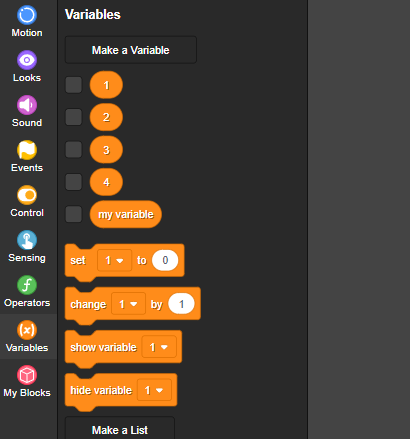
Using the picture I'll show you, if you've created the variable “times w has been pressed” there'll be a little cirle with the text where “1”, “2”, “3”, “4” and “my variable” are. If you haven't yet, the picture also shows you where you can create the variable, just click “Make a variable” and then fill out what it says.
you can then just drag that into where you'd put a normal input like instead of
move (5) steps
You'll put it like this
move (variable name here!) steps
- GERMAN-PIGY
-
Scratcher
15 posts
how do i block the player from pressing a button a certain amount of times
its not working. the w key is supposed to make the size of a sprite bigger, but only to an extent.
- nyamandlovue
-
Scratcher
43 posts
how do i block the player from pressing a button a certain amount of times
Oh! In that case, you can do a different thing instead of the variable mumbo-jumbo I've been giving you.
when [w] key pressed
if <(size) < [200 or whatever you want the max size to be]> then
change size by (10)
end
- GERMAN-PIGY
-
Scratcher
15 posts
how do i block the player from pressing a button a certain amount of times
thank you, but its still not working
Last edited by GERMAN-PIGY (Oct. 1, 2023 20:57:19)
- nyamandlovue
-
Scratcher
43 posts
how do i block the player from pressing a button a certain amount of times
Glad to have helped! ^v^
- GERMAN-PIGY
-
Scratcher
15 posts
how do i block the player from pressing a button a certain amount of times
the part that isnt working is when i size it down using the s key. but when i do, i cant resize up becuase of the script i just put in
Last edited by GERMAN-PIGY (Oct. 1, 2023 21:07:12)
- nyamandlovue
-
Scratcher
43 posts
how do i block the player from pressing a button a certain amount of times
Does the shrink input look something like this? This works for me
when [s] key pressed
if <[100 or whatever you want the minimum size to be] < (size)> then
change size by (-10)
end
- GERMAN-PIGY
-
Scratcher
15 posts
how do i block the player from pressing a button a certain amount of times
yes it does, but when i try to make it grow, it doesnt work because of the script
Last edited by GERMAN-PIGY (Oct. 1, 2023 22:18:31)
- GERMAN-PIGY
-
Scratcher
15 posts
how do i block the player from pressing a button a certain amount of times
i found out! thank you for the help!
Last edited by GERMAN-PIGY (Oct. 1, 2023 21:25:45)
- nyamandlovue
-
Scratcher
43 posts
how do i block the player from pressing a button a certain amount of times
Are you sure you have your “greater than” block correctly placed?
If it’s like
If it’s like
<(size) < [100 or whatever you want the minimum size to be]>It will not work, be sure it’s like this
< [100 or whatever you want the minimum size to be] < (size)>
Last edited by nyamandlovue (Oct. 1, 2023 21:20:42)
- GERMAN-PIGY
-
Scratcher
15 posts
how do i block the player from pressing a button a certain amount of times
i fixed it, thank you!
- nyamandlovue
-
Scratcher
43 posts
how do i block the player from pressing a button a certain amount of times
Great to hear! No problem!
- GERMAN-PIGY
-
Scratcher
15 posts
how do i block the player from pressing a button a certain amount of times
nvm
Last edited by GERMAN-PIGY (Oct. 1, 2023 22:19:09)
- exneret
-
 Scratcher

4 posts
how do i block the player from pressing a button a certain amount of times
Hey everybody who can see this, i am making an egg hatching game and i need some code telling me how to not let the player click something without hiding it for a short amount of time.
P.S
I want to make a function when you click the egg, you get luck, and not actually hatching the egg repeatedly. I have an idea about invisible cursors…
@nyamandlove and whoever finds this
P.S
I want to make a function when you click the egg, you get luck, and not actually hatching the egg repeatedly. I have an idea about invisible cursors…
@nyamandlove and whoever finds this
- SpyCoderX
-
 Scratcher

1000+ posts
how do i block the player from pressing a button a certain amount of times
Hey everybody who can see this, i am making an egg hatching game and i need some code telling me how to not let the player click something without hiding it for a short amount of time.Welcome to the Scratch Forums!
P.S
I want to make a function when you click the egg, you get luck, and not actually hatching the egg repeatedly. I have an idea about invisible cursors…
@nyamandlove and whoever finds this
Please don’t reply to old or abandoned topics. This is known as Necroposting, and is considered spam.
Thanks!

Btw, I answered your question in your topic.
- Discussion Forums
- » Help with Scripts
-
» how do i block the player from pressing a button a certain amount of times