Discuss Scratch

- Discussion Forums
- » Show and Tell
- » SUDOKU ♥ Beautiful Rendition with Over 200 Puzzles ♥
![[RSS Feed]](//cdn.scratch.mit.edu/scratchr2/static/__ff7229f036c458728e45c39b0751aa44__//djangobb_forum/img/feed-icon-small.png "[RSS Feed]")
![[RSS Feed]](http://cdn.scratch.mit.edu/scratchr2/static/__ff7229f036c458728e45c39b0751aa44__//djangobb_forum/img/feed-icon-small.png "[RSS Feed]")
- BoltBait
-
 Scratcher

1000+ posts
SUDOKU ♥ Beautiful Rendition with Over 200 Puzzles ♥
If you are a fan of Sudoku puzzles, come take a look a this project:
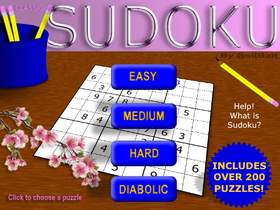
Classic Sudoku
This project includes the premier sudoku software on the Scratch web site.
Features:
★Over 200 puzzles to solve including over 30 easy puzzles
★Select multiple cells at once
★Make pencil marks in cells to keep notes as you solve the puzzle
★Change the background color of cells*
★Unlimited Undo (single step backwards if you make a mistake)
★Large, easy to read cells
★Mobile friendly
How it works:
★Click to select a cell (or drag to select multiple cells). You can hold the A key and click to select multiple cells.
★To change a selected cell press S and a number to SET a number in the puzzle or press M and a number to make a pencil MARK. Use keys or on-screen buttons.
★When you have SET a number in every cell, click the green Check button to verify your work.
You can use the on-screen buttons or the following keys:
C = Check puzzle
X = Delete contents of currently selected cells
U = Undo last move
B = Color cells blue*
R = Color cells red*
W = Color cells white (the default)
S = Prepare to SET a number into selected cells
M = Prepare to pencil MARK a number into selected cells
1-9 = SET (if the number buttons are black) or MARK (if the number buttons are gray) the desired number
*Red and Blue can be mixed to form Purple. Coloring cells allows you to do some advanced techniques, like coloring X-Wing cells, or doing the Slot Machine technique.
If you are a fan of Sudoku, I know you will “♥” this game!
Come play: https://scratch.mit.edu/projects/385122729
Classic Sudoku
This project includes the premier sudoku software on the Scratch web site.
Features:
★Over 200 puzzles to solve including over 30 easy puzzles
★Select multiple cells at once
★Make pencil marks in cells to keep notes as you solve the puzzle
★Change the background color of cells*
★Unlimited Undo (single step backwards if you make a mistake)
★Large, easy to read cells
★Mobile friendly
How it works:
★Click to select a cell (or drag to select multiple cells). You can hold the A key and click to select multiple cells.
★To change a selected cell press S and a number to SET a number in the puzzle or press M and a number to make a pencil MARK. Use keys or on-screen buttons.
★When you have SET a number in every cell, click the green Check button to verify your work.
You can use the on-screen buttons or the following keys:
C = Check puzzle
X = Delete contents of currently selected cells
U = Undo last move
B = Color cells blue*
R = Color cells red*
W = Color cells white (the default)
S = Prepare to SET a number into selected cells
M = Prepare to pencil MARK a number into selected cells
1-9 = SET (if the number buttons are black) or MARK (if the number buttons are gray) the desired number
*Red and Blue can be mixed to form Purple. Coloring cells allows you to do some advanced techniques, like coloring X-Wing cells, or doing the Slot Machine technique.
If you are a fan of Sudoku, I know you will “♥” this game!
Come play: https://scratch.mit.edu/projects/385122729
Last edited by BoltBait (July 4, 2020 22:17:35)
- BoltBait
-
Scratcher
1000+ posts
SUDOKU ♥ Beautiful Rendition with Over 200 Puzzles ♥
It was requested to add some harder puzzles… so I did. Enjoy.
- BoltBait
-
Scratcher
1000+ posts
SUDOKU ♥ Beautiful Rendition with Over 200 Puzzles ♥
How to solve a Sudoku puzzle
Sudoku is a puzzle in which players insert the numbers one to nine into a grid consisting of nine squares subdivided into a further nine smaller squares in such a way that every number appears once in each horizontal line, vertical line, and square.
The name “sudoku” is abbreviated from the Japanese suuji wa dokushin ni kagiru, which means “the numbers (or digits) must remain single.”
Here is a typical Sudoku puzzle:
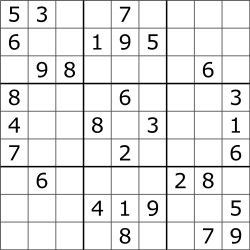
The digits given at the beginning are the clues you would use to solve the puzzle. A properly formed puzzle has one (and only one) unique solution.
So, if we look at the 5 in the upper left corner of the puzzle, we can know from that clue there are no more 5's in row 1 and no more 5's in column 1 and no more 5's in the upper left 3x3 block.
In order to solve the Sudoku puzzle, we must place the digits 1-9 in each row of the grid. We must place the digits 1-9 in each column of the grid. And, we must place the digits 1-9 in each of the 3x3 outlined blocks shown above. There must not be any duplicate numbers in a row. There must not be any duplicate numbers in a column. And, there must not be any duplicate numbers within any of the outlined 3x3 grids.
Step 1: Naked Singles
If we look at the very center square of the entire grid, it is surrounded by 6, 3, 2, and 8. By looking at the numbers in the row, column, and 3x3 grid surrounding that cell, we can determine that the only number that could possibly go into that cell is a 5. Why? Well, if we look at the numbers 1-9, we can eliminate them one-by-one until only 1 number remains, 5. See, it can't be a 1 because there is already a 1 in the column (and in the row). It can't be a 2 because there is a 2 in the 3x3 cell. It can't be a 3 for the same reason. It can't be a 4 because there's a 4 in the row. It CAN be a 5. It can't be a 6 because there is a 6 in the 3x3 cell. It can't be a 7 because there is a 7 in the column. It can't be an 8 because there is an 8 in the 3x3 cell. And, it can't be a 9 because there is already a 9 in that column. Therefore, the only number left is a 5 which goes in the center cell of the puzzle.
Step 2: Eliminations
Now, let's look at the 3x3 grid in the bottom right corner. There are 4 open boxes in that 3x3 grid that need to be filled. Ask yourself where can a 1 go in that 3x3 grid? If we look at the rightmost column, we can see a 1 in there already (higher up in the puzzle), so you can't put a 1 in the upper right corner of that 3x3 grid–that eliminates one of the 4 possible open boxes. We can also see a 1 in the second to last row of the puzzle (middle column). Since you can't have a duplicate in that same row, that eliminates 2 of the remaining possibilities. That just leaves one empty box left that can take the 1. So, we place a 1 in the lower left corner of that 3x3 grid giving us “1-7-9” on the bottom row.
Step 3: Pencil Marks
Now that we have a 1 in the bottom row and a 1 in the second to last row, we need to place a 1 in the 3rd to last row. The bottom right corner 3x3 grid already has a 1 in it, and so does the bottom middle 3x3 grid. Therefore, there needs to be a 1 in the bottom left 3x3 grid and it will need to go in the top row of that 3x3 grid. We can see that there are 2 blank cells in that part of the grid, “blank-6-blank”. So we will make a pencil mark in the two blank cells telling us that the 1 will go into one of those cells when the puzzle is finished. Now, we don't know which one… yet! But, eventually, when we fill out enough of the puzzle that choice will be made obvious for us.
That should give you enough skills to complete an Easy level Sudoku puzzle.
Good luck!
Sudoku is a puzzle in which players insert the numbers one to nine into a grid consisting of nine squares subdivided into a further nine smaller squares in such a way that every number appears once in each horizontal line, vertical line, and square.
The name “sudoku” is abbreviated from the Japanese suuji wa dokushin ni kagiru, which means “the numbers (or digits) must remain single.”
Here is a typical Sudoku puzzle:
The digits given at the beginning are the clues you would use to solve the puzzle. A properly formed puzzle has one (and only one) unique solution.
So, if we look at the 5 in the upper left corner of the puzzle, we can know from that clue there are no more 5's in row 1 and no more 5's in column 1 and no more 5's in the upper left 3x3 block.
In order to solve the Sudoku puzzle, we must place the digits 1-9 in each row of the grid. We must place the digits 1-9 in each column of the grid. And, we must place the digits 1-9 in each of the 3x3 outlined blocks shown above. There must not be any duplicate numbers in a row. There must not be any duplicate numbers in a column. And, there must not be any duplicate numbers within any of the outlined 3x3 grids.
Step 1: Naked Singles
If we look at the very center square of the entire grid, it is surrounded by 6, 3, 2, and 8. By looking at the numbers in the row, column, and 3x3 grid surrounding that cell, we can determine that the only number that could possibly go into that cell is a 5. Why? Well, if we look at the numbers 1-9, we can eliminate them one-by-one until only 1 number remains, 5. See, it can't be a 1 because there is already a 1 in the column (and in the row). It can't be a 2 because there is a 2 in the 3x3 cell. It can't be a 3 for the same reason. It can't be a 4 because there's a 4 in the row. It CAN be a 5. It can't be a 6 because there is a 6 in the 3x3 cell. It can't be a 7 because there is a 7 in the column. It can't be an 8 because there is an 8 in the 3x3 cell. And, it can't be a 9 because there is already a 9 in that column. Therefore, the only number left is a 5 which goes in the center cell of the puzzle.
Step 2: Eliminations
Now, let's look at the 3x3 grid in the bottom right corner. There are 4 open boxes in that 3x3 grid that need to be filled. Ask yourself where can a 1 go in that 3x3 grid? If we look at the rightmost column, we can see a 1 in there already (higher up in the puzzle), so you can't put a 1 in the upper right corner of that 3x3 grid–that eliminates one of the 4 possible open boxes. We can also see a 1 in the second to last row of the puzzle (middle column). Since you can't have a duplicate in that same row, that eliminates 2 of the remaining possibilities. That just leaves one empty box left that can take the 1. So, we place a 1 in the lower left corner of that 3x3 grid giving us “1-7-9” on the bottom row.
Step 3: Pencil Marks
Now that we have a 1 in the bottom row and a 1 in the second to last row, we need to place a 1 in the 3rd to last row. The bottom right corner 3x3 grid already has a 1 in it, and so does the bottom middle 3x3 grid. Therefore, there needs to be a 1 in the bottom left 3x3 grid and it will need to go in the top row of that 3x3 grid. We can see that there are 2 blank cells in that part of the grid, “blank-6-blank”. So we will make a pencil mark in the two blank cells telling us that the 1 will go into one of those cells when the puzzle is finished. Now, we don't know which one… yet! But, eventually, when we fill out enough of the puzzle that choice will be made obvious for us.
That should give you enough skills to complete an Easy level Sudoku puzzle.
Good luck!
- Gummiber
-
 Scratcher

2 posts
SUDOKU ♥ Beautiful Rendition with Over 200 Puzzles ♥
I don’t understand to complicated
- owlover2010
-
 Scratcher

100+ posts
SUDOKU ♥ Beautiful Rendition with Over 200 Puzzles ♥
(join [4] [world])
next costume
show
think [5]
think [7] for (2) secs
say [8]
- peepbunny2021
-
 Scratcher

32 posts
SUDOKU ♥ Beautiful Rendition with Over 200 Puzzles ♥
define oh hey a block
go to [nananana:) v]
- thessajoseph
-
 Scratcher

3 posts
SUDOKU ♥ Beautiful Rendition with Over 200 Puzzles ♥
move () stepsBruh
turn cw () degrees
turn cw () degrees
turn ccw () degrees
turn ccw () degrees
point in direction ( v)
point towards [ v]
go to [ v]
glide () secs to x: (0) y: (0)
change x by ()
set x to ()
change y by ()
change y by ()
change y by ()
change y by ()
- max688
-
 Scratcher

6 posts
SUDOKU ♥ Beautiful Rendition with Over 200 Puzzles ♥
when green flag clicked
Sudoku
- IHEYLOOKOUTwhat
-
 Scratcher

94 posts
SUDOKU ♥ Beautiful Rendition with Over 200 Puzzles ♥
when green flag clickedI don't know how to program jumping
go to x: (-222) y: (-90)
set [xvel] to [0]
set [yvel] to [0]
forever
if <key [right arrow] pressed?> then
if <(xvel) = [22]> then
set [xvel] to [22]
else
change [xvel] by [2]
end
end
if <key [left arrow] pressed?> then
if <(xvel) = [-22]> then
set [xvel] to [-22]
else
change [xvel] by [-2]
end
end
end
- andreajessie
-
 New Scratcher

1 post
SUDOKU ♥ Beautiful Rendition with Over 200 Puzzles ♥
If you are a fan of Sudoku puzzles, come take a look a this project:exciting game. that's great
Classic Sudoku
This project includes the premier sudoku software on the Scratch web site.
Features:
★Over 200 puzzles to solve including over 30 easy puzzles
★Select multiple cells at once
★Make pencil marks in cells to keep notes as you solve the puzzle
★Change the background color of cells*
★Unlimited Undo (single step backwards if you make a mistake)
★Large, easy to read cells
★Mobile friendly
How it works:
★Click to select a cell (or drag to select multiple cells). You can hold the A key and click to select multiple cells.
★To change a selected cell press S and a number to SET a number in the puzzle or press M and a number to make a pencil MARK. Use keys or on-screen buttons.
★When you have SET a number in every cell, click the green Check button to verify your work.
You can use the on-screen buttons or the following keys:
C = Check puzzle
X = Delete contents of currently selected cells
U = Undo last move
B = Color cells blue*
R = Color cells red*
W = Color cells white (the default)
S = Prepare to SET a number into selected cells
M = Prepare to pencil MARK a number into selected cells
1-9 = SET (if the number buttons are black) or MARK (if the number buttons are gray) the desired number Geometry Dash: https://geometrydash-lite.com
*Red and Blue can be mixed to form Purple. Coloring cells allows you to do some advanced techniques, like coloring X-Wing cells, or doing the Slot Machine technique.
If you are a fan of Sudoku, I know you will “♥” this game!
Come play: https://scratch.mit.edu/projects/385122729
Last edited by andreajessie (Sept. 12, 2023 06:52:43)
- Incognito-Cat
-
 Scratcher

100+ posts
SUDOKU ♥ Beautiful Rendition with Over 200 Puzzles ♥
Super cool! I love that you put the explanations in the forums and how to solve them!
- Discussion Forums
- » Show and Tell
-
» SUDOKU ♥ Beautiful Rendition with Over 200 Puzzles ♥