Discuss Scratch

- Discussion Forums
- » Bugs and Glitches
- » Bug with the backdrop "Rays"
![[RSS Feed]](//cdn.scratch.mit.edu/scratchr2/static/__ff7229f036c458728e45c39b0751aa44__//djangobb_forum/img/feed-icon-small.png "[RSS Feed]")
![[RSS Feed]](http://cdn.scratch.mit.edu/scratchr2/static/__ff7229f036c458728e45c39b0751aa44__//djangobb_forum/img/feed-icon-small.png "[RSS Feed]")
- harry_males
-
 Scratcher

19 posts
Bug with the backdrop "Rays"
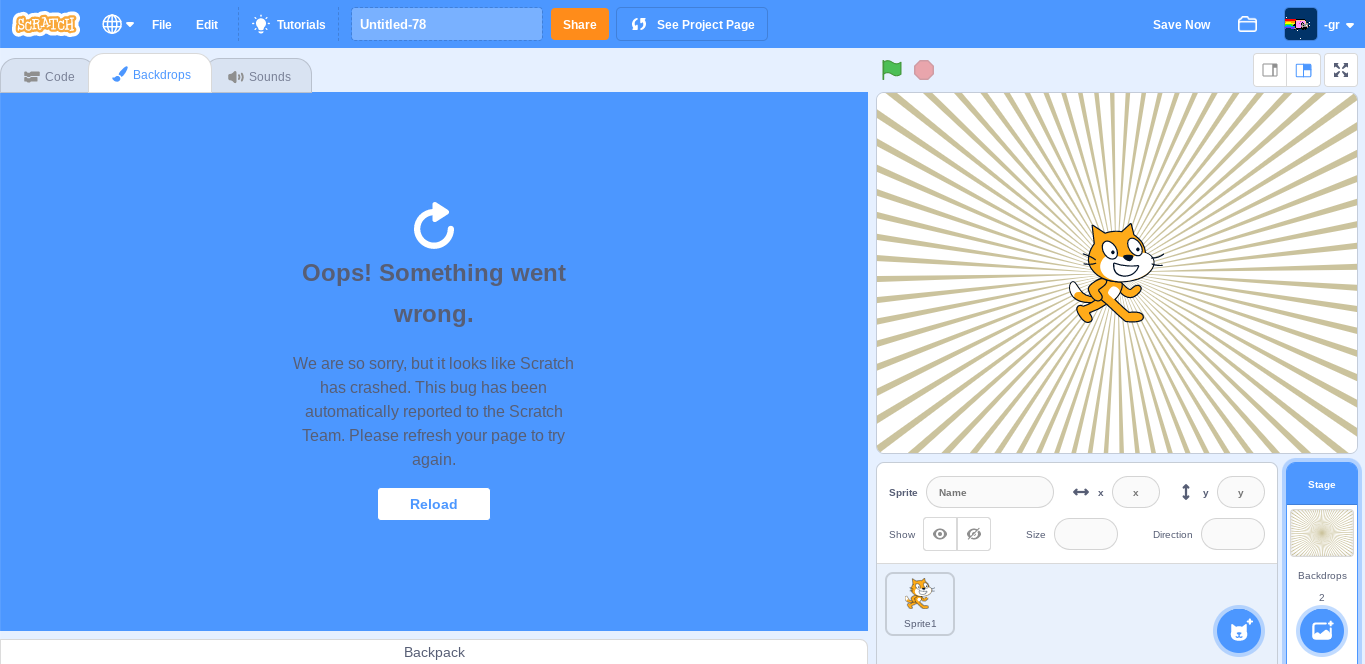
Hello. I have recently encountered a bug where when I convert the Rays backdrop to bitmap, and then back to vector, this error message appears:
“Oops! Something went wrong.
We are so sorry, but it looks like Scratch has crashed. This bug has been automatically reported to the Scratch Team. Please refresh your page to try again.”
Can someone please help?
“Oops! Something went wrong.
We are so sorry, but it looks like Scratch has crashed. This bug has been automatically reported to the Scratch Team. Please refresh your page to try again.”
Can someone please help?
- Spentine
-
 Scratcher

1000+ posts
Bug with the backdrop "Rays"
WIthout further information or what file caused the issue, there is no way to help or know what happened.
- medians
-
 Scratcher

1000+ posts
Bug with the backdrop "Rays"
WIthout further information or what file caused the issue, there is no way to help or know what happened.Here’s all steps:
1. Add the rays backdrop to a newer version of 3.0 (this didn’t happen at first)
2. Convert it to bitmap.
3. Convert it back to vector.
- Knightbot63
-
 Scratcher

1000+ posts
Bug with the backdrop "Rays"
Ye rays is pretty broken. It has many issues with it. Probably make your own rays?
- wer65hertg
-
 Scratcher

1000+ posts
Bug with the backdrop "Rays"
Only the backdrop editor portion will crash, but when you switch to a different tab (and back to the costume editor) then it will work again. It appears that when you go back to the costume editor, the Rays will be in vector mode again, as it was when it was first selected from the library.
My browser / operating system: ChromeOS 14541.0.0, Chrome 111.0.0.0, No Flash version detected
My browser / operating system: ChromeOS 14541.0.0, Chrome 111.0.0.0, No Flash version detected
Last edited by wer65hertg (March 17, 2023 15:55:50)
- notjohnson2_alt
-
 Scratcher

5 posts
Bug with the backdrop "Rays"
The bug was real but it did not crash scratch, if you converted rays to bitmap then vector scratch does not crash, it makes scratch think “hmm… I crashed? I think so” then scratch thinks it crashed, but actually if you clicked blocks or sounds after scratch thinked it crashed then scratch will think “oh I was wrong the whole time, stupid me”.
define scratch thinking did I crash
set [ did scratch crash]to [scratch crashed(prank)]
Last edited by notjohnson2_alt (May 8, 2023 13:00:36)
- RAiNKiTT3N
-
 Scratcher

100+ posts
Bug with the backdrop "Rays"
I did find a way to bypass it
Convert to bitmap
Copy the whole sprite
Paste into a new vector costume
Convert to bitmap
Copy the whole sprite
Paste into a new vector costume

- Wilfredlam0418
-
 Scratcher

44 posts
Bug with the backdrop "Rays"
I think I have a solution. The problem is that the “Rays” backdrop cannot be converted to a bitmap file. To replicate this, simply load the “Rays” backdrop and click on “Convert to Bitmap”. If you go away and come back, it will be reverted to a vector file with no changes. A solution to bypass this is by using the copy function. If you copy the bitmap file before going away, you can paste the bitmap version of “Rays” onto a blank backdrop. That way, “Rays” can become a bitmap file in a vector file.
Edit: Someone else has already covered this method, so I'm just explaining it in a clearer way.
Edit: Someone else has already covered this method, so I'm just explaining it in a clearer way.
Last edited by Wilfredlam0418 (July 10, 2023 10:46:32)
- Discussion Forums
- » Bugs and Glitches
-
» Bug with the backdrop "Rays"