Discuss Scratch

- Discussion Forums
- » Suggestions
- » Highlighting Code
![[RSS Feed]](//cdn.scratch.mit.edu/scratchr2/static/__5b3e40ec58a840b41702360e9891321b__//djangobb_forum/img/feed-icon-small.png "[RSS Feed]")
![[RSS Feed]](http://cdn.scratch.mit.edu/scratchr2/static/__5b3e40ec58a840b41702360e9891321b__//djangobb_forum/img/feed-icon-small.png "[RSS Feed]")
- DunnoWho
-
 Scratcher

66 posts
Highlighting Code
I feel like scratch should implement a highlighting feature for code. It would be a more accurate way to select and move code. And maybe, after you've highlighted it you could copy and paste it.
- Nambaseking01
-
 Scratcher

1000+ posts
Highlighting Code
For dragging particular blocks around, just left click, move your mouse, and put it where you want it to be. For copying and pasting, just use the options you have by right clicking.
We already have these features, isn't that sufficient?
We already have these features, isn't that sufficient?
- DunnoWho
-
Scratcher
66 posts
Highlighting Code
I know, but it would be more accurate, efficient, and easier with highlighting code.
- A-Hadi
-
 Scratcher

100+ posts
Highlighting Code
oh, but for that scratch will need to be a text language like:
response = ask(“how many steps do you want the cat to move”)
cat.move(response * 10) in direction.right
repeat 10(
print(generation)
)
and then syntax highlighting like this:
response = ask(“how many steps do you want the cat to move”)
cat.move(response * 10) in direction.right
repeat 10(
print(generation)
)
response = ask(“how many steps do you want the cat to move”)
cat.move(response * 10) in direction.right
repeat 10(
print(generation)
)
and then syntax highlighting like this:
response = ask(“how many steps do you want the cat to move”)
cat.move(response * 10) in direction.right
repeat 10(
print(generation)
)

- KangaCoder
-
 Scratcher
1000+ posts
Highlighting Code
how do you highlight blocks?Maybe drag your mouse over a section of code creating a rectangle, and everything inside gets highlighted? (Sorta like the select tool in the paint editor)
- Taro--Sasaki
-
 Scratcher

1000+ posts
Highlighting Code
how do you highlight blocks?Like
Maybe drag your mouse over a section of code creating a rectangle, and everything inside gets highlighted? (Sorta like the select tool in the paint editor)
I had a thought for highlighting single blocks, so here it is, a mock up from ibis:
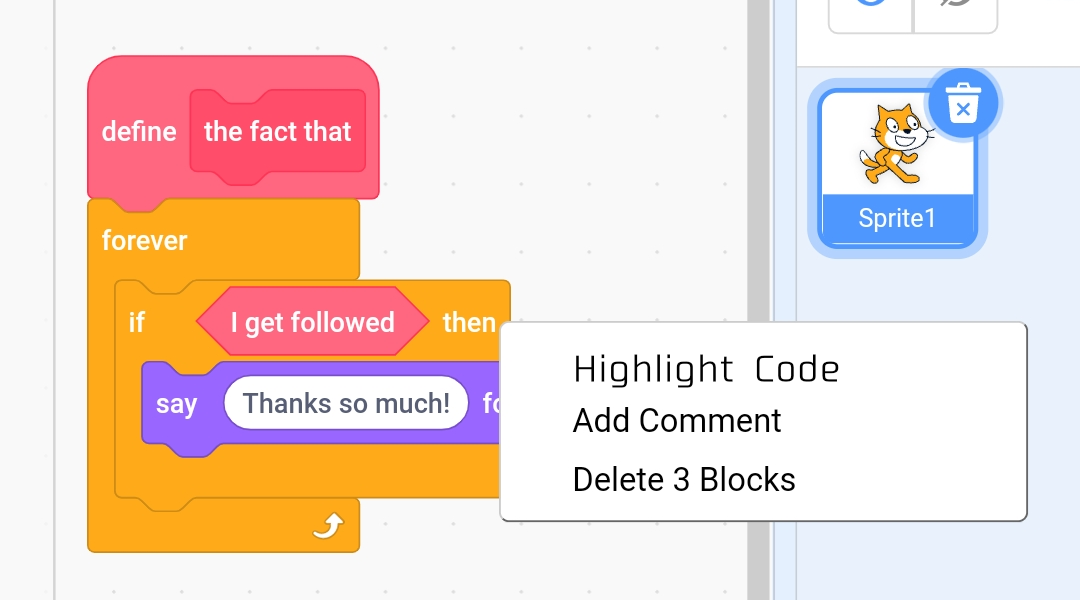
(menu for when selecting blocks)
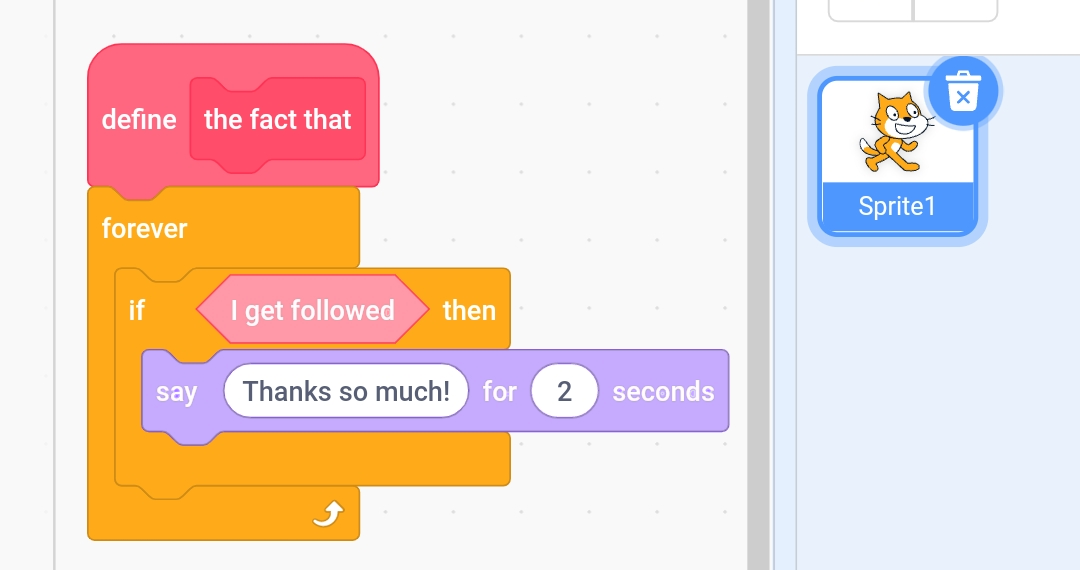
(when blocks are highlighted, there is a lighter shade of that block type color, I tinted a looks and custom boolean)
- KangaCoder
-
Scratcher
1000+ posts
Highlighting Code
snipNice mockup! Although, maybe the tint could be a bit less? It looks a little pale, imo.
What would happen after you've highlighted? Would you just be able to move your mouse and the blocks would move? Or would you need to be dragging on a part of the highlighted blocks?
- Taro--Sasaki
-
Scratcher
1000+ posts
Highlighting Code
snipNice mockup! Although, maybe the tint could be a bit less? It looks a little pale, imo.
Well, I agree. Maybe I overdid the tint? Idk guys, you guys rate.
What would happen after you've highlighted? Would you just be able to move your mouse and the blocks would move? Or would you need to be dragging on a part of the highlighted blocks?That part honestly needs to go to the OP. But, probably it's like normal blocks, you have to drag it.
- musicROCKS013
-
 Scratcher

1000+ posts
Highlighting Code
That part honestly needs to go to the OP.The OP hasn't been active for 6 months, so I doubt they will be able to clear anything up.


- Discussion Forums
- » Suggestions
-
» Highlighting Code