Discuss Scratch

- Discussion Forums
- » Bugs and Glitches
- » Vector editor: Unmovable object
![[RSS Feed]](//cdn.scratch.mit.edu/scratchr2/static/__d235e7f35585482ca999583499337ccd__//djangobb_forum/img/feed-icon-small.png "[RSS Feed]")
![[RSS Feed]](http://cdn.scratch.mit.edu/scratchr2/static/__d235e7f35585482ca999583499337ccd__//djangobb_forum/img/feed-icon-small.png "[RSS Feed]")
- awsome_guy_360
-
 Scratcher

1000+ posts
Vector editor: Unmovable object
My browser / operating system: Windows NT 10.0, Chrome 98.0.4758.82, No Flash version detected
In the vector costume editor, it appears that I have somehow, it appears that I have created a shape that is “permanently” in edit mode: The shape cannot be moved, and is a bit difficult to edit the nodes of. As far as I know, the nodes can be edited. However, the odd thing is, that the select box is expressed in nodes, making it editable (the circle can be “freed” if the nodes of the box can be edited to a certain degree). Unfortunately, I cannot recall exactly what occurred in order for this bug to be produced. I believe I was editing the shape, when my computer froze I didn't realize my computer un-froze because, of course, the shape was still selected.
I'm not quite sure if this is just on my side, so here are some shapes to demonstrate:
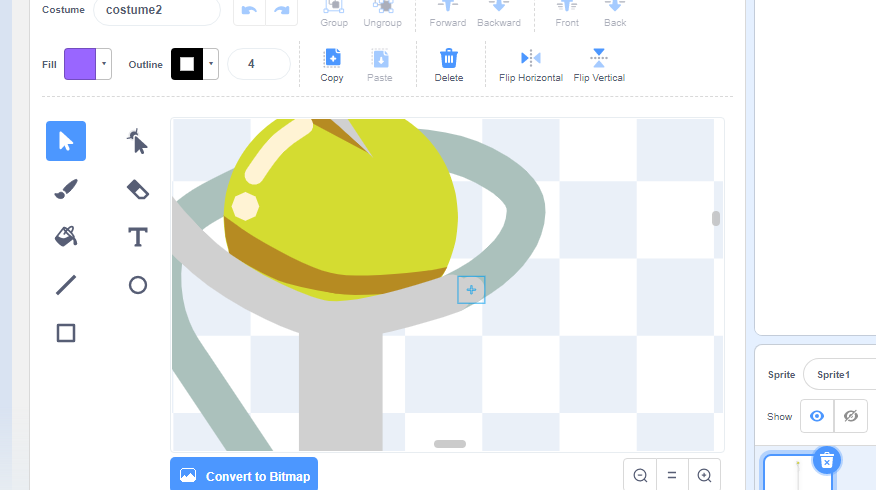
Original costume; “costume 2”. This shape cannot be moved. However, it's nodes can be edited.
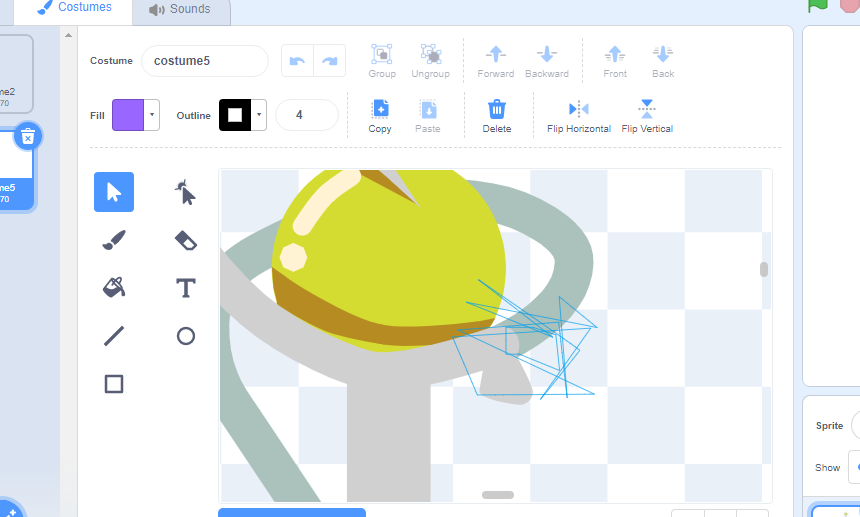
“costume 5”: A costume that I played around with
It appears that cubeupload isn't supported in Scratch anymore, for some reason? I'm not aware of any other image hosting sites, and I'm afraid I don't know which sites Scratch accepts other than cubeupload, so any feedback on that would be appreciated. My apologies if linking to outside websites isn't allowed; if you do not trust these image links (which, to my knowledge, lead to images of the issue), the direct project link can be found above, and below.
Edit:Nevermind
Admittedly, I'm not quite sure if this is a bug, or a feature of some sort that I'm unaware of.
Here is the project link if you are interested:
https://scratch.mit.edu/projects/639665975/
link can also be found at the top
Thank you for your time.
In the vector costume editor, it appears that I have somehow, it appears that I have created a shape that is “permanently” in edit mode: The shape cannot be moved, and is a bit difficult to edit the nodes of. As far as I know, the nodes can be edited. However, the odd thing is, that the select box is expressed in nodes, making it editable (the circle can be “freed” if the nodes of the box can be edited to a certain degree). Unfortunately, I cannot recall exactly what occurred in order for this bug to be produced. I believe I was editing the shape, when my computer froze I didn't realize my computer un-froze because, of course, the shape was still selected.
I'm not quite sure if this is just on my side, so here are some shapes to demonstrate:
Original costume; “costume 2”. This shape cannot be moved. However, it's nodes can be edited.
“costume 5”: A costume that I played around with
It appears that cubeupload isn't supported in Scratch anymore, for some reason? I'm not aware of any other image hosting sites, and I'm afraid I don't know which sites Scratch accepts other than cubeupload, so any feedback on that would be appreciated. My apologies if linking to outside websites isn't allowed; if you do not trust these image links (which, to my knowledge, lead to images of the issue), the direct project link can be found above, and below.
Edit:Nevermind
Admittedly, I'm not quite sure if this is a bug, or a feature of some sort that I'm unaware of.
Here is the project link if you are interested:
https://scratch.mit.edu/projects/639665975/
link can also be found at the top
Thank you for your time.
Last edited by awsome_guy_360 (Feb. 6, 2022 05:19:47)
- CST1229
-
 Scratcher

1000+ posts
Vector editor: Unmovable object
It appears that cubeupload isn't supported in Scratch anymore, for some reason?It still is. You have to use the
 direct link, not the viewing link:
However, cubeupload has a tendency to go down and is currently down I think.
- awsome_guy_360
-
Scratcher
1000+ posts
Vector editor: Unmovable object
It appears that cubeupload isn't supported in Scratch anymore, for some reason?It still is. You have to use the
However, cubeupload has a tendency to go down and is currently down I think.
Ah, gotcha. Thanks for that!
- 960times10_5is106044
-
 Scratcher

500+ posts
Vector editor: Unmovable object
Try using the reshape tool (select the mouse icon pointing a dot) then move and delete the shape. It works for me.

- hiPeeps124816
-
 Scratcher

500+ posts
Vector editor: Unmovable object
the project edits fine
My browser / operating system: MacOS 11.6.2, Safari 15.3, No Flash version detected
My browser / operating system: MacOS 11.6.2, Safari 15.3, No Flash version detected
Last edited by hiPeeps124816 (Feb. 12, 2022 18:28:59)
- awsome_guy_360
-
Scratcher
1000+ posts
Vector editor: Unmovable object
Try using the reshape tool (select the mouse icon pointing a dot) then move and delete the shape. It works for me.
Yeah! I did! Actually, if you move the circle and “plus” around a bit, then attempt to move the square (which shouldn't move), then move the other shapes, it should act like a grouped shape, without the ability to be ungrouped. Funny thing is, the other shapes shouldn't be able to move independently after that.
I just thought the glitch was quite interesting, the fact that it was able to create a shapeable “plus” and selection square. However, thanks a lot for your response. :3
the project edits fine
My browser / operating system: MacOS 11.6.2, Safari 15.3, No Flash version detected
It should apply to that specific shape rather than the project as a whole. But if it still works fine after editing the shape, then that's quite odd-
Regardless, thanks for your response. :3
- Discussion Forums
- » Bugs and Glitches
-
» Vector editor: Unmovable object