Discuss Scratch
- Discussion Forums
- » Questions about Scratch
- » Top Tips? What is one thing you wish you knew when you started coding on Scratch?
![[RSS Feed]](//cdn.scratch.mit.edu/scratchr2/static/__5f750b17a17db0b5d7ffaf5afb2e7e2b__//djangobb_forum/img/feed-icon-small.png "[RSS Feed]")
![[RSS Feed]](http://cdn.scratch.mit.edu/scratchr2/static/__5f750b17a17db0b5d7ffaf5afb2e7e2b__//djangobb_forum/img/feed-icon-small.png "[RSS Feed]")
- Vaibhs11
-
 Scratcher

1000+ posts
Top Tips? What is one thing you wish you knew when you started coding on Scratch?
I thought it was 0.02I usually go with 0.005Scratch's minimum is 0.03.
- RL1123
-
 Scratcher

1000+ posts
Top Tips? What is one thing you wish you knew when you started coding on Scratch?
I thought it was 0.02Scratch runs at 30FPS so it's 1/30
This is offtopic no derailing
Last edited by RL1123 (Dec. 3, 2021 08:51:17)
- banananology
-
 Scratcher

100+ posts
Top Tips? What is one thing you wish you knew when you started coding on Scratch?
(sharing this on my main instead of my foruming account 'cause why not)
Clones. Clones are really useful, but they can be kinda confuzzling at first. Make a clone using the
When I first started, I thought that creating a clone automatically meant the clone would do anything under that block. It doesn't. You have to use
What if you want to make multiple clones? Use a repeat loop like so:
What if you want to have multiple clones that all do different things? This is where variables come in. Make a variable called something like ‘CloneID’.
Clones. Clones are really useful, but they can be kinda confuzzling at first. Make a clone using the
create clone of [myself v]block.
When I first started, I thought that creating a clone automatically meant the clone would do anything under that block. It doesn't. You have to use
when I start as a clonehat block to get clones to do something. For example,
when I start as a clone
show
point towards [mouse pointer v]
start sound [meow v] ::sound
next costume
wait (1) secs
delete this clone
What if you want to make multiple clones? Use a repeat loop like so:
repeat (10)Then, you just use the When I Start As A Clone hat block to program all the clones! All the clones will do the same thing.
create clone of [myself v]
end
What if you want to have multiple clones that all do different things? This is where variables come in. Make a variable called something like ‘CloneID’.
(CloneID)Now, you can use the ‘CloneID’ variable to check what a clone should do! For example:
when green flag clicked
set [CloneID v] to [cat]
create clone of [myself v]
wait (1) secs
set [CloneID v] to [dog]
create clone of [myself v]
when I start as a clone
if <(CloneID) = [cat]> then
play sound [meow v] until done
end
when I start as a clone
if <(CloneID) = [dog]> then
play sound [woof v] until done
end
- warriorcatz2009
-
 Scratcher

100+ posts
Top Tips? What is one thing you wish you knew when you started coding on Scratch?
That I would have learned how to use the blocks correctly before creating my scratch account 

- MagentaPink
-
 Scratcher

500+ posts
Top Tips? What is one thing you wish you knew when you started coding on Scratch?
Not so much when I started coding, but when I started animating:
1) Use vector if you plan on animating it, because it's much easier than bitmap
2) Split limbs into two sections that overlap with about a circle the width of the limb. “No elbows Magenta” was annoying to work with.
3) Group stuff together if it is intended to move together. If it generally moves together but there is an instance where it doesn't, still group it, you can ungroup it for specifically that part.
4) Use squash and stretch, eg between two frames you can add a stretched one, it makes your animation so much smoother. In the same theme, use animation smears when something is fast.
5) Avoid animating using reshape, use select instead. An exception is stickman animation.
6) Plan out things before you actually start making it.
1) Use vector if you plan on animating it, because it's much easier than bitmap
2) Split limbs into two sections that overlap with about a circle the width of the limb. “No elbows Magenta” was annoying to work with.
3) Group stuff together if it is intended to move together. If it generally moves together but there is an instance where it doesn't, still group it, you can ungroup it for specifically that part.
4) Use squash and stretch, eg between two frames you can add a stretched one, it makes your animation so much smoother. In the same theme, use animation smears when something is fast.
5) Avoid animating using reshape, use select instead. An exception is stickman animation.
6) Plan out things before you actually start making it.
- -MyNewAccount-
-
 Scratcher

1000+ posts
Top Tips? What is one thing you wish you knew when you started coding on Scratch?
1) Don't be afraid to ask for help. There's a Help with Scripts forum and a Questions about Scratch forum where you can ask things. You can also ask on a Scratcher's profile!
2) Try using
It makes the movement more smooth.
3) Don't be afraid of custom blocks. They just help you make your code more clean.
4) Scratch isn't everything. Take pauses and don't just sit at your computer each day.
I think that's all! Good luck with your project :)
2) Try using
when green flag clickedinstead of
forever
if <key [right arrow v] pressed?> then
move (10) steps
end
end
when [right arrow v] key pressed.
move (10) steps
It makes the movement more smooth.
3) Don't be afraid of custom blocks. They just help you make your code more clean.
4) Scratch isn't everything. Take pauses and don't just sit at your computer each day.
I think that's all! Good luck with your project :)
- MagentaPink
-
Scratcher
500+ posts
Top Tips? What is one thing you wish you knew when you started coding on Scratch?
About coding:
1) If you use movement blocks, you need to tell it where to go at the start so the sprite goes back to the start location when you play the project. Otherwise sprites will just stay where you last left them.
2) After you drag the sprite into position on the stage, the motion block automatically sets to your sprite's current location so you don't have to type it.
3) USE BROADCAST. Broadcast is a block that's like an announcement to the entire project at once so you can tell different sprites to do stuff at the same time. It's basically like if someone in sprite 1 blows a trumpet so all the other sprites can hear it and will do something when they hear the trumpet.
4) When you click the bar at the bottom of the inside of the project that says Backpack, it opens backpack which is like a storage that you can put stuff in and you can take out the stuff in different projects so you don't have to remake the thing in each new project.
5) If you tell something to hide at the end of a project, put a show block at the beginning of the code, if you don't it will just stay hidden.
6) The picture that is the stage when you save it will become the thumbnail.
1) If you use movement blocks, you need to tell it where to go at the start so the sprite goes back to the start location when you play the project. Otherwise sprites will just stay where you last left them.
2) After you drag the sprite into position on the stage, the motion block automatically sets to your sprite's current location so you don't have to type it.
3) USE BROADCAST. Broadcast is a block that's like an announcement to the entire project at once so you can tell different sprites to do stuff at the same time. It's basically like if someone in sprite 1 blows a trumpet so all the other sprites can hear it and will do something when they hear the trumpet.
4) When you click the bar at the bottom of the inside of the project that says Backpack, it opens backpack which is like a storage that you can put stuff in and you can take out the stuff in different projects so you don't have to remake the thing in each new project.
5) If you tell something to hide at the end of a project, put a show block at the beginning of the code, if you don't it will just stay hidden.
6) The picture that is the stage when you save it will become the thumbnail.
- Nezon
-
 Scratcher

1000+ posts
Top Tips? What is one thing you wish you knew when you started coding on Scratch?
Here's one; you can put a boolean in blocks that have circles, and there's a feature where it will report 1 or 0 in number inputs.
If the bootlean is true, it will report 1 into the input. if it is false, it will report 0 into the input.
move <[1] = [1]> steps // will move 1 step
If the bootlean is true, it will report 1 into the input. if it is false, it will report 0 into the input.
foreveractually works
move <key [right v] pressed?> steps
end
- lolecksdeehaha
-
 Scratcher

1000+ posts
Top Tips? What is one thing you wish you knew when you started coding on Scratch?
No, you'll have to make custom blocks for that. This just helps with synchronizing actions.Oh, this one will be useful.
Unless the game heavily relies on broadcasts otherwise, use a tick system. It really helps to synchronize everything, especially with turbo mode.when green flag clicked // in stage or another sprite
forever
broadcast [tick v]
end
when I receive [tick v] // fires at the same time, all sprites
... // game code
This is a great tip - so this works a bit like a run without screen refresh without using your own blocks?
- MrHill26
-
 Scratcher

17 posts
Top Tips? What is one thing you wish you knew when you started coding on Scratch?
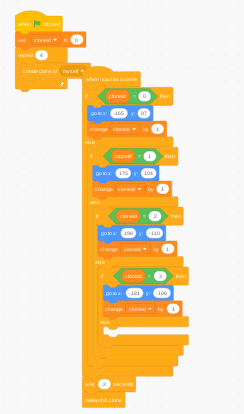
One of my favorite basic tips is Clone ID's, which you can use to tell individual clones what to do. Here's some example code:
The output is that 4 scratch cats are put in the corners of the stage.
This is perfect - I will add it in to my day 4 tip (next Monday) and give you credit - thanks for the share
This is our tip of the day for Day 4#! https://sites.google.com/view/12gamesofchristmas/home/day-4
Thank you!
- MrHill26
-
Scratcher
17 posts
Top Tips? What is one thing you wish you knew when you started coding on Scratch?
To everyone who keeps adding their tips! I am so thankful - I have added a new section to my videos called “Scratch Experts” - where these tips are featured and I also give you a shout out on the video and link to your profile for others to see.
You are all amazing thank you so much! Keep them coming - some tips I would love for beginner/intemediate scratchers:
- Examples of why to use lists (that isn't waaay complicated)
- Difference between broadcast and broadcast and wait (and why)
- pen tool tips (I'm terrible with the pen tool)
- how to make enemies follow you
- how you can use ghost effect
and many more!
I know we have the wiki but it is nice to share tips from you guys and give you a shout out.
Thanks again.
- moo2645m
-
 Scratcher

4 posts
Top Tips? What is one thing you wish you knew when you started coding on Scratch?
How to make a square in scratch
when green flag clicked
pen down
set [variable name] to [4]
define
go to x: (-50) y: (50)
repeat ((variable name))
move (50) steps
turn cw (90) degrees
end
Last edited by moo2645m (March 21, 2024 19:32:35)
- -Silentstar
-
 Scratcher

78 posts
Top Tips? What is one thing you wish you knew when you started coding on Scratch?
When I joined Scratch I wish I knew how to colorpick in the costume editor (it woulda been so much easier for my art if I knew what the colorpicking feature was, I made tons of fanarts without getting the colors right and instead eyeballing it, it was painful)
- Malicondi
-
 Scratcher

1000+ posts
Top Tips? What is one thing you wish you knew when you started coding on Scratch?
Please don't necropost, this topic is over 3 years old.
- Discussion Forums
- » Questions about Scratch
-
» Top Tips? What is one thing you wish you knew when you started coding on Scratch?