Discuss Scratch

- Discussion Forums
- » Help with Scripts
- » Help with winning score
![[RSS Feed]](//cdn.scratch.mit.edu/scratchr2/static/__d99df16e04aff6222b0d15eae35ae560__//djangobb_forum/img/feed-icon-small.png "[RSS Feed]")
![[RSS Feed]](http://cdn.scratch.mit.edu/scratchr2/static/__d99df16e04aff6222b0d15eae35ae560__//djangobb_forum/img/feed-icon-small.png "[RSS Feed]")
- Masterofscratches
-
 New Scratcher

3 posts
Help with winning score
Hi I'm learning this with my son. We want the winning message and a sound we recorded for reaching 10 points but for some reason its not doing anything new at 10 points. Can you please help us figure out where we need to change something?
Smh. Can't link or post image of what we have. Not sure how to share it with yall
Thank you
Smh. Can't link or post image of what we have. Not sure how to share it with yall
Thank you
Last edited by Masterofscratches (July 11, 2021 17:38:29)
- The_Imaginarium
-
 Scratcher

1000+ posts
Help with winning score
It may be difficult to help if we can't see the code. If the project is unshared, then just post the project ID, which can be found in the URL.

- helloworldbyeworld
-
 Scratcher

1000+ posts
Help with winning score
Hi I'm learning this with my son. We want the winning message and a sound we recorded for reaching 10 points but for some reason its not doing anything new at 10 points. Can you please help us figure out where we need to change something?
Smh. Can't link or post image of what we have. Not sure how to share it with yall
Thank you
It would be greatly appreciated if you post the project ID, but in general, this script should work to play a sound when the user has 10 points:
when green flag clicked
forever
if <(points) = [10]> then
play sound [sound you recorded for reaching 10 points v] until done
wait until <not <(points) = [10]>> // this is to prevent it from playing the sound more than 1 time
end
end
- Masterofscratches
-
New Scratcher
3 posts
Help with winning score
Thank you,
Here is the project ID: 552399255
Here is the project ID: 552399255
- -MyNewAccount-
-
 Scratcher

1000+ posts
Help with winning score
Hi I'm learning this with my son. We want the winning message and a sound we recorded for reaching 10 points but for some reason its not doing anything new at 10 points. Can you please help us figure out where we need to change something?Hello! I have found out what's happening with the project.
Smh. Can't link or post image of what we have. Not sure how to share it with yall
Thank you
This is your script:
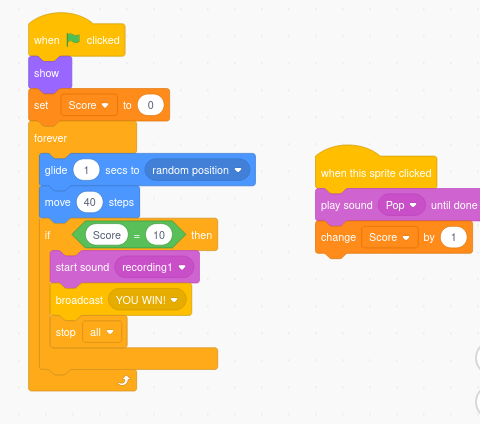
First, in the “if Score = 10”, you should replace the word “score” with the variable “score”.
Second, there is the block “start sound”. This block starts playing the sound, and then continues running the script.
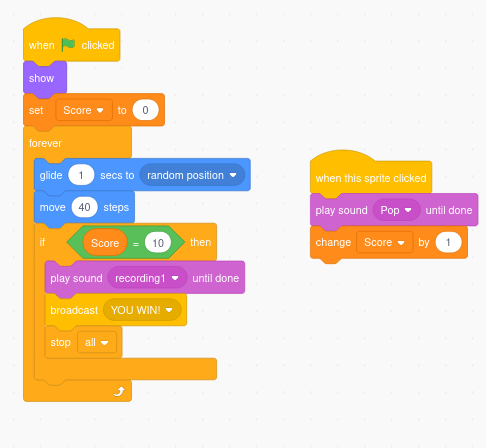
So, you need to put the block “play sound until done” (like how you did in the When this sprite clicked script).
Greetings!
P.D.: Here is how it should like now:
- Discussion Forums
- » Help with Scripts
-
» Help with winning score