Discuss Scratch

- Discussion Forums
- » Help with Scripts
- » Griffpatch's Tutorial
![[RSS Feed]](//cdn.scratch.mit.edu/scratchr2/static/__5b3e40ec58a840b41702360e9891321b__//djangobb_forum/img/feed-icon-small.png "[RSS Feed]")
![[RSS Feed]](http://cdn.scratch.mit.edu/scratchr2/static/__5b3e40ec58a840b41702360e9891321b__//djangobb_forum/img/feed-icon-small.png "[RSS Feed]")
- Yusei-Fudo
-
 Scratcher

1000+ posts
Griffpatch's Tutorial
Why do I get a feeling that when I follow Griffpatch's tutorials, even when I follow his scripts exactly, why does my project not do the same thing as Griffpatch?
- MopperTech
-
 Scratcher

79 posts
Griffpatch's Tutorial
Probably because there might be a slight difference in your project vs. Griffpatch's tutorial. When I follow his tutorial, it works fine for me.
- Yusei-Fudo
-
Scratcher
1000+ posts
Griffpatch's Tutorial
Probably because there might be a slight difference in your project vs. Griffpatch's tutorial. When I follow his tutorial, it works fine for me.
So you're saying it might be a simulation mistake?
- CodingBaguette
-
 Scratcher

500+ posts
Griffpatch's Tutorial
Why do I get a feeling that when I follow Griffpatch's tutorials, even when I follow his scripts exactly, why does my project not do the same thing as Griffpatch?Double check the work always, it could be a small error. maybe you did not make a variable for “this sprite only” or you did not make a custom block with screen refresh. Can you please tell me what tutorial you are using? I am actually making a multiplayer scrolling platformer with two of griffpatch's tutorials combined.
- Yusei-Fudo
-
Scratcher
1000+ posts
Griffpatch's Tutorial
Why do I get a feeling that when I follow Griffpatch's tutorials, even when I follow his scripts exactly, why does my project not do the same thing as Griffpatch?Double check the work always, it could be a small error. maybe you did not make a variable for “this sprite only” or you did not make a custom block with screen refresh. Can you please tell me what tutorial you are using? I am actually making a multiplayer scrolling platformer with two of griffpatch's tutorials combined.
I did, nothing isn't matching Griffpatch's scripts.
- mstone326
-
 Scratcher

1000+ posts
Griffpatch's Tutorial
Share your project. Not sure what tutorial you followed.
- Scratchperson1000000
-
 Scratcher

500+ posts
Griffpatch's Tutorial
make sure to triple-check your scripts, maybe you made some variables “For all sprites” instead “For this sprite only”. Maybe you made some custom blocks not “Run without screen refresh”. Maybe you mixed up greater than and less than. Maybe you mixed up Addition and Subtraction, Multiplication and Division, maybe you mixed up “to” with equilization or subtraction. Just always triple-check your work
- Yusei-Fudo
-
Scratcher
1000+ posts
Griffpatch's Tutorial
Share your project. Not sure what tutorial you followed.I did. Go to my profile to find it. I left it as a remixed name. It has griffpatch.
- Yusei-Fudo
-
Scratcher
1000+ posts
Griffpatch's Tutorial
make sure to triple-check your scripts, maybe you made some variables “For all sprites” instead “For this sprite only”. Maybe you made some custom blocks not “Run without screen refresh”. Maybe you mixed up greater than and less than. Maybe you mixed up Addition and Subtraction, Multiplication and Division, maybe you mixed up “to” with equilization or subtraction. Just always triple-check your work
I did, and none of what you said.
- deck26
-
 Scratcher

1000+ posts
Griffpatch's Tutorial
You mean this one? https://scratch.mit.edu/projects/488286137/Share your project. Not sure what tutorial you followed.I did. Go to my profile to find it. I left it as a remixed name. It has griffpatch.
- CodingBaguette
-
Scratcher
500+ posts
Griffpatch's Tutorial
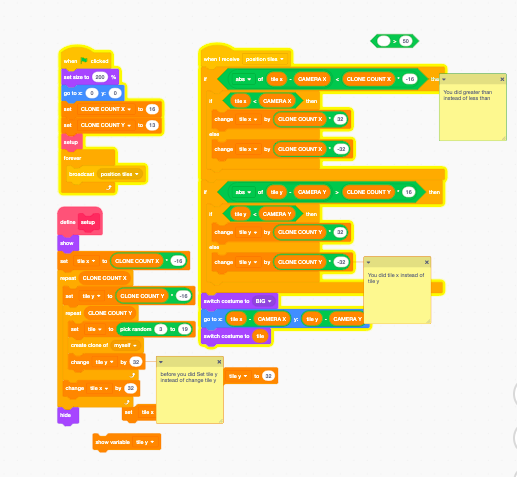
You probably did not double or triple check. Like i said, it was small mistakes. Next time figure it out yourself especially when people told you to double check. I figured out the problem. You did set variables instead of change, you used greater than instead of less than, you used x instead of y. Here is what you should do.Why do I get a feeling that when I follow Griffpatch's tutorials, even when I follow his scripts exactly, why does my project not do the same thing as Griffpatch?Double check the work always, it could be a small error. maybe you did not make a variable for “this sprite only” or you did not make a custom block with screen refresh. Can you please tell me what tutorial you are using? I am actually making a multiplayer scrolling platformer with two of griffpatch's tutorials combined.
I did, nothing isn't matching Griffpatch's scripts.
Last edited by CodingBaguette (Feb. 16, 2021 20:06:20)
- deck26
-
Scratcher
1000+ posts
Griffpatch's Tutorial
Seriously, you think you've copied the scripts from the tutorial?
There's a difference between change x by 32 and set x to 32. And if you're supposed to be setting a y variable there's no point setting an x variable. And you need to spot the difference between less than and greater than symbols.
If you follow a tutorial and don't know enough to change things you need to follow it EXACTLY and that requires attention to details like this. I remixed your project and only made changes to bring it into line with the tutorial and it all worked as it should. Go back to the later stage of the tutorial and freeze the screen where you can see the different scripts in their final state and look closely at the details.
Edit - Ninja'd by @CodingBaguette. But as we said from the start you had made errors in following the tutorial.
There's a difference between change x by 32 and set x to 32. And if you're supposed to be setting a y variable there's no point setting an x variable. And you need to spot the difference between less than and greater than symbols.
If you follow a tutorial and don't know enough to change things you need to follow it EXACTLY and that requires attention to details like this. I remixed your project and only made changes to bring it into line with the tutorial and it all worked as it should. Go back to the later stage of the tutorial and freeze the screen where you can see the different scripts in their final state and look closely at the details.
Edit - Ninja'd by @CodingBaguette. But as we said from the start you had made errors in following the tutorial.
Last edited by deck26 (Feb. 16, 2021 20:13:09)
- CodingBaguette
-
Scratcher
500+ posts
Griffpatch's Tutorial
Seriously, you think you've copied the scripts from the tutorial?Yeah, it took me like 15 minutes just to figure out how to add a photo
There's a difference between change x by 32 and set x to 32. And if you're supposed to be setting a y variable there's no point setting an x variable. And you need to spot the difference between less than and greater than symbols.
If you follow a tutorial and don't know enough to change things you need to follow it EXACTLY and that requires attention to details like this. I remixed your project and only made changes to bring it into line with the tutorial and it all worked as it should. Go back to the later stage of the tutorial and freeze the screen where you can see the different scripts in their final state and look closely at the details.
Edit - Ninja'd by @CodingBaguette. But as we said from the start you had made errors in following the tutorial.

- Nezon
-
 Scratcher

1000+ posts
Griffpatch's Tutorial
Edit - Ninja'd by @CodingBaguette.woah, you have actually done a trend
- Discussion Forums
- » Help with Scripts
-
» Griffpatch's Tutorial