Discuss Scratch
- Discussion Forums
- » Bugs and Glitches
- » Fix: Project Wont Save After I've Uploaded Audio
![[RSS Feed]](//cdn.scratch.mit.edu/scratchr2/static/__3da742731204c0148352e5fd3a64dde9__//djangobb_forum/img/feed-icon-small.png "[RSS Feed]")
![[RSS Feed]](http://cdn.scratch.mit.edu/scratchr2/static/__3da742731204c0148352e5fd3a64dde9__//djangobb_forum/img/feed-icon-small.png "[RSS Feed]")
- codemaster_inc
-
 Scratcher

16 posts
Fix: Project Wont Save After I've Uploaded Audio
My browser / operating system: Windows NT 10.0, Chrome 71.0.3578.98, No Flash version detected
I posted about this earlier, but I've tracked the bug down even further! It's not so much to do with audio length/total audio data, but rather to do with editing the audio. Uploading music to a project worked fine, but as soon as I edited it, the saving broke. Removing the audio and putting it back fixes it.
Below is a gif showing the audio work before editing, and break after.
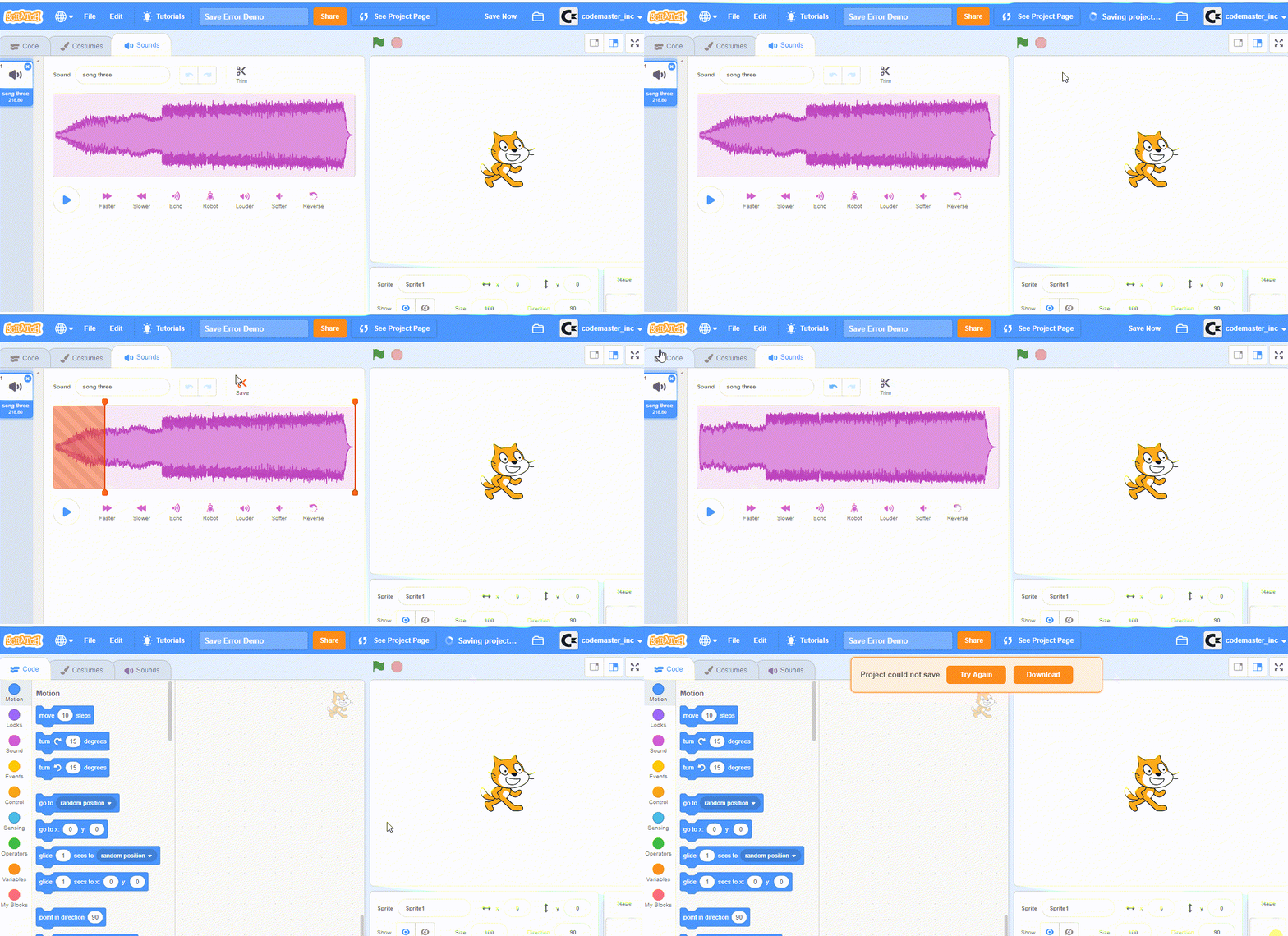
To fix, remove the audio and put it back. AND NEVER EDIT IT IN SCRATCH. Until they fix it, of course.

I posted about this earlier, but I've tracked the bug down even further! It's not so much to do with audio length/total audio data, but rather to do with editing the audio. Uploading music to a project worked fine, but as soon as I edited it, the saving broke. Removing the audio and putting it back fixes it.
Below is a gif showing the audio work before editing, and break after.
To fix, remove the audio and put it back. AND NEVER EDIT IT IN SCRATCH. Until they fix it, of course.
Last edited by codemaster_inc (Jan. 12, 2019 09:43:51)
- Skeletron2007
-
 Scratcher

3 posts
Fix: Project Wont Save After I've Uploaded Audio
and they have still not fixed it.. and it has been at least 3 months

- The_MusicalDoodle
-
 Scratcher

71 posts
Fix: Project Wont Save After I've Uploaded Audio
Still not fixed? I FINALLY got a good audio of myself but it won't save 

- Skeletron2007
-
Scratcher
3 posts
Fix: Project Wont Save After I've Uploaded Audio
still not fixed after almost half a year….
- CatsUnited
-
 Scratcher

1000+ posts
Fix: Project Wont Save After I've Uploaded Audio
For anyone wondering as to what's going on with this issue:
For the issue with the sound editor, the reason it acts weird with files sometimes is because it's only able to modify sounds if the file is a WAV file. You can import an MP3 file, but it gets automatically converted to WAV if you try to modify the sound within the editor, however you can keep it stored in the project as an MP3 file if you don't make any changes to it. Since WAV is a larger format than MP3, the sound editor locks you out of modifying the sound if the resultant WAV file will be larger than 10 MB, which is the asset limit.I don't know if OP already knows this or not, but I'm just going to post that here for reference
To get around this, you'll have to edit the sound using an external audio editing program and then import it as an MP3 into Scratch.
- amircraft2007
-
 Scratcher

4 posts
Fix: Project Wont Save After I've Uploaded Audio
ima quit scratch cuz of this problem like click team and unity mite be hard but to upload audio on those platforms are easy. BTW the desktop version saves the audio
- LaurensTheTurtleBoi
-
 Scratcher

1 post
Fix: Project Wont Save After I've Uploaded Audio
I have the exact same problem my audio file is 3 minutes long tho T~T
I just want my Schuyler Sisters…
I just want my Schuyler Sisters…
- NoNEd
-
 Scratcher

18 posts
Fix: Project Wont Save After I've Uploaded Audio
Still not working UNTILL NOW!
- whatisyolife
-
 Scratcher

12 posts
Fix: Project Wont Save After I've Uploaded Audio
February 20 still not working
- mats4medal17
-
 Scratcher

1 post
Fix: Project Wont Save After I've Uploaded Audio
ye I uploaded a music thingy ( which is actually like 5 min long maybe that's the problem but I don't think so ) and so on my pc when i did that, i saved it and it said couldn't save so i started freaking out and i tried on my mom's pc because it is WAY faster and it still doesn't work so like im pretty lost and confused.
when green flag clicked
set [what should i do? v] to []
- chucky-cheese-balls
-
 Scratcher

26 posts
Fix: Project Wont Save After I've Uploaded Audio
still not working
- WilliamsVSV
-
 New Scratcher

1 post
Fix: Project Wont Save After I've Uploaded Audio
.wav still not working 20 June 2020
- sonicace
-
 Scratcher

29 posts
Fix: Project Wont Save After I've Uploaded Audio
Don't perform multiple edits at once, doing this can cause an overload to the system as editing audio isn't an easy task.
Also, try using another sound format, some are easier to edit than others.
Also, try using another sound format, some are easier to edit than others.
Last edited by sonicace (June 20, 2020 13:01:19)
- pvzsupersanicman
-
 Scratcher

50 posts
Fix: Project Wont Save After I've Uploaded Audio
when green flag clicked
forever
say [.........................................................................................................................]
end
- yuzarseef
-
 Scratcher

11 posts
Fix: Project Wont Save After I've Uploaded Audio
when green flag clicked
say [doesn't work:(] for (2) secs
- lillyfern
-
 Scratcher

100+ posts
Fix: Project Wont Save After I've Uploaded Audio
I have a chromebook as well, and the same problem
- lazyperson55
-
 Scratcher

12 posts
Fix: Project Wont Save After I've Uploaded Audio
Still not fixed after over a year and a half… -_-
- geometric_ghast
-
 Scratcher

1000+ posts
Fix: Project Wont Save After I've Uploaded Audio
Still not fixed after over a year and a half… -_-Please don't necropost

- fatitoac
-
 Scratcher

7 posts
Fix: Project Wont Save After I've Uploaded Audio
This Has Been Never Fixed
when green flag clicked
broadcast [[scratchblocks]
 v][/scratchblocks]
broadcast [ [scratchblocks]
v]
broadcast [ CRI]
[/scratchblocks]
- Discussion Forums
- » Bugs and Glitches
-
» Fix: Project Wont Save After I've Uploaded Audio