Discuss Scratch

![[RSS Feed]](http://cdn.scratch.mit.edu/scratchr2/static/__5b3e40ec58a840b41702360e9891321b__//djangobb_forum/img/feed-icon-small.png "[RSS Feed]")
- RokCoder
-
 Scratcher

1000+ posts
RokCoder's Save-Game Toolkit
RokCoder's Save-Game Toolkit
Add game loading and saving to any project!
Add game loading and saving to any project!
Features include:
- Compression to give the shortest possible codes
- Error reporting to allow you to handle invalid codes
- Optional CRC to verify codes are valid
- Optional username encoding so that codes for games saved by a certain user will only work for that specific user
- Handles all data (booleans, strings, integers and floating point numbers)
- Project contains a sample use of the save-game code system

Instructions for use
- Backpack the Savegame sprite from the Toolkit project and add it to your own project
- Add a format description list
- To save a game put your game data into a list and broadcast to create a save-game code
- To load a game broadcast to decode a save-game code and put the data from the list into your game
Format description list
The toolkit needs to know the format of the data to be saved - whether it contains strings, booleans, lists, etc. To do this, modify the Savegame: format list. For example, if you want to save a string and an integer the list would contain -
string length 10
integer
These are the values that can be used in the format list -
- boolean {array <array length>}
- string {extended} {“variable”} length <max length> {array <array length>}
- integer {min <min value>} {max <max value>} {array <array length>}
- float {min <min value>} {max <max value>} {precision <decimal places>} {array <array length | varName>}
Directives
- assign <varName>
encode - crc
Adding encode to the format list will make the savegame code encrypted using the player's username. This means that players cannot share their savegame codes.
Adding crc to the format list forces the toolkit to check the validity of entered savegame codes which prevents players from being able to guess random codes.
Format syntax
boolean - A single boolean value
boolean array 10 - A list of ten boolean values
string length 10 - a string exactly ten characters long
string variable length 10 - a string that is a maximum of ten characters long
string variable length 10 array 4 - a list of four strings, each of which is a maximum of ten characters long
integer - an integer (whole number) between 0 and 63
integer min 10 - an integer (whole number) between 10 and 63
integer max 100 - an integer (whole number) between 0 and 100
integer min -10 max 50 - an integer (whole number) between -10 and 50
integer min -10 max 10 array 5 - a list of five integers each of which is between -10 and 10
float works the same as integer with the addition of the optional precision parameter to define the number of decimal places. By default it will store floats with one decimal place (e.g. 4.51 will be stored as 4.5).
Example using the toolkit
For a simple game we might want to store the character that the player has chosen to use, the name he has given that character, his maximum hit points, his current hit points and a list of which treasures have been found. The format list (Savegame: format) would look something like this -
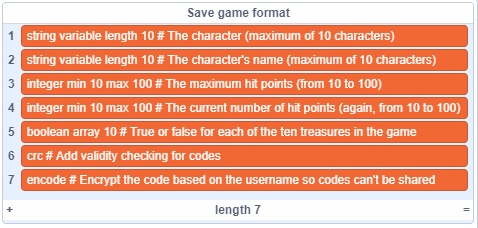
Note that you can add comments at any point in the format file by adding the # character but this is entirely optional.
To save the game, the game data would need to be written to the Savegame: data list. The script for that would be similar to this -
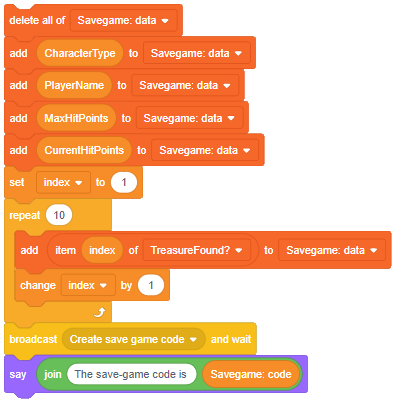
To load a game the script would look something like this -

Final notes
I wrote this toolkit because I've lost count of the number of times I've implemented different save-game systems in projects. Using this solution I'll never need to write another one! I'm contemplating doing something similar for cloud variables so please let me know if you might find that useful.
If you have any questions, suggestions, improvements, feedback or bug reports, please post them to this forum.
Last edited by RokCoder (Feb. 3, 2020 12:56:25)
- Cloud-Multiplayer
-
 Scratcher

100 posts
RokCoder's Save-Game Toolkit
Cloud would be really useful! I can then use this to shorten up data so that I can have more room to add more!
- dude341
-
 Scratcher

1000+ posts
RokCoder's Save-Game Toolkit
This looks really useful! Perhaps if it could be adapted to use number-based save codes suitable for Cloud Data, I could use this for the Earthworm Jim collab.
Also, may I ask how you got the list names on the screen to be different from their actual names? For example, “Save game format” is actually called “Savegame: format” inside the project.
Also, may I ask how you got the list names on the screen to be different from their actual names? For example, “Save game format” is actually called “Savegame: format” inside the project.
Last edited by dude341 (July 30, 2019 22:55:32)
- RokCoder
-
Scratcher
1000+ posts
RokCoder's Save-Game Toolkit
Cloud would be really useful!
Perhaps if it could be adapted to use number-based save codes suitable for Cloud Data.I'll look into this when I get to the high score cloud storage of the Mr. Do! game that I'm currently working on.
Also, may I ask how you got the list names on the screen to be different from their actual names?That wasn't by design. There's a Scratch 3.0 bug which means it displays the original list name even if the list has been renamed.


- Maximouse
-
 Scratcher

1000+ posts
RokCoder's Save-Game Toolkit
I think that multidimensional arrays would be a useful feature.
- RokCoder
-
Scratcher
1000+ posts
RokCoder's Save-Game Toolkit
I think that multidimensional arrays would be a useful feature.But Scratch doesn't have multidimensional arrays/lists?
- Maximouse
-
Scratcher
1000+ posts
RokCoder's Save-Game Toolkit
But Scratch doesn't have multidimensional arrays/lists?
I know. I meant formats like this:
integer min 0 max 100
assign var1
integer min 0 max 100
assign var2
string variable length 10 array var1 var2 # two-dimensional array
This is useful if you want to save a table.
- Goldtabby
-
 Scratcher

95 posts
RokCoder's Save-Game Toolkit
??? Ok. Hi, could you please make a cloud login for my OS? I would really appreciate it! Thx!
follow
say [me]
now

- kriblo
-
 Scratcher

100+ posts
RokCoder's Save-Game Toolkit
Wow, you've really gone to town with this! Excellent work!
- RokCoder
-
Scratcher
1000+ posts
RokCoder's Save-Game Toolkit
Wow, you've really gone to town with this! Excellent work!Thanks! I was writing different save game scripts for each project before I made this. Now it's just a five minute job for each game

- cs2011226
-
 Scratcher

35 posts
RokCoder's Save-Game Toolkit
when green flag clicked
say [Ok.]
ask [But can I do it with just numbers?] and wait
if <(answer) = [yes]> then


say [Can someone show me how to do it?]

else

say [Ok.]
- RokCoder
-
Scratcher
1000+ posts
RokCoder's Save-Game Toolkit
Can I do it with just numbers?Not with this script. I'll probably make a cloud one at some point but haven't done it yet.
- Tender_babies
-
 Scratcher

4 posts
RokCoder's Save-Game Toolkit
Will you please dumb this down for me or put this in my game please and make it where when they press the save button that would be nice here is my project Your text to link here…RokCoder's Save-Game Toolkit
Add game loading and saving to any project!
Features include:
- Compression to give the shortest possible codes
- Error reporting to allow you to handle invalid codes
- Optional CRC to verify codes are valid
- Optional username encoding so that codes for games saved by a certain user will only work for that specific user
- Handles all data (booleans, strings, integers and floating point numbers)
- Project contains a sample use of the save-game code system
Instructions for use
- Backpack the Savegame sprite from the Toolkit project and add it to your own project
- Add a format description list
- To save a game put your game data into a list and broadcast to create a save-game code
- To load a game broadcast to decode a save-game code and put the data from the list into your game
Format description list
The toolkit needs to know the format of the data to be saved - whether it contains strings, booleans, lists, etc. To do this, modify the Savegame: format list. For example, if you want to save a string and an integer the list would contain -
string length 10
integer
These are the values that can be used in the format list -Parameters in <angled brackets> are compulsory. Parameters in {curly brackets} are optional.
- boolean {array <array length>}
- string {extended} {“variable”} length <max length> {array <array length>}
- integer {min <min value>} {max <max value>} {array <array length>}
- float {min <min value>} {max <max value>} {precision <decimal places>} {array <array length | varName>}
DirectivesAdding assign count will assign the variable count with whatever value was previously encountered. This variable can then be used to declare the lengths of arrays. This is extremely useful if you need to save arrays of data that may be different lengths each time.
- assign <varName>
encode- crc
Adding encode to the format list will make the savegame code encrypted using the player's username. This means that players cannot share their savegame codes.
Adding crc to the format list forces the toolkit to check the validity of entered savegame codes which prevents players from being able to guess random codes.
Format syntax
boolean - A single boolean value
boolean array 10 - A list of ten boolean values
string length 10 - a string exactly ten characters long
string variable length 10 - a string that is a maximum of ten characters long
string variable length 10 array 4 - a list of four strings, each of which is a maximum of ten characters long
integer - an integer (whole number) between 0 and 63
integer min 10 - an integer (whole number) between 10 and 63
integer max 100 - an integer (whole number) between 0 and 100
integer min -10 max 50 - an integer (whole number) between -10 and 50
integer min -10 max 10 array 5 - a list of five integers each of which is between -10 and 10
float works the same as integer with the addition of the optional precision parameter to define the number of decimal places. By default it will store floats with one decimal place (e.g. 4.51 will be stored as 4.5).
Example using the toolkit
For a simple game we might want to store the character that the player has chosen to use, the name he has given that character, his maximum hit points, his current hit points and a list of which treasures have been found. The format list (Savegame: format) would look something like this -
Note that you can add comments at any point in the format file by adding the # character but this is entirely optional.
To save the game, the game data would need to be written to the Savegame: data list. The script for that would be similar to this -
To load a game the script would look something like this -
Final notes
I wrote this toolkit because I've lost count of the number of times I've implemented different save-game systems in projects. Using this solution I'll never need to write another one! I'm contemplating doing something similar for cloud variables so please let me know if you might find that useful.
If you have any questions, suggestions, improvements, feedback or bug reports, please post them to this forum.
- Goldtabby
-
Scratcher
95 posts
RokCoder's Save-Game Toolkit
I'm having a hard time understanding this… Can you help me?
When it loads the game, If I was using lists, would it come out like this:
( Example List )
1(ex1 ex2 ex3 )
all in one row,
or like this:
( Example List )
1(ex1)
2(ex2)
3(ex3)
I need it to come out the second way!
When it loads the game, If I was using lists, would it come out like this:
( Example List )
1(ex1 ex2 ex3 )
all in one row,
or like this:
( Example List )
1(ex1)
2(ex2)
3(ex3)
I need it to come out the second way!
- RokCoder
-
Scratcher
1000+ posts
RokCoder's Save-Game Toolkit
I'm having a hard time understanding this… Can you help me?I've set up a simple example to show how a list of five numbers can be saved/loaded.
Notice that the Savegame: format list is already set up. This should be modified for whatever data you want to save/load.
- Goldtabby
-
Scratcher
95 posts
RokCoder's Save-Game Toolkit
I'm having a hard time understanding this… Can you help me?I've set up a simple example to show how a list of five numbers can be saved/loaded.
Notice that the Savegame: format list is already set up. This should be modified for whatever data you want to save/load.
What is the format for?
- RokCoder
-
Scratcher
1000+ posts
RokCoder's Save-Game Toolkit
So the toolkit knows what data to save. It can save strings, numbers, lists and pretty much anything else but you need to let it know.Notice that the Savegame: format list is already set up. This should be modified for whatever data you want to save/load.
What is the format for?
- Goldtabby
-
Scratcher
95 posts
RokCoder's Save-Game Toolkit
So the toolkit knows what data to save. It can save strings, numbers, lists and pretty much anything else but you need to let it know.Notice that the Savegame: format list is already set up. This should be modified for whatever data you want to save/load.
What is the format for?
So I just put the word ‘strings’ in it?