Discuss Scratch

![[RSS Feed]](http://cdn.scratch.mit.edu/scratchr2/static/__5b3e40ec58a840b41702360e9891321b__//djangobb_forum/img/feed-icon-small.png "[RSS Feed]")
- ggenije
-
 Scratcher

500+ posts
Minimize scratch block group
Hope this is not a duplicate/closed, I gave my best…
As my previous idea became too complex, I came up with a new idea:
Idea:
The main idea is minimizable scratch block group like custom block or broadcast or when green flag clicked (which one will be called “starting block” in next text)
How it works?
Right click on any “starting block” or even any other block in the script , and there will be pop-up option to minimize whole block group, leaving only the “starting block” and block which don't have option to be continued (like stop all).
Then when you want to maximize back just press arrow which is placed on that stop a like button (see image below)
Also there may be “minimize all” button which may be useful.
Why minimizing?
Same as before idea: ,there are plenty of reasons but MAIN reason is to reduce lag when you have 2000+ blocks(you can see in the image down there), it will start to lag also you'll need to wait 2-10 seconds to load the sprite , also I can't work on my laptop because it's to slow and it's lagging because of that high number of blocks in that sprite.
Is it all ages friendly?
This is literally the most simple thing, just like a minimizing a window, and will not make scratch more complex.
What is difference between this suggestion and Best block idea! Organise code (CODE SECTIONS)
This is much simpler , the other idea uses new block and mine just option.
There is image how it will look like:
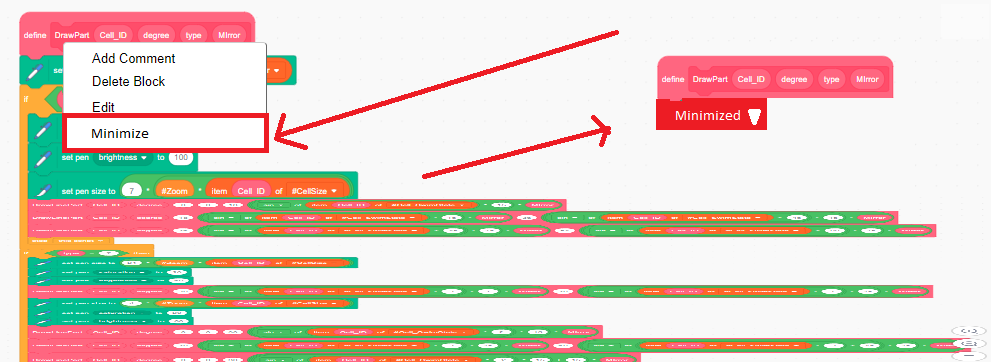
As my previous idea became too complex, I came up with a new idea:
Idea:
The main idea is minimizable scratch block group like custom block or broadcast or when green flag clicked (which one will be called “starting block” in next text)
How it works?
Right click on any “starting block” or even any other block in the script , and there will be pop-up option to minimize whole block group, leaving only the “starting block” and block which don't have option to be continued (like stop all).
Then when you want to maximize back just press arrow which is placed on that stop a like button (see image below)
Also there may be “minimize all” button which may be useful.
Why minimizing?
Same as before idea: ,there are plenty of reasons but MAIN reason is to reduce lag when you have 2000+ blocks(you can see in the image down there), it will start to lag also you'll need to wait 2-10 seconds to load the sprite , also I can't work on my laptop because it's to slow and it's lagging because of that high number of blocks in that sprite.
Is it all ages friendly?
This is literally the most simple thing, just like a minimizing a window, and will not make scratch more complex.
What is difference between this suggestion and Best block idea! Organise code (CODE SECTIONS)
This is much simpler , the other idea uses new block and mine just option.
There is image how it will look like:
Last edited by ggenije (June 9, 2020 18:56:49)
- UnconstructivePoster
-
 New Scratcher

100+ posts
Minimize scratch block group
Support - this would make it much easier to organize code.
Last edited by UnconstructivePoster (Aug. 29, 2019 12:31:40)
- DaEpikDude
-
 Scratcher

1000+ posts
Minimize scratch block group
I'd definitely like any sort of option to make your code cleaner, so that's a support from me.
Although I would like to be able to minimise both cap blocks (when flag clicked, when i start as a clone etc.) and C blocks (if, repeat etc.).
Edit: If minimised cap blocks would look like
(Maybe the block could say “expand” instead of “minimised” as well?)
Although I would like to be able to minimise both cap blocks (when flag clicked, when i start as a clone etc.) and C blocks (if, repeat etc.).
Edit: If minimised cap blocks would look like
when gf clickedthen a minimised C block would probably look like
minimised ▼
repeat (10)
minimised ▼
(Maybe the block could say “expand” instead of “minimised” as well?)
Last edited by DaEpikDude (Aug. 30, 2019 01:55:10)
- LegoManiac04
-
 Scratcher
1000+ posts
Minimize scratch block group
Support.
Especially when making long sets of code, this would be extremely useful. This would also be really great for mobile users (such as myself) as it isn't necessarily the easiest to navigate the editor when there's long sets of code.
The only problem that comes to mind is that if you minimize some code, but have some code right underneath the minimized code, when you maximize the code it will cover, and possibly interfere with the code below.
Especially when making long sets of code, this would be extremely useful. This would also be really great for mobile users (such as myself) as it isn't necessarily the easiest to navigate the editor when there's long sets of code.

The only problem that comes to mind is that if you minimize some code, but have some code right underneath the minimized code, when you maximize the code it will cover, and possibly interfere with the code below.
- ggenije
-
Scratcher
500+ posts
Minimize scratch block group
I'd definitely like any sort of option to make your code cleaner, so that's a support from me.
Although I would like to be able to minimise both cap blocks (when flag clicked, when i start as a clone etc.) and C blocks (if, repeat etc.).
Edit: If minimised cap blocks would look likewhen gf clickedthen a minimised C block would probably look like
minimised ▼repeat (10)
minimised ▼
The reason for being to minimize only the “cap” blocks(flags, custom blocks, when I start as clone) is because you can see what is minimized by looking the top “cap” block , this way you won't get confused to find target script, also there is solution to add “labels” which says which “function” that minimized block is doing , but then that will convert to this:
Best block idea! Organise code (CODE SECTIONS)
which is maybe to complex, so just minimizing the cap block will be the best solution.
Also you can use
repeat (10)
 custom/define block :: #632e99
end
(Maybe the block could say “expand” instead of “minimised” as well?)
Doesn't matter to me , it's just important to remove lag and to be easier to work in the editor.
- ggenije
-
Scratcher
500+ posts
Minimize scratch block group
The only problem that comes to mind is that if you minimize some code, but have some code right underneath the minimized code, when you maximize the code it will cover, and possibly interfere with the code below.
Stack minimized scripts on one pile, then you want to edit some code move all minimized block you want to edit , arrange them horizontally then maximize the scripts , then when you finish return them back to pile

- Dragonlord767
-
 Scratcher

1000+ posts
Minimize scratch block group
Support.
I HATE moving around my long scripts. However, I think it would have to look like the replies in a long comment chain, to avoid confusion when debugging.
I HATE moving around my long scripts. However, I think it would have to look like the replies in a long comment chain, to avoid confusion when debugging.
- martinlaoshi
-
 Scratcher

25 posts
Minimize scratch block group
Support!
As an easy workaround I use My Blocks.
As an easy workaround I use My Blocks.
- adumbfull
-
 Scratcher

52 posts
Minimize scratch block group
Hope this is not a duplicate/closed, I gave my best…
As my previous idea became too complex, I came up with a new idea:
Idea:
The main idea is minimizable scrtach block group like custom block or broadcast or when green flag clicked (which one will be called “starting block” in next text)
How it works?
Right click on any “starting block” or even any other block in the script , and there will be pop-up option to minimize whole block group, leaving only the “starting block” and block which don't have option to be continued (like stop all).
Then when you want to maximize back just press arrow which is placed on that stop a like button (see image below)
Also there may be “minimize all” button which may be useful.
Why minimizing?
Same as before idea: ,there are plenty of reasons but MAIN reason is to reduce lag when you have 2000+ blocks(you can see in the image down there), it will start to lag also you'll need to wait 2-10 seconds to load the sprite , also I can't work on my laptop because it's to slow and it's lagging because of that high number of blocks in that sprite.
Is it all ages friendly?
This is literally the most simple thing, just like a minimizing a window, and will not make scratch more complex.
What is difference between this suggestion and Best block idea! Organise code (CODE SECTIONS)
This is much simpler , the other idea uses new block and mine just option.
There is image how it will look like:
Also “good partner” of this topic is Go to Definition suggestion.
Nice, if the Scratch team adds this it will be a great feature!
- bushymurry
-
 Scratcher

17 posts
Minimize scratch block group
Support. I am working on a project which has tons of long scripts. If these were minimized, it would be much easier to handle.
Additionally, it would probably make scratch faster, since it doesn't have to draw so many blocks.
Additionally, it would probably make scratch faster, since it doesn't have to draw so many blocks.
- 1132262
-
 Scratcher

1000+ posts
Minimize scratch block group
Support. While there are a few technical questions to sort out (When you right-click and minimize the top block, how many of the blocks would be minimized with it?) I feel like this would be a really useful feature.
- ggenije
-
Scratcher
500+ posts
Minimize scratch block group
While there are a few technical questions to sort out (When you right-click and minimize the top block, how many of the blocks would be minimized with it?)All the block within that top block, because point to is to hide scripts which are unnecessary to change in close future.

- cs240487
-
 Scratcher

26 posts
Minimize scratch block group
Support! I'm making a large game and I could seriously use this!
- Nambaseking01
-
 Scratcher

1000+ posts
Minimize scratch block group
Support. I usually try to make huge projects, so this would be really useful (ehh, posted on too many topics and getting more and more less constructive)