Discuss Scratch

- Discussion Forums
- » Bugs and Glitches
- » Flag & Stop Covered By Save Dialog
![[RSS Feed]](//cdn.scratch.mit.edu/scratchr2/static/__5f750b17a17db0b5d7ffaf5afb2e7e2b__//djangobb_forum/img/feed-icon-small.png "[RSS Feed]")
![[RSS Feed]](http://cdn.scratch.mit.edu/scratchr2/static/__5f750b17a17db0b5d7ffaf5afb2e7e2b__//djangobb_forum/img/feed-icon-small.png "[RSS Feed]")
- bushymurry
-
 Scratcher

17 posts
Flag & Stop Covered By Save Dialog
When a project cannot save, a dialog appears with two buttons: “Try Again” and “Download”
There are many reasons a project could not save, such as no internet or too many items in lists.
However, this dialog covers the green flag and stop buttons.
This is because the <div> spans the entire width of the screen, as shown in this image.
UPDATE (8/31/19):
When it Started: This has been a problem since the beginning of Scratch 3 (not counting beta/preview) .
Where it is: It can be reproduced with any Scratch 3 editor.
Reproduction Steps: To reproduce, create a new project, fill a few lists with 200000 items and click “save now.” The dialog should come up. Now try to click the green flag. It cannot be done.
Expected Result: The flag button responds when hovered over (highlights itself) and clicked (starts any scripts starting with “when flag clicked”). The stop button stops all scripts when clicked and highlights when enabled and hovered over.
Actual Result: The flag button does not respond to hovering or clicking while the dialog is up. The stop button does not respond to any hovering or clicking.
My browser / operating system: Windows NT 10.0, Firefox 68.0, No Flash version detected (but affects all browsers & operating systems)
Image: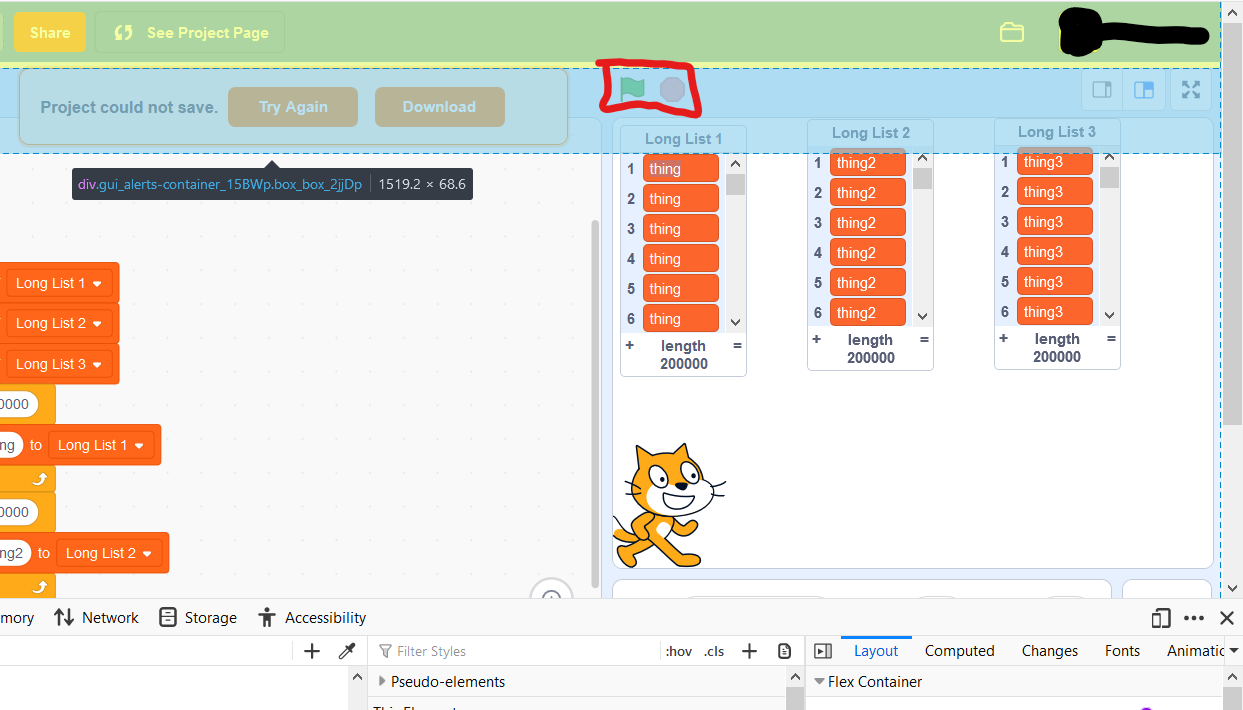
Possible solution: in .gui_alerts-container_15BWp style, remove “width: 100%;” and add “margin-left: 30%” or “margin-left: 350px”
There are many reasons a project could not save, such as no internet or too many items in lists.
However, this dialog covers the green flag and stop buttons.
This is because the <div> spans the entire width of the screen, as shown in this image.
UPDATE (8/31/19):
As mentioned by CatsUnited, this bug also affects the Code, Costumes/Backdrops, and Sounds tabs, as well as the stage size buttons (small, big, fullscreen)
When it Started: This has been a problem since the beginning of Scratch 3 (not counting beta/preview) .
Where it is: It can be reproduced with any Scratch 3 editor.
Reproduction Steps: To reproduce, create a new project, fill a few lists with 200000 items and click “save now.” The dialog should come up. Now try to click the green flag. It cannot be done.
Expected Result: The flag button responds when hovered over (highlights itself) and clicked (starts any scripts starting with “when flag clicked”). The stop button stops all scripts when clicked and highlights when enabled and hovered over.
Actual Result: The flag button does not respond to hovering or clicking while the dialog is up. The stop button does not respond to any hovering or clicking.
My browser / operating system: Windows NT 10.0, Firefox 68.0, No Flash version detected (but affects all browsers & operating systems)
Image:
Possible solution: in .gui_alerts-container_15BWp style, remove “width: 100%;” and add “margin-left: 30%” or “margin-left: 350px”
Last edited by bushymurry (Aug. 31, 2019 16:48:29)
- bushymurry
-
Scratcher
17 posts
Flag & Stop Covered By Save Dialog
If anyone can reproduce the problem, please reply with “CR.”
By replying, you help get the attention of the Scratch team, and make it more likely that this problem gets fixed.
By replying, you help get the attention of the Scratch team, and make it more likely that this problem gets fixed.
- CatsUnited
-
 Scratcher

1000+ posts
Flag & Stop Covered By Save Dialog
Was able to replicate. The costume and sound pane buttons, along with the small screen, standard screen and full screen stage options were also covered by that div element. Since it's a coding issue, it doesn't appear to be OS or browser specific.
My browser / operating system: MacOS Macintosh X 10.13.6, Chrome 76.0.3809.132
My browser / operating system: MacOS Macintosh X 10.13.6, Chrome 76.0.3809.132

- bushymurry
-
Scratcher
17 posts
Flag & Stop Covered By Save Dialog
I still believe this topic is relevant, until we get confirmation that this has been seen by the Scratch Team.
(updated topic post)
(updated topic post)
- SirFlimFlam
-
 Scratcher

90 posts
Flag & Stop Covered By Save Dialog
I have reproduced this many times in the past, even today.
I don't think it's a glitch though. Even if it is, you can click “Try Again” and then you can temporarily access the covered areas until the dialog pops back up.
I don't think it's a glitch though. Even if it is, you can click “Try Again” and then you can temporarily access the covered areas until the dialog pops back up.
- bushymurry
-
Scratcher
17 posts
Flag & Stop Covered By Save Dialog
I do believe it is a glitch.
My script automatically clears all the lists when I click the flag.
However, here's what I have to do to NOW to save my project:
Here's what I will be able to do to save it once it's fixed:
PLUS
I don't always WANT to save every time I click the flag. I may click it 20 times before I save.
And remember, this also applies to the tabs and Stage size. If I want to use any of those, I have to first click try again.
I believe it is a glitch because I don't think the ST intended to cover the buttons with this dialog. I think it was just intended to notify that the project failed to save.
My script automatically clears all the lists when I click the flag.
However, here's what I have to do to NOW to save my project:
- Click “Try Again”
- Hit the Flag button
- Hit the Stop button
- Wait for dialog to pop up again (~3 secs)
- Click “Try Again”
It saves
Here's what I will be able to do to save it once it's fixed:
- Click the Flag button
- Click the Stop button
- Click try again
It saves
PLUS
I don't always WANT to save every time I click the flag. I may click it 20 times before I save.
And remember, this also applies to the tabs and Stage size. If I want to use any of those, I have to first click try again.
I believe it is a glitch because I don't think the ST intended to cover the buttons with this dialog. I think it was just intended to notify that the project failed to save.
Last edited by bushymurry (Aug. 31, 2019 21:14:22)
- SirFlimFlam
-
Scratcher
90 posts
Flag & Stop Covered By Save Dialog
I'd say it might not be a glitch, rather it may be like that to make sure the user is completely aware their work could be lost.
- bushymurry
-
Scratcher
17 posts
Flag & Stop Covered By Save Dialog
I think the message is enough to make the user aware that their project failed to save, and I don't think the user should have to click try again every time they want to access the flag(or another button).
Also, in Scratch 2, I believe the “could not save” dialog did not cover the flag,etc.
It really depends on the Scratch Team's reasoning for making the div element so wide (and whether they intended to cover the buttons).
Also, in Scratch 2, I believe the “could not save” dialog did not cover the flag,etc.
It really depends on the Scratch Team's reasoning for making the div element so wide (and whether they intended to cover the buttons).
- bushymurry
-
Scratcher
17 posts
Flag & Stop Covered By Save Dialog
Does anyone else experience this problem?


- SpiderSutenGod
-
 Scratcher
100+ posts
Flag & Stop Covered By Save Dialog
Bruh
when green flag clicked
forever
broadcast [scratch team please fix the problems with green flag and stop v]
define MCGUY is Sad Because Of The Bugs With Green Flag And Stop....
forever
fix [bugs v]
- mightybrayan
-
 Scratcher

100+ posts
Flag & Stop Covered By Save Dialog
Please don't put random messages in blocks, they make it hard to read.Bruhwhen green flag clicked
forever
broadcast [scratch team please fix the problems with green flag and stop v]
define MCGUY is Sad Because Of The Bugs With Green Flag And Stop....
forever
fix [bugs v]

Also, I don't know if this actually impacts much, or does it make it unable to click the flag when it is there?

- UnlinedBus
-
 Scratcher

14 posts
Flag & Stop Covered By Save Dialog
Pls fix dis
if <(length of [ bugs] :: list) = [1]> then
play sound [sad music]
say[nooooooooooooooooooooooooooooooooooooooooooooooooooooooooooooooooooooooooooo]
- SpiderSutenGod
-
Scratcher
100+ posts
Flag & Stop Covered By Save Dialog
Nice Topic! I Used Scratch
Did You Use Inspect Element On A Project Editor? ( Maybe Yes Or No )
I Didnt Necropost. Sorry
Did You Use Inspect Element On A Project Editor? ( Maybe Yes Or No )
I Didnt Necropost. Sorry

- Discussion Forums
- » Bugs and Glitches
-
» Flag & Stop Covered By Save Dialog