Discuss Scratch

- Discussion Forums
- » Bugs and Glitches
- » Control+Z Keyboard Shortcut Glitch
![[RSS Feed]](//cdn.scratch.mit.edu/scratchr2/static/__5b3e40ec58a840b41702360e9891321b__//djangobb_forum/img/feed-icon-small.png "[RSS Feed]")
![[RSS Feed]](http://cdn.scratch.mit.edu/scratchr2/static/__5b3e40ec58a840b41702360e9891321b__//djangobb_forum/img/feed-icon-small.png "[RSS Feed]")
- ChiaJia
-
 Scratcher

62 posts
Control+Z Keyboard Shortcut Glitch
A while back when Scratch was first released, I remember hearing that the bug with Control+Z/Command+Z was fixed. (If I'm wrong, please lmk) However, the glitch still happens for me…
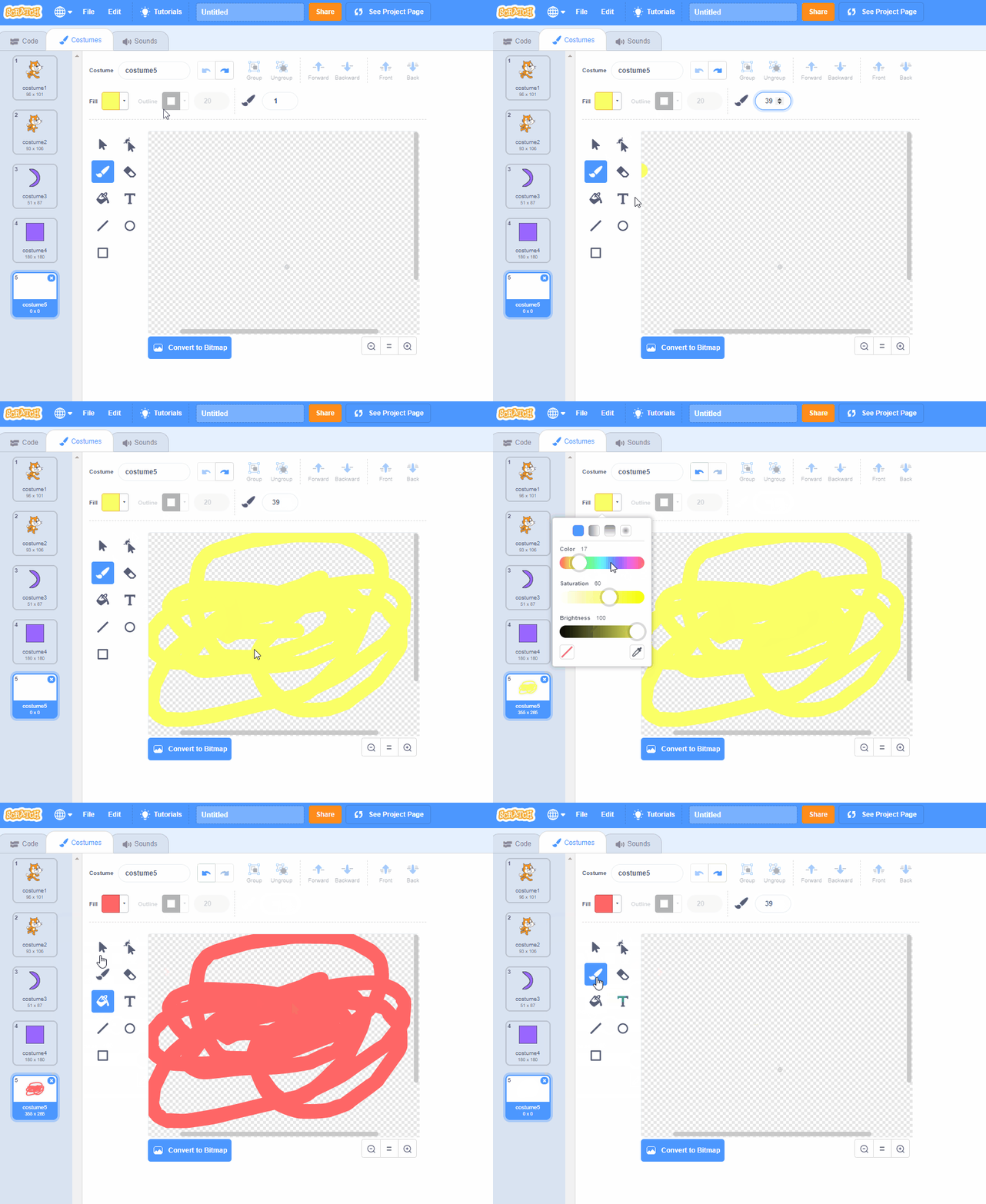
Basically, when I'm in the Paint Editor (I use bitmap) and I change the title/type in the brush size, if I use a tool (e.g., make a brush stroke or use the fill tool) then press Control+Z, the change I made in my art gets undo-ed, but the title/brush size that I edited also gets undo-ed. If I use the “undo” button in the Paint Editor, this glitch doesn't happen
In all of my projects, this glitch happens.
My browser / operating system: Windows NT 10.0, Chrome 74.0.3729.131, No Flash version detected
Basically, when I'm in the Paint Editor (I use bitmap) and I change the title/type in the brush size, if I use a tool (e.g., make a brush stroke or use the fill tool) then press Control+Z, the change I made in my art gets undo-ed, but the title/brush size that I edited also gets undo-ed. If I use the “undo” button in the Paint Editor, this glitch doesn't happen
In all of my projects, this glitch happens.
My browser / operating system: Windows NT 10.0, Chrome 74.0.3729.131, No Flash version detected
Last edited by ChiaJia (May 8, 2019 21:38:23)
- dogeiscut
-
 Scratcher

500+ posts
Control+Z Keyboard Shortcut Glitch
OH MY GORSH I HATE This plz fix scratch
- banana439monkey
-
 Scratcher

1000+ posts
Control+Z Keyboard Shortcut Glitch
CNR, the brush size isn't undone. My browser / operating system: Windows NT 10.0, Chrome 74.0.3729.131, No Flash version detected
Banana
Banana
- ChiaJia
-
Scratcher
62 posts
Control+Z Keyboard Shortcut Glitch
CNR, the brush size isn't undone. My browser / operating system: Windows NT 10.0, Chrome 74.0.3729.131, No Flash version detected
Banana
the glitch only works when you type in the brush size/title

- coolbunnygirlawsome
-
 Scratcher

100+ posts
Control+Z Keyboard Shortcut Glitch
A while back when Scratch was first released, I remember hearing that the bug with Control+Z/Command+Z was fixed. (If I'm wrong, please lmk) However, the glitch still happens for me…Its not a glitch try using that in art programs or typing that's just a short cut to undo stuff.
Basically, when I'm in the Paint Editor (I use bitmap) and I change the title/type in the brush size, if I use a tool (e.g., make a brush stroke or use the fill tool) then press Control+Z, the change I made in my art gets undo-ed, but the title/brush size that I edited also gets undo-ed. If I use the “undo” button in the Paint Editor, this glitch doesn't happen
In all of my projects, this glitch happens.
My browser / operating system: Windows NT 10.0, Chrome 74.0.3729.131, No Flash version detected
- -InsanityPlays-
-
 Scratcher

1000+ posts
Control+Z Keyboard Shortcut Glitch
Scratch is bringing old bugs from the dead now. The messages bug from 2019, images not loading, and now this.
- mtech22
-
 Scratcher

1000+ posts
Control+Z Keyboard Shortcut Glitch
This has happened to me in the past.
My browser / operating system: Windows 8.1, Chrome 86.0.4240.198, No Flash version detected
My browser / operating system: Windows 8.1, Chrome 86.0.4240.198, No Flash version detected
- Fun_Cupcake_i81
-
 Scratcher

1000+ posts
Control+Z Keyboard Shortcut Glitch
Its not a glitch try using that in art programs or typing that's just a short cut to undo stuff.Yes, but you usually only want to undo 1 thing at a time. It can get annoying doing multiple undo-s when you want it to do one.
- zHmonster
-
 Scratcher

100+ posts
Control+Z Keyboard Shortcut Glitch
Ok, THe same thing happens to me. I use bitmap, and when I press Cmd/Ctrl Z, to undo something, it undos it but undos the size, costume name, and sprite name! PLEASE GET THIS FIXED!
- bluedragon8633
-
 Scratcher

1000+ posts
Control+Z Keyboard Shortcut Glitch
I know this is old, but it still hasn't been fixed, and it's really annoying. It would be nice if the pen size/costume name thing only applied when you are in that field, not every time you press Ctrl+Z.

- Mervinpais
-
 Scratcher

14 posts
Control+Z Keyboard Shortcut Glitch
NOTE: this isnt really how scratch's change index in the Scratch API work so, take this with a grain of salt(as in, this post won't be 100% correct)
this bug is proably scratch's index of changes being deleted randomly or now(see below to understand)
so as you can see, this is what i imagine is how scratch saves changes in a list. so what im thinking, the scratch api might miss a change or get confused which change is at what number in the list (see below)
this bug is proably scratch's index of changes being deleted randomly or now(see below to understand)
forever
add [changed color to Blue] to [user Project changes v]
add [changed pensize to 10] to [user Project changes v]
add [changed Name to "Cool Sprite"] to [user Project changes v]
end
so as you can see, this is what i imagine is how scratch saves changes in a list. so what im thinking, the scratch api might miss a change or get confused which change is at what number in the list (see below)
user Project changes listsee, where did pensize change go??so iguess scratch's api is bugged a bit so it forgets stuff
{
change color to Blue
change Name to "Cool Sprite"}
Last edited by Mervinpais (Dec. 17, 2021 14:23:02)
- 1-o-v-e
-
 Scratcher

100+ posts
Control+Z Keyboard Shortcut Glitch
Hey, someone just pointed out this topic to me since I made a topic about it earlier too. To keep this conversation together in the same place, here's the information I've collected and shared there:
My browser / operating system: MacOS Macintosh X 10.15.7, Chrome 96.0.4664.93, No Flash version detected
Hey, so I've noticed that when I'm in the Costumes tab, there's a weird and annoying glitch that happens when I use ⌘+z.
I've been noting when this happens, here's what I've noticed:
Here's what happens:
I'm in a project, and I go into the costumes tab at some point or another to continue working on the display of the costumes. This can happen when there's more than one costume that's been edited/created, and also can happen when there's only one costume, or I haven't even started yet. Sometimes I have already edited or continue to edit the costume a bit before this happens:
However, this only happens some of the time, and other times, ctrl+z carries out it's function perfectly, which is a little weird too.
From what I can tell, it appears that ⌘+z works fine when the last thing I did was with the text or eraser tool, but it doesn't do the right thing when I used the selection, paint, ellipse, or rectangle tool last.
If I am using a tool, then select another tool but don't use it yet, it doesn't change the output– the only thing that matters is what you used last. (for example, if I've been using the paint tool, then select the text tool [but don't do anything with the text yet,] then type command+z, it still undoes the wrong thing.)
(For clarification, the undo button that is built into the scratch vector editor and scratch bitmap editor does work properly, but I've never fully gotten used to it, so I've continued to use the buggy command+z.)
If someone on the scratch team could fix this, I would be so grateful!
My browser / operating system: MacOS Macintosh X 10.15.7, Chrome 96.0.4664.93, No Flash version detected
Hey, so I've noticed that when I'm in the Costumes tab, there's a weird and annoying glitch that happens when I use ⌘+z.
I've been noting when this happens, here's what I've noticed:
Here's what happens:
I'm in a project, and I go into the costumes tab at some point or another to continue working on the display of the costumes. This can happen when there's more than one costume that's been edited/created, and also can happen when there's only one costume, or I haven't even started yet. Sometimes I have already edited or continue to edit the costume a bit before this happens:
- I change the costume name, or the sprite name (and sometimes other sprite controls) while in the costumes tab.
- I continue to edit the costume's display, using various tools in the sve.
- At some point I make a mistake or something and I end up using ⌘+z. For some reason this ends up undoing what I did in step 1 AND what I did last instead of just undoing what I did last, (which would have been an edit to the display of the costume.)
However, this only happens some of the time, and other times, ctrl+z carries out it's function perfectly, which is a little weird too.
From what I can tell, it appears that ⌘+z works fine when the last thing I did was with the text or eraser tool, but it doesn't do the right thing when I used the selection, paint, ellipse, or rectangle tool last.
If I am using a tool, then select another tool but don't use it yet, it doesn't change the output– the only thing that matters is what you used last. (for example, if I've been using the paint tool, then select the text tool [but don't do anything with the text yet,] then type command+z, it still undoes the wrong thing.)
(For clarification, the undo button that is built into the scratch vector editor and scratch bitmap editor does work properly, but I've never fully gotten used to it, so I've continued to use the buggy command+z.)
If someone on the scratch team could fix this, I would be so grateful!
- xX_Unreal_Cool_Xx
-
 Scratcher

100+ posts
Control+Z Keyboard Shortcut Glitch
I think this is because Scratch has two separate undo systems and one of them is undoing text field changes and the other is undoing costume changes. So when you press Ctrl+Z, both of them are activated, when only one should be.
- Discussion Forums
- » Bugs and Glitches
-
» Control+Z Keyboard Shortcut Glitch