Discuss Scratch
- Discussion Forums
- » Announcements
- » “Load from your computer” Update!
![[RSS Feed]](//cdn.scratch.mit.edu/scratchr2/static/__ff7229f036c458728e45c39b0751aa44__//djangobb_forum/img/feed-icon-small.png "[RSS Feed]")
![[RSS Feed]](http://cdn.scratch.mit.edu/scratchr2/static/__ff7229f036c458728e45c39b0751aa44__//djangobb_forum/img/feed-icon-small.png "[RSS Feed]")
- JojoGamer1
-
 Scratcher

2 posts
“Load from your computer” Update!
Hi! I just became a complete scratcher!!

- purplewolves
-
 Scratcher

500+ posts
“Load from your computer” Update!
Hi! I just became a complete scratcher!!Congratulations!
Also, this sounds great!

- SYOUI-2
-
 Scratcher

100+ posts
“Load from your computer” Update!
Hi folks,nice
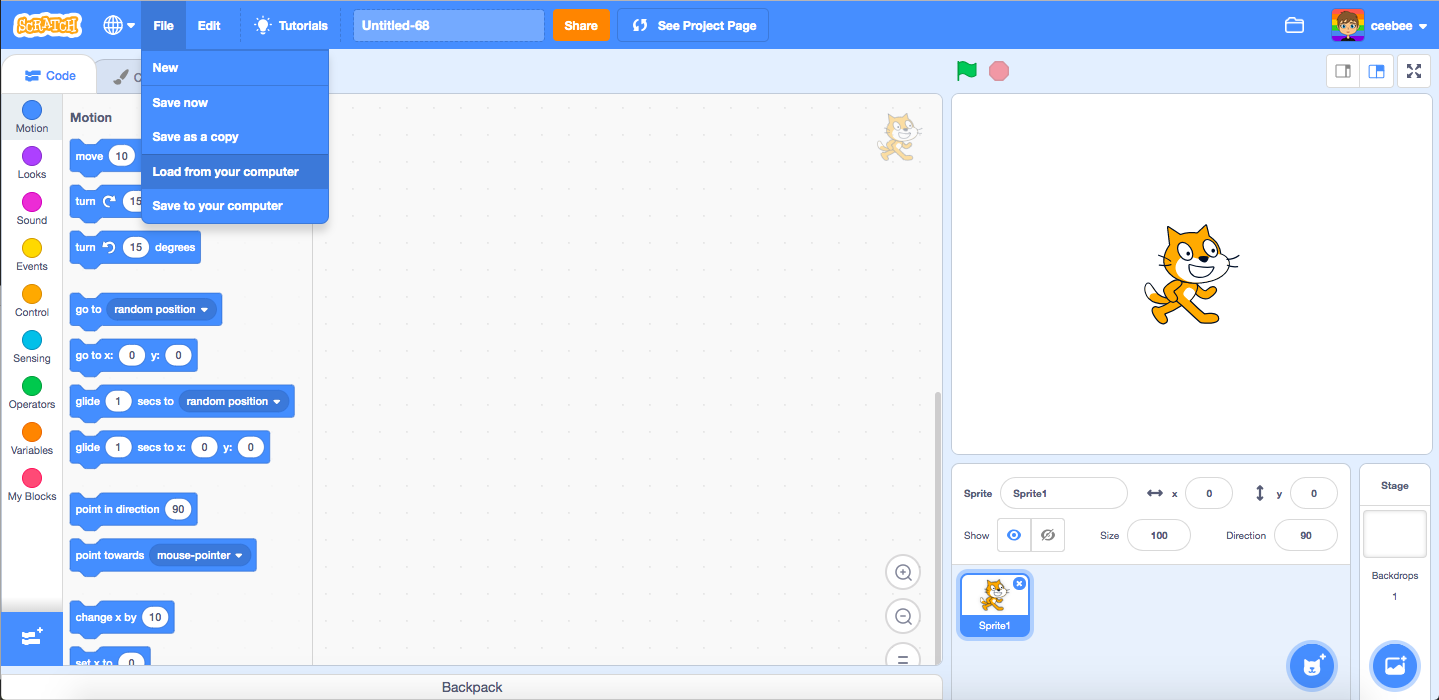
Thanks for all of your continued feedback about Scratch 3.0! We’ve been working on bug fixes and updates since the time of launch and will continue doing so
One thing we have heard a lot of feedback on is the “Load from your computer” option in the project editor.
Since the launch of Scratch 3.0, selecting “Load from your computer” created a brand new project rather than updating the current project with the file you are uploading. Today, we have updated this option so that if you click “Load from your computer” it will load your file directly into the project you are currently in - going back to the way it worked in Scratch 2.0. This will allow you to use the offline editor to make changes to your projects and then reupload online. We encourage you to be mindful when uploading projects since it will delete the contents of the existing project.
Thanks again for all the feedback that resulted in this change ^.^
Scratch On!


- welchl08
-
 Scratcher

6 posts
“Load from your computer” Update!
do we really need a feature that allows us to NOT SAVE OUR PROJECTS!!!!!!!!!!!

when I receive [TRIGGERD v]
move (100000000000000000000000000000) steps
ask [really?] and wait
- mateohideg
-
 Scratcher

40 posts
“Load from your computer” Update!
@ceebee If I create an advanced project and then I click “Load from your computer” it will be losted?

- Slam_The_Blue_Button
-
 New Scratcher

1 post
“Load from your computer” Update!
when green flag clickedFollow me
- coolhck
-
 Scratcher

6 posts
“Load from your computer” Update!
when green flag clicked
play sound [ happy]
say [cuz im happy] for (2) secs
say [if u know what it feels] for (2) secs
say [like without a roof] for (2) secs
yes i do
- coolhck
-
Scratcher
6 posts
“Load from your computer” Update!
My browser / operating system: Linux, Chrome 57.0.2987.133, Flash 32.0 (release 0)hello:):):):):):)
- coolhck
-
Scratcher
6 posts
“Load from your computer” Update!
My browser / operating system: Linux, Chrome 57.0.2987.133, Flash 32.0 (release 0)
make this more compatible
i can't do this
make this more compatible
i can't do this
<touching color [#e38e28] ?>
- coolhck
-
Scratcher
6 posts
“Load from your computer” Update!
i cant copy colors from my game wit dis
My browser / operating system: Linux, Chrome 57.0.2987.133, Flash 32.0 (release 0)
My browser / operating system: Linux, Chrome 57.0.2987.133, Flash 32.0 (release 0)
- Aryap270
-
 Scratcher

15 posts
“Load from your computer” Update!
pokjhgvfgbhnjmnhbgvfcghjhgfdxfghgfdsxdfgfcd
- redstonelasher2010
-
 Scratcher

100+ posts
“Load from your computer” Update!
Hi folks,Yay! This will allow me to update Megarraria after creating a version in the Offline Editor!
Thanks for all of your continued feedback about Scratch 3.0! We’ve been working on bug fixes and updates since the time of launch and will continue doing so
One thing we have heard a lot of feedback on is the “Load from your computer” option in the project editor.
Since the launch of Scratch 3.0, selecting “Load from your computer” created a brand new project rather than updating the current project with the file you are uploading. Today, we have updated this option so that if you click “Load from your computer” it will load your file directly into the project you are currently in - going back to the way it worked in Scratch 2.0. This will allow you to use the offline editor to make changes to your projects and then reupload online. We encourage you to be mindful when uploading projects since it will delete the contents of the existing project.
Thanks again for all the feedback that resulted in this change ^.^
Scratch On!
- StormBringger
-
 Scratcher

5 posts
“Load from your computer” Update!
Hi folks,
Thanks for all of your continued feedback about Scratch 3.0! We’ve been working on bug fixes and updates since the time of launch and will continue doing so
One thing we have heard a lot of feedback on is the “Load from your computer” option in the project editor.
Since the launch of Scratch 3.0, selecting “Load from your computer” created a brand new project rather than updating the current project with the file you are uploading. Today, we have updated this option so that if you click “Load from your computer” it will load your file directly into the project you are currently in - going back to the way it worked in Scratch 2.0. This will allow you to use the offline editor to make changes to your projects and then reupload online. We encourage you to be mindful when uploading projects since it will delete the contents of the existing project.
Thanks again for all the feedback that resulted in this change ^.^
Scratch On!
This is a great Easter present! Thanks Scratch Team
Storm
- MarioGamerExpert
-
 Scratcher

15 posts
“Load from your computer” Update!
Ceebee and all Scratch members,
this is the greatest game/coding site and I am proud to be a scratcher. There is some minor downsides to Scratch for features that if only they worked properly when first added, like custom fonts… and all that.
this is the greatest game/coding site and I am proud to be a scratcher. There is some minor downsides to Scratch for features that if only they worked properly when first added, like custom fonts… and all that.
when this sprite clicked
say [Scratch is great with few downsides]
say [Ceebee is one of my favorite Scratch Team members]

- CrazyZuzu66
-
 Scratcher

5 posts
“Load from your computer” Update!
This is great! Thank you SO much Scratch team for all of the amazing work you do to make Scratch better!!!

- Discussion Forums
- » Announcements
-
» “Load from your computer” Update!