Discuss Scratch

- Discussion Forums
- » Suggestions
- » Better scoping - let block
![[RSS Feed]](//cdn.scratch.mit.edu/scratchr2/static/__5f750b17a17db0b5d7ffaf5afb2e7e2b__//djangobb_forum/img/feed-icon-small.png "[RSS Feed]")
![[RSS Feed]](http://cdn.scratch.mit.edu/scratchr2/static/__5f750b17a17db0b5d7ffaf5afb2e7e2b__//djangobb_forum/img/feed-icon-small.png "[RSS Feed]")
- Jonathan50
-
 Scratcher

1000+ posts
Better scoping - let block
Better scoping - let block
The idea is a way to have local variables – not just ‘For this sprite only’ but for a script, or a specific part of a script.
This is done by adding a new block, let in:
when gf clickedThe first say block prints ‘bar’.
let (foo) be [bar] in {
say (foo) for (2) secs
} :: grey
say (foo) for (2) secs
The second say block will NOT say ‘bar’, as the foo variable isn't in the scope. The Scratch behaviour for undefined variables is to create a new ‘for this sprite only’ variable with the value of zero, so unless that behaviour is changed, the second say block should print zero.
Other possibilites
Instead of gray, it could be an orange variables block, like this:
let (foo) be [bar] in {
  say (foo) for (2) secs
} :: variables
It would be useful if I could declare multiple local variables in a single let block, perhaps something likelet ((foo) be [bar] :: grey) ◀ ▶ in {
say (foo) for (2) secs
} :: greyEach time you press the rightmost arrow, a new grey oval shape (but not really a reporter, as it isn't a block and can't be dragged out.) with '(variable name) be [variable value]' would appear.Perhaps it should have an equals sign rather than ‘be’?
let (foo) = [bar] in {
  say (foo) for (2) secs
} :: grey
I personally like the ‘be’ version better.Workaround
There is a sort-of-workaround that can achieve the same results in many cases:
define let foo be (foo) in say foo for 2 secsOf course, it doesn't matter what the custom block is called. But this is obviously tedious and often will NOT suffice:
say (foo) for (2) secs
when gf clicked
let foo be [bar] in say foo for 2 secs
define my block 2 (bar)In this case, since ‘foo’ is local to my block 1 and my block 2 is declared outside of my block 1 foo can't be accessed. (Lambda would fix this though! Lambda fixes pretty much everything!!)
say (join [foo = ] (foo)) for (2) secs
say (join [bar = ] (bar)) for (2) secs
define my block 1 (foo)
say (foo) for (2) secs
my block 2 [baz]
when gf clicked
my block 1 [bar]
Cases when local variables are needed and there is no workaround that doesn't require hacked blocks
There are cases when doing something in Scratch is simply not possible without local variables.
Say I have a custom block, named foo, that uses the variable ‘foo i’ for counting:
define fooThis works if used on a single thread at the same time, but if two threads run this block at the same time, it'll get completely messed up.
set [foo i v] to [1]
say [Here's what fruit we have:] for (1.5) secs
repeat (length of [fruit v])
if <(foo i) = (length of [fruit v])> then
say (join (item (foo i) of [fruit v]) [!]) for (1.5) secs
else
say (join (item (foo i) of [fruit v]) [...]) for (1) secs
end
change [foo i v] by (1)
end
Here's the solution, which requires hacked blocks:
define foo (i name)This is non-trivial, requires hacked blocks (which ST doesn't super approve of), and makes the custom block annoying to use.
set (i name) to [1]
say [Here's what fruit we have:] for (1.5) secs
repeat (length of [fruit v])
if <((i name) of [Stage v]) = (length of [fruit v])> then
say (join (item ((i name) of [Stage v]) of [fruit v]) [!]) for (1.5) secs
else
say (join (item ((i name) of [Stage v]) of [fruit v]) [...]) for (1) secs
end
change (i name) by (1)
end
when gf clicked
foo [foo i 1]
when gf clicked
foo [foo i 2]
...
This example would be messed up anyway because of the same sprite switching between saying things. So I'd need to move one script to another sprite.
But as there is no such thing as ‘global custom blocks’, I'd need to use broadcasts.
The problem here is that I'd need to use a global variable to pass ‘i name’, and as the global variable isn't local to the block, I'd have the same issue all over again, except this time it's not possible to solve at all without copying the block into the other sprite!!
Please post if you support, don't support, semi-support, and your reasons why.

Last edited by Jonathan50 (Oct. 25, 2016 01:03:53)

- Sigton
-
 Scratcher

1000+ posts
Better scoping - let block
Can't you just use inputs as local variables?
Sigton
Sigton

- Zekrom01
-
 Scratcher

1000+ posts
Better scoping - let block
seems confusing to people who do only programming in scratch, so semi-support.

- Zro716
-
 Scratcher

1000+ posts
Better scoping - let block
Can't you just use inputs as local variables?He could, but the problem he's addressing is the lack of mutability. That is, once you assign a value to a block argument, you cannot change it. The other way around, if you use a local variable instead, there's no way to discard it after being used.
This idea is not new to me, and it has been suggested several times in the past; nonetheless, I still support some way of incorporating temporary variables. The C-block is a nice idea and allows one to discard variables after a point in the code (unlike Snap!). Supposing it doesn't introduce anything radically new to the Scratch editor interface, it is possible to implement smoothly.
declare temp variables (temp1) ::variables cstartFor example, if you right click ‘temp1’, you have the option to delete the variable or rename it. If you right click the block, you have the option to add a new temp variable (aptly named “temp” with an increment).
...
end
Edit: I should explain why I chose this scheme instead of Jonathan50's. I want to reduce redundancy of code. The block should not do the assignment, only the declaration. See below.
When you want to modify the variable, you do this:
declare temp variables (temp1) ::variables cstartAnd using the variables is easy. Just like custom block definitions, you drag copies directly from the declaration. In total, this fulfills declaration, assignment, mutation, access, and garbage collection. In other words, it's how variables are supposed to be.
set [temp1 v] to [foo] // the dropdown should recognize any temp variables for its scope
...
end
Last edited by Zro716 (March 31, 2016 14:13:39)
- gdpr533f604550b2f20900645890
-
 Scratcher

1000+ posts
Better scoping - let block
Can't you just use inputs as local variables?Inputs cannot be reassigned in Scratch. Also, who would want to declare a bunch of unnecessary parameters just to get local variables?
Sigton
Also, this is a duplicate. Original: https://scratch.mit.edu/discuss/topic/20661/ (idea # 3)
Last edited by gdpr533f604550b2f20900645890 (March 31, 2016 14:16:08)
- fivesythe
-
 New Scratcher

80 posts
Better scoping - let block
I like the idea of lexical scoping in Scratch. However, I don't think the exact wording of this block ('let…') works in the Scratch metaphor. Also, what if you wanted to assign multiple variables?
seems confusing to people who do only programming in scratch, so semi-support.I don't get it. Isn't the whole point of Scratch to learn new stuff?
- Zekrom01
-
Scratcher
1000+ posts
Better scoping - let block
I like the idea of lexical scoping in Scratch. However, I don't think the exact wording of this block ('let…') works in the Scratch metaphor. Also, what if you wanted to assign multiple variables?Yes, but can't you do that in another language?seems confusing to people who do only programming in scratch, so semi-support.I don't get it. Isn't the whole point of Scratch to learn new stuff?

Last edited by Zekrom01 (March 31, 2016 15:00:14)
- DaSpudLord
-
 Scratcher

1000+ posts
Better scoping - let block
The way you described it is a bit confusing, but I do support this-
create local var [variable] (variable)::variables cstartTo create multiple local variables, you could just nest them-
end
create local var [variable1] (variable1)::variables cstart
create local var [variable2] (variable2)::variables cstart

end
end
Last edited by DaSpudLord (March 31, 2016 15:39:54)
- Jonathan50
-
Scratcher
1000+ posts
Better scoping - let block
Also, this is a duplicate. Original: https://scratch.mit.edu/discuss/topic/20661/ (idea # 3)That's a different idea.

I like the idea of lexical scoping in Scratch. However, I don't think the exact wording of this block ('let…') works in the Scratch metaphor. Also, what if you wanted to assign multiple variables?Another naming could work.
Can't you just use inputs as local variables?Read the whole first post. I explain why it won't always work, and it's not mutable, as @Zro716 and @Chibi-Matoran. (But if you're doing Functional Programming you don't need mutation. But the other issues stop it from working.)
Sigton
- Jonathan50
-
Scratcher
1000+ posts
Better scoping - let block
The way you described it is a bit confusing, but I do support this-Huh? Shouldn't you be able to click on the variable to rename it? I should at that to the first post.create local var [variable] (variable)::variables cstartTo create multiple local variables, you could just nest them-
endcreate local var [variable1] (variable1)::variables cstart
create local var [variable2] (variable2)::variables cstart
end
end
- BookOwl
-
 Scratcher

1000+ posts
Better scoping - let block
Support. I like @Zro716's version the best, but the one in the OP is nice too.
- Jonathan50
-
Scratcher
1000+ posts
Better scoping - let block
But it's declaring them. It isn't as clear that the block is only in the scope of the C-shape. (And the way Scheme and Haskell do it is specifying the initial value.)Can't you just use inputs as local variables?He could, but the problem he's addressing is the lack of mutability. That is, once you assign a value to a block argument, you cannot change it. The other way around, if you use a local variable instead, there's no way to discard it after being used.
This idea is not new to me, and it has been suggested several times in the past; nonetheless, I still support some way of incorporating temporary variables. The C-block is a nice idea and allows one to discard variables after a point in the code (unlike Snap!). Supposing it doesn't introduce anything radically new to the Scratch editor interface, it is possible to implement smoothly.declare temp variables (temp1) ::variables cstartFor example, if you right click ‘temp1’, you have the option to delete the variable or rename it. If you right click the block, you have the option to add a new temp variable (aptly named “temp” with an increment).
...
end
Edit: I should explain why I chose this scheme instead of Jonathan50's. I want to reduce redundancy of code. The block should not do the assignment, only the declaration. See below.
When you want to modify the variable, you do this:declare temp variables (temp1) ::variables cstartAnd using the variables is easy. Just like custom block definitions, you drag copies directly from the declaration. In total, this fulfills declaration, assignment, mutation, access, and garbage collection. In other words, it's how variables are supposed to be.
set [temp1 v] to [foo] // the dropdown should recognize any temp variables for its scope
...
end
- DaSpudLord
-
Scratcher
1000+ posts
Better scoping - let block
You type the variable name into the textbox to rename it.Huh? Shouldn't you be able to click on the variable to rename it? I should at that to the first post....
- Jonathan50
-
Scratcher
1000+ posts
Better scoping - let block
Oh. That's what I thought. In the idea in OP then you can click on the variable to rename it.You type the variable name into the textbox to rename it.Huh? Shouldn't you be able to click on the variable to rename it? I should at that to the first post....
- DaSpudLord
-
Scratcher
1000+ posts
Better scoping - let block
Oh yeah, that works too.Oh. That's what I thought. In the idea in OP then you can click on the variable to rename it.You type the variable name into the textbox to rename it.Huh? Shouldn't you be able to click on the variable to rename it? I should at that to the first post....
- gdpr533f604550b2f20900645890
-
Scratcher
1000+ posts
Better scoping - let block
Are you sure?Also, this is a duplicate. Original: https://scratch.mit.edu/discuss/topic/20661/ (idea # 3)That's a different idea.
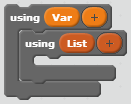
I think this is the better solution. How it would work is similar to custom blocks. Only the blocks inside of the C-Block could use the variables. The weird looking variables and lists that look like “+” are just a quick sketch of how the using block could create more than one variable. However, I think it should only be able to hold either variables or lists.
The inspiration for this idea came from a language I use called C#, in which you can say this:I think that maybe these should also have different colors, and they should use the right-click functions to get the other blocks.void doStuff()
{
using (int x)
{
do stuff that uses int x
}
do stuff that doesn't use int x
}
Last edited by gdpr533f604550b2f20900645890 (March 31, 2016 23:13:55)
- Jonathan50
-
Scratcher
1000+ posts
Better scoping - let block
using != letAre you sure?Also, this is a duplicate. Original: https://scratch.mit.edu/discuss/topic/20661/ (idea # 3)That's a different idea.
I think this is the better solution. How it would work is similar to custom blocks. Only the blocks inside of the C-Block could use the variables. The weird looking variables and lists that look like “+” are just a quick sketch of how the using block could create more than one variable. However, I think it should only be able to hold either variables or lists.
The inspiration for this idea came from a language I use called C#, in which you can say this:I think that maybe these should also have different colors, and they should use the right-click functions to get the other blocks.void doStuff()
{
using (int x)
{
do stuff that uses int x
}
do stuff that doesn't use int x
}
The let lets (pun not originally intended, but now it is
) you assign an initial value.- Discussion Forums
- » Suggestions
-
» Better scoping - let block