Discuss Scratch

- Discussion Forums
- » Suggestions
- » Variable input for keyboard key sensors for making customizable controls?
![[RSS Feed]](//cdn.scratch.mit.edu/scratchr2/static/__5b3e40ec58a840b41702360e9891321b__//djangobb_forum/img/feed-icon-small.png "[RSS Feed]")
![[RSS Feed]](http://cdn.scratch.mit.edu/scratchr2/static/__5b3e40ec58a840b41702360e9891321b__//djangobb_forum/img/feed-icon-small.png "[RSS Feed]")
- dusty22
-
 Scratcher

100+ posts
Variable input for keyboard key sensors for making customizable controls?
So, it'd be nice if for blocks/sensors that respond to keyboard key presses, you could ‘insert’ variables into the slots that determine which key activates the block, so you could have games use user set custom controls.
That way you could make custom player-defined controls.
Like have a "When Key Pressed“, or ”If Key Pressed", and then have the player set those variables (jumpkey, crouchkey) to which keys they want. Then if they set it to an invalid key the script just simply wouldn't respond.
//////////////////////////////////////////////////
Also, as a side suggestion, it'd be nice if we could get a few more keys to select.
I'd mainly like the Shift, Enter, and Ctrl keys, and also definitive right-click Mouse sensing. I know there's some kind of subtle work-around for right mouse click sensing, but it'd be nice to have straight up sensing for it. Anyone agree?
That way you could make custom player-defined controls.
Like have a "When Key Pressed“, or ”If Key Pressed", and then have the player set those variables (jumpkey, crouchkey) to which keys they want. Then if they set it to an invalid key the script just simply wouldn't respond.
//////////////////////////////////////////////////
Also, as a side suggestion, it'd be nice if we could get a few more keys to select.
I'd mainly like the Shift, Enter, and Ctrl keys, and also definitive right-click Mouse sensing. I know there's some kind of subtle work-around for right mouse click sensing, but it'd be nice to have straight up sensing for it. Anyone agree?
Last edited by dusty22 (June 12, 2013 16:04:11)
- dusty22
-
Scratcher
100+ posts
Variable input for keyboard key sensors for making customizable controls?
No one would like being able to set up custom controls?
- xlk
-
 Scratcher

100+ posts
Variable input for keyboard key sensors for making customizable controls?
this could be done
just use <if key (custom set key) pressed>
and set custom set key to whatever the person set that button to.
You can't do this through scratch thought, you have to edit it with winrar or similar application.
just use <if key (custom set key) pressed>
and set custom set key to whatever the person set that button to.
You can't do this through scratch thought, you have to edit it with winrar or similar application.
- dusty22
-
Scratcher
100+ posts
Variable input for keyboard key sensors for making customizable controls?
But wouldn't it be cool if we could do this IN scratch?
- dusty22
-
Scratcher
100+ posts
Variable input for keyboard key sensors for making customizable controls?
*Bump*
So, does my idea make sense the way I explained it? Or no?
So, does my idea make sense the way I explained it? Or no?
- iTweak0r
-
 Scratcher

100+ posts
Variable input for keyboard key sensors for making customizable controls?
+1 cool idea, I hate having to edit the JSON every time to do this
- dusty22
-
Scratcher
100+ posts
Variable input for keyboard key sensors for making customizable controls?
*Bump*
^Thanks for supporting! I'm guessing by JSON you mean you have to hack the Scratch.exe or something along those lines like what xlk said?
^Thanks for supporting! I'm guessing by JSON you mean you have to hack the Scratch.exe or something along those lines like what xlk said?
- NASA-Space
-
 Scratcher

100+ posts
Variable input for keyboard key sensors for making customizable controls?
- TheMatrixKid
-
 Scratcher

100+ posts
Variable input for keyboard key sensors for making customizable controls?
Hack the JSON > hack the file data to create a variable block inside the <is () key pressed> block.
- VoltageGames
-
 Scratcher

1000+ posts
Variable input for keyboard key sensors for making customizable controls?
Griffpatch made hacks so you could use tab backspace and enter.
There will never be right clicking. Go around and right click something. Anything! Right-clicks are an important part of computers, and if they are used in a game, you'll find a big white block over a small part of the screen, because it will be listing the options you get for right-clicking.
No support.
There will never be right clicking. Go around and right click something. Anything! Right-clicks are an important part of computers, and if they are used in a game, you'll find a big white block over a small part of the screen, because it will be listing the options you get for right-clicking.
No support.
- Dylan5797
-
 Scratcher

1000+ posts
Variable input for keyboard key sensors for making customizable controls?
It is
It is possible is Windows. All Scratch projects are .zip archives, meaning, renaming a .sb2 file to a .zip file would give you a zip file with the contents of a Scratch project.
When you have this zip file in your hands, you can do things Scratch doesn't normally let you do.
so you could put a
see http://scratch.mit.edu/discuss/topic/29421/
EDIT: Ctrl and Command are returned differently in Flash, so Scratch doesn't track Ctrl/Command
So, it'd be nice if for blocks/sensors that respond to keyboard key presses, you could ‘insert’ variables into the slots that determine which key activates the block, so you could have games use user set custom controls.
That way you could make custom player-defined controls.
Like have a "When Key Pressed“, or ”If Key Pressed", and then have the player set those variables (jumpkey, crouchkey) to which keys they want. Then if they set it to an invalid key the script just simply wouldn't respond.
//////////////////////////////////////////////////
Also, as a side suggestion, it'd be nice if we could get a few more keys to select.
I'd mainly like the Shift, Enter, and Ctrl keys, and also definitive right-click Mouse sensing. I know there's some kind of subtle work-around for right mouse click sensing, but it'd be nice to have straight up sensing for it. Anyone agree?
It is possible is Windows. All Scratch projects are .zip archives, meaning, renaming a .sb2 file to a .zip file would give you a zip file with the contents of a Scratch project.
When you have this zip file in your hands, you can do things Scratch doesn't normally let you do.
so you could put a
(variable)in a
<key [space v] pressed?>like this
<key (variable) pressed?>or like
<key [\r v] pressed?>to be exact
see http://scratch.mit.edu/discuss/topic/29421/
EDIT: Ctrl and Command are returned differently in Flash, so Scratch doesn't track Ctrl/Command
Last edited by Dylan5797 (Nov. 29, 2014 20:13:50)
- Cyoce
-
 Scratcher

500+ posts
Variable input for keyboard key sensors for making customizable controls?
Support, although if you are really devoted to doing customizable controls, there is a work-around.
Instead of:
Instead of:
use:
when gf clicked
forever
if <key (jump key) pressed?> then
jump ::custom-arg
end
end
when green flag clicked
forever
delete (all v) of [Keys v]
if <key [up arrow v] pressed?> then
add [up arrow] to [Keys v]
end
if <key [down arrow v] pressed?> then
add [down arrow] to [Keys v]
end
··· :: grey
if <key [9 v] pressed?> then
add [9] to [Keys v]
end
if <[Keys v] contains (jump key)> then
jump :: custom-arg
end
end
- mathman314
-
 Scratcher

100+ posts
Variable input for keyboard key sensors for making customizable controls?
Griffpatch made hacks so you could use tab backspace and enter.WAIT! WHOA WHOA WHOA! You're talking about Griffpatch, OK! Griffpatch! He is probably a professional programmer! I agree with what you said about right-clicks, but anybody who isn't as good as Griffpatch, which is almost everybody, should have to use the blocks to do it.
There will never be right clicking. Go around and right click something. Anything! Right-clicks are an important part of computers, and if they are used in a game, you'll find a big white block over a small part of the screen, because it will be listing the options you get for right-clicking.
No support.
Last edited by mathman314 (Nov. 30, 2014 16:43:19)
- mathman314
-
Scratcher
100+ posts
Variable input for keyboard key sensors for making customizable controls?
Support, although if you are really devoted to doing customizable controls, there is a work-around.
Instead of:use:
when gf clicked
forever
if <key (jump key) pressed?> then
jump ::custom-arg
end
endwhen green flag clicked
forever
delete (all v) of [Keys v]
if <key [up arrow v] pressed?> then
add [up arrow] to [Keys v]
end
if <key [down arrow v] pressed?> then
add [down arrow] to [Keys v]
end
··· :: grey
if <key [9 v] pressed?> then
add [9] to [Keys v]
end
if <[Keys v] contains (jump key)> then
jump :: custom-arg
end
end
[/quote]
Brilliant.
- Cyoce
-
Scratcher
500+ posts
Variable input for keyboard key sensors for making customizable controls?
Thanks, and sorry I forgot to close scratchblocksSupport, although if you are really devoted to doing customizable controls, there is a work-around.
Instead of:use:
when gf clicked
forever
if <key (jump key) pressed?> then
jump ::custom-arg
end
endwhen green flag clicked
forever
delete (all v) of [Keys v]
if <key [up arrow v] pressed?> then
add [up arrow] to [Keys v]
end
if <key [down arrow v] pressed?> then
add [down arrow] to [Keys v]
end
··· :: grey
if <key [9 v] pressed?> then
add [9] to [Keys v]
end
if <[Keys v] contains (jump key)> then
jump :: custom-arg
end
end
[/quote]
Brilliant.
- Alpex
-
 Scratcher

17 posts
Variable input for keyboard key sensors for making customizable controls?
But wouldn't you have to define the variable that you are using to customize the controls. This is a way of doing that
Then you could define it and use it.
when green flag clicked
ask [Define Right key] and wait
set [rKey] to [answer ]
ask [define left key] and wait
set [lKey] to [answer ]
ask [define up key] and wait
set [uKey] to [answer ]
ask [define down key] and wait
set [dKey] to [answer ]
Then you could define it and use it.
- FalconGunner99
-
 Scratcher

1000+ posts
Variable input for keyboard key sensors for making customizable controls?
But wouldn't you have to define the variable that you are using to customize the controls. This is a way of doing thatWell, generally you'd just define the keys while making the project, but if you want customizable controls, then yes.when green flag clickedask [Define Right key] and waitset [rKey] to [answer ]ask [define left key] and waitset [lKey] to [answer ]ask [define up key] and waitset [uKey] to [answer ]ask [define down key] and waitset [dKey] to [answer ]
Then you could define it and use it.
By the way, don't necropost. Like seriously this thread is older than the rocks that got slowly ground into the old dirt itself.
Last edited by FalconGunner99 (April 10, 2015 04:05:05)
- stickfiregames
-
 Scratcher

1000+ posts
Variable input for keyboard key sensors for making customizable controls?
Support for right click, ctrl, shift and enter sensing.
Support for being able to put variables into the key pressed block, but how would it work with named keys while still being consistent across languages?
Support for being able to put variables into the key pressed block, but how would it work with named keys while still being consistent across languages?
By the way, don't necropost. Like seriously this thread is older than the rocks that got slowly ground into the old dirt itself.It may be old, but it's still relevant since it hasn't been implemented or rejected.
Last edited by stickfiregames (April 10, 2015 10:49:05)
- matey1234
-
 Scratcher

1000+ posts
Variable input for keyboard key sensors for making customizable controls?
Support for right click, ctrl, shift and enter sensing.Flash cannot detect right click. :L
Support for being able to put variables into the key pressed block, but how would it work with named keys while still being consistent across languages?By the way, don't necropost. Like seriously this thread is older than the rocks that got slowly ground into the old dirt itself.It may be old, but it's still relevant since it hasn't been implemented or rejected.
Seriously, you didn't support tab?
I support ctrl, shift, enter, and tab
- stickfiregames
-
Scratcher
1000+ posts
Variable input for keyboard key sensors for making customizable controls?
I'm not sure if tab can be detected.Support for right click, ctrl, shift and enter sensing.Flash cannot detect right click. :L
Support for being able to put variables into the key pressed block, but how would it work with named keys while still being consistent across languages?By the way, don't necropost. Like seriously this thread is older than the rocks that got slowly ground into the old dirt itself.It may be old, but it's still relevant since it hasn't been implemented or rejected.
Seriously, you didn't support tab?
I support ctrl, shift, enter, and tab
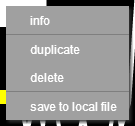
Right click can be detected though:
Support.if the editor can detect it, then so can the player.right click = undetectable by flashHow does this work then?
- Discussion Forums
- » Suggestions
-
» Variable input for keyboard key sensors for making customizable controls?